Getting Started with Huh in TypeScript: Terminal Forms in Ten Minutes
Every CLI eventually needs to ask its user something: a project name, a choice between three options, a yes or a no. You can write that with readline and a lot of if statements, or you can describe the questions and let a library draw them.
@oakoliver/huh is that library: interactive terminal forms for TypeScript, ported from Charm's Huh? for Go. This guide goes from an empty folder to a small project scaffolder in about ten minutes.
You describe fields and bind them to variables; huh draws the form, handles the keyboard, and hands the answers back.

Every snippet below was run exactly as printed, in a fresh project, and every animation is a recording of that run. If you want to know how the port was built, that story is in Porting Go's Huh? to TypeScript. This article is only about using it.
I – Install
Create a project and add the package:
mkdir huh-tour && cd huh-tour
npm init -y
npm pkg set type=module
npm install @oakoliver/huh
The type=module line matters. The examples use top-level await, which only works in ES modules, and a fresh npm init project is CommonJS. (Name your files .mts instead if you'd rather not change package.json.)
huh brings its three building blocks with it: @oakoliver/bubbletea (the event loop), @oakoliver/bubbles (the text input, list and other widgets) and @oakoliver/lipgloss (the styling). Nothing else.
You can run the .ts files below directly with node file.ts on a recent Node, or with bun file.ts.
II – One Question
The smallest useful program asks one thing and uses the answer:
// ask.ts
import { NewInput, Run } from '@oakoliver/huh';

let name = '';

await Run(
  NewInput()
    .title('What should we call you?')
    .placeholder('Ada Lovelace')
    .value(() => name, (v) => { name = v; }),
);

console.log(`Nice to meet you, ${name}.`);
node ask.ts
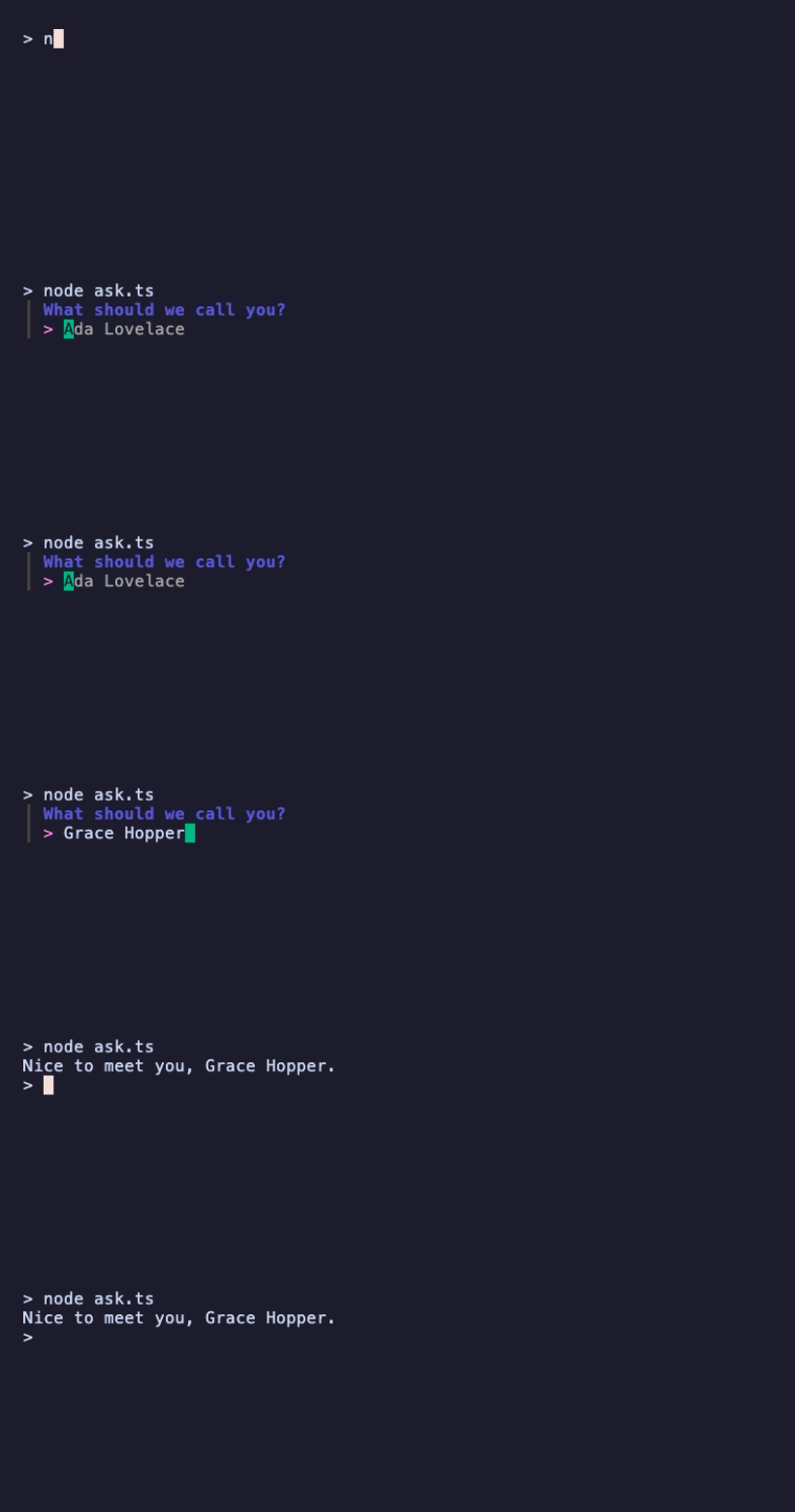
Two ideas carry through the rest of the guide:
- Fields are built with chained calls.
NewInput()returns a field, and.title(),.placeholder()and friends configure it. - Fields are bound to your variables with
.value(getter, setter). The getter supplies the starting value; the setter receives every change. When the prompt finishes,namealready holds the answer: there is no result object to unpack.
Run() is the shortcut for a single field. For anything bigger you build a form.
III – A Form With Three Kinds of Field
A form is a list of groups, and a group is a list of fields shown together on one screen. Here is one group with a text input, a single-choice select, and a yes/no confirm:
// form.ts
import {
  NewForm, NewGroup, NewInput, NewSelect, NewConfirm, NewOption,
} from '@oakoliver/huh';

let name = '';
let runtime = 'bun';
let typescript = true;

const form = NewForm(
  NewGroup(
    NewInput()
      .title('Project name')
      .placeholder('my-app')
      .value(() => name, (v) => { name = v; }),

    NewSelect<string>()
      .title('Runtime')
      .options([
        NewOption('Bun', 'bun'),
        NewOption('Node.js', 'node'),
        NewOption('Deno', 'deno'),
      ])
      .value(() => runtime, (v) => { runtime = v; }),

    NewConfirm()
      .title('Use TypeScript?')
      .value(() => typescript, (v) => { typescript = v; }),
  ),
);

await form.run();

console.log({ name, runtime, typescript });

NewOption(label, value) separates what the user sees from what your code gets: the user picks "Node.js", your variable holds 'node'. The starting value of each variable also decides what is pre-selected, which is why the select opens on Bun and the confirm on Yes.
The keys are what you'd guess. Enter moves to the next field and submits on the last one, Shift+Tab goes back, the arrows move through a select, ←/→ (or y/n) toggle the confirm, and the bottom line always shows the keys for the focused field. When the form is done, huh clears it from the screen, so only your own output remains.
IV – Validation
A validator is a function that takes the current value and returns an Error to reject it, or null to accept it:
// validate.ts
import { NewForm, NewGroup, NewInput } from '@oakoliver/huh';

let name = '';
let port = '3000';

const form = NewForm(
  NewGroup(
    NewInput()
      .title('Project name')
      .description('Lowercase letters, digits and dashes')
      .validate((s: string) =>
        /^[a-z][a-z0-9-]*$/.test(s) ? null : new Error('use lowercase letters, digits and dashes'),
      )
      .value(() => name, (v) => { name = v; }),

    NewInput()
      .title('Port')
      .validate((s: string) => {
        const n = Number(s);
        return Number.isInteger(n) && n > 0 && n < 65536 ? null : new Error('must be 1–65535');
      })
      .value(() => port, (v) => { port = v; }),
  ),
);

await form.run();

console.log(`${name} will listen on :${port}`);

The user can't leave a field while it's invalid: the error appears under the form, the title gets a *, and Enter does nothing until the value passes.
One thing to know: a field has one validator. Calling .validate() a second time replaces the first instead of adding to it, so put all the checks for a field in one function, as the port check does. huh also ships ready-made validators such as ValidateNotEmpty(), ValidateMinLength(n) and ValidateMaxLength(n) for the common cases.
V – Themes
A form's look comes from a theme. Five are built in, ThemeCharm (the default), ThemeBase, ThemeDracula, ThemeBase16 and ThemeCatppuccin, and you apply one with .withTheme():
// theme.ts
import {
  NewForm, NewGroup, NewSelect, NewOption, ThemeFunc, ThemeDracula,
} from '@oakoliver/huh';

let license = 'MIT';

await NewForm(
  NewGroup(
    NewSelect<string>()
      .title('License')
      .options([
        NewOption('MIT', 'MIT'),
        NewOption('Apache 2.0', 'Apache-2.0'),
        NewOption('ISC', 'ISC'),
      ])
      .value(() => license, (v) => { license = v; }),
  ),
)
  .withTheme(ThemeFunc(ThemeDracula))
  .run();

console.log(`License: ${license}`);
This one is run with Bun, to show that nothing changes between runtimes:
bun theme.ts
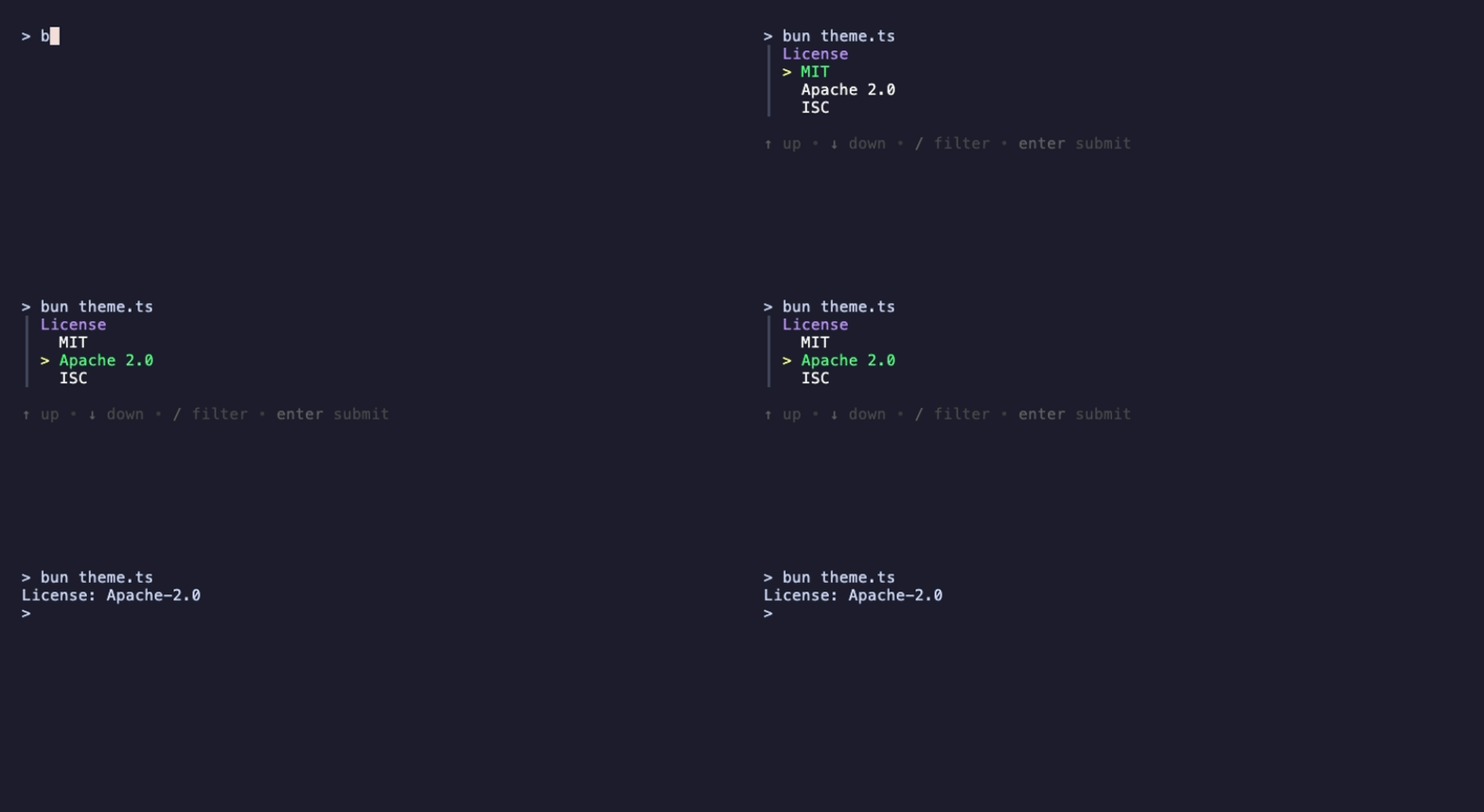
ThemeFunc wraps a theme so huh can pick its light or dark variant from the terminal's background. To build your own, start from ThemeBase(isDark) and override the styles you care about; the README has a complete example.
VI – A Real Script: create-app
Now put it together. This script asks for a name, a runtime and some extras over two screens, then creates the project on disk:
// create-app.ts
import { mkdir, writeFile } from 'node:fs/promises';
import {
  NewForm, NewGroup, NewInput, NewSelect, NewMultiSelect, NewConfirm, NewNote,
  NewOption, ThemeFunc, ThemeCatppuccin, ErrUserAborted,
} from '@oakoliver/huh';

const answers = {
  name: '',
  runtime: 'bun',
  extras: [] as string[],
  confirmed: true,
};

const form = NewForm(
  NewGroup(
    NewNote().title('create-app').description('Scaffolds a *minimal* TypeScript project.'),
    NewInput()
      .title('Project name')
      .placeholder('my-app')
      .validate((s: string) =>
        /^[a-z][a-z0-9-]*$/.test(s) ? null : new Error('use lowercase letters, digits and dashes'),
      )
      .value(() => answers.name, (v) => { answers.name = v; }),
    NewSelect<string>()
      .title('Runtime')
      .options([NewOption('Bun', 'bun'), NewOption('Node.js', 'node')])
      .value(() => answers.runtime, (v) => { answers.runtime = v; }),
  ),
  NewGroup(
    NewMultiSelect<string>()
      .title('Extras')
      .options([
        NewOption('README', 'readme'),
        NewOption('.gitignore', 'gitignore'),
        NewOption('MIT license', 'license'),
      ])
      .height(4) // title + 3 options; see the note below
      .value(() => answers.extras, (v) => { answers.extras = v; }),
    NewConfirm()
      .title('Create the project?')
      .value(() => answers.confirmed, (v) => { answers.confirmed = v; }),
  ),
).withTheme(ThemeFunc(ThemeCatppuccin));

try {
  await form.run();
} catch (err) {
  if (err instanceof ErrUserAborted) {
    console.log('Cancelled.');
    process.exit(130);
  }
  throw err;
}

if (!answers.confirmed) {
  console.log('Nothing created.');
  process.exit(0);
}

const { name, runtime, extras } = answers;
await mkdir(name);

const start = runtime === 'bun' ? 'bun src/index.ts' : 'node src/index.ts';
const pkg = { name, version: '0.1.0', type: 'module', scripts: { start } };
await writeFile(`${name}/package.json`, JSON.stringify(pkg, null, 2) + '\n');

await mkdir(`${name}/src`);
await writeFile(`${name}/src/index.ts`, `console.log('hello from ${name}');\n`);

if (extras.includes('readme')) await writeFile(`${name}/README.md`, `# ${name}\n`);
if (extras.includes('gitignore')) await writeFile(`${name}/.gitignore`, 'node_modules\n');
if (extras.includes('license')) await writeFile(`${name}/LICENSE`, 'MIT License\n');

console.log(`Created ${name}/ (${runtime}${extras.length ? ', ' + extras.join(', ') : ''})`);
console.log(`  cd ${name} && npm start`);
What's new compared with the earlier steps:
- Two groups make two screens.
Enteron the last field of the first group moves to the second. NewNote()shows read-only text. Its description understands*bold*,_italic_and`code`.NewMultiSelect()binds to an array.Space(orx) toggles an option,Ctrl+Atoggles all of them.- Answers live in one object. Binding every field to a property of
answerskeeps the script after the form readable. - Cancelling is an exception. If the user presses
Ctrl+C,form.run()throwsErrUserAbortedinstead of returning, so the script prints "Cancelled." and exits with code 130, the shell convention for an interrupted program, without writing anything.
About that .height(4). Without it, a MultiSelect sizes its list to fit the options and then takes the title's line out of that space, so the last option is hidden until you scroll to it. That's how upstream Huh? behaves too; I checked the same form in the Go library. When every option should be visible, set the height to the title plus the number of options.
VII – What to Read Next
- More field types.
NewText()for multi-line input, andNewFilePicker()for choosing a file. Both bind with.value(getter, setter)like everything above. - Fields that react to other fields.
.titleFunc()and.optionsFunc()recompute a field when another answer changes, for example a "Department" list that depends on the "Role" chosen above it. The README has a working example. - Accessible mode.
form.withAccessible(true)replaces the interactive drawing with plain sequential prompts, for screen readers or dumb terminals. - The building blocks. If a form isn't enough and you want a full terminal app, huh is built on @oakoliver/bubbletea and @oakoliver/bubbles, and a huh form is itself a Bubble Tea model.
Requirements
- Runtimes. Every example here was run on Node 26.8 and Bun 1.4. Node runs
.tsfiles directly from 22.18 (and 23.6); on an older Node, compile the files first or use a TypeScript runner. The package ships both ES module and CommonJS builds, plus type declarations. - Terminal. Any terminal with ANSI colour support. Forms need an interactive terminal (a TTY); for piped or non-interactive use, turn on accessible mode or take the values from flags instead.
- Source. github.com/oakoliver/huh, MIT licensed, based on charmbracelet/huh.