Getting Started with Lip Gloss in TypeScript: Terminal Styling in Ten Minutes
Terminal output doesn't have to be a wall of plain text. Lip Gloss is Charm's styling library for the terminal: you describe how text should look (color, padding, borders, width, alignment) the way you would in CSS, and it renders the ANSI escape codes for you.
@oakoliver/lipgloss is the TypeScript port. It runs on Node, Bun and Deno with no runtime dependencies, and it's the styling layer underneath our other terminal ports: Bubble Tea, Bubbles, Huh, Glamour and Glow all draw with it.
From an empty folder to a small dashboard in five steps, and every picture below is the real output of the code above it.
I – Install
npm install @oakoliver/lipgloss
# or
bun add @oakoliver/lipgloss
# or
deno add npm:@oakoliver/lipgloss
The examples are TypeScript files. Bun and Deno run them directly. Recent Node versions can too (we ran them with plain node on Node 26); on older versions, use tsx: npx tsx hello.ts.
II – Your First Style
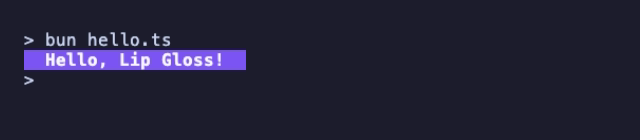
A style is an immutable description you build with chained calls. Calling render() on it returns a string with the escape codes applied.
// hello.ts
import { newStyle, println } from '@oakoliver/lipgloss';

const style = newStyle()
  .bold(true)
  .foreground('#FAFAFA')
  .background('#7D56F4')
  .padding(0, 2);

println(style.render('Hello, Lip Gloss!'));
Two details are worth knowing from the start.
Padding uses CSS shorthand. padding(0, 2) means zero lines above and below and two cells left and right. padding(1), padding(1, 2) and padding(1, 2, 3, 4) work like their CSS equivalents, and so does margin().
Prefer println to console.log. println checks what the output supports and downsamples colors to fit: true color becomes 256 colors or 16 colors on older terminals, and colors are dropped entirely when the output isn't a terminal (piped into a file, for example) or when NO_COLOR is set. console.log prints the escape codes unchanged.
III – Padding, Borders and Width
Borders are just another style property. Combine one with a fixed width and centered alignment, and you have a box.
// box.ts
import { newStyle, println, roundedBorder, Center } from '@oakoliver/lipgloss';

const box = newStyle()
  .border(roundedBorder())
  .borderForeground('#F25D94')
  .foreground('#FFF7DB')
  .padding(1, 4)
  .width(40)
  .align(Center);

const title = newStyle().bold(true).foreground('#F25D94');
const subtle = newStyle().foreground('#8A8A8A').italic(true);

println(box.render(`${title.render('Deploy finished')}\n\n${subtle.render('3 services · 42s · no warnings')}`));
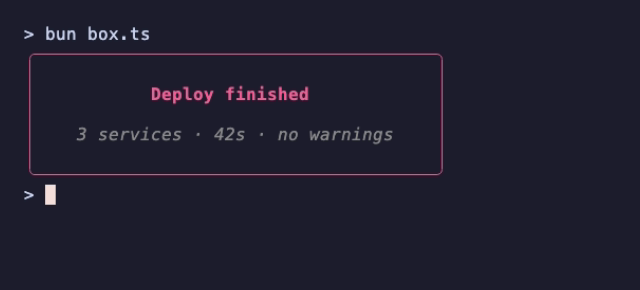
Styled strings can be nested: the title and subtitle are rendered first, and the box then lays the result out. Widths are measured in terminal cells, not characters, so ·, emoji and East Asian characters line up correctly.
The built-in borders are normalBorder, roundedBorder, thickBorder, doubleBorder, blockBorder, outerHalfBlockBorder, innerHalfBlockBorder, hiddenBorder, asciiBorder and markdownBorder. borderForeground also takes up to four colors, one per side, in CSS order.
Note that width() includes the padding and the border, as in Lip Gloss v2: this box is 40 cells wide in total.
IV – Layout: Joining and Placing Blocks
Once you have rendered blocks, joinHorizontal puts them side by side and joinVertical stacks them. The first argument says how to align blocks of different sizes. place() positions a block inside a larger empty area.
// layout.ts
import {
  newStyle,
  println,
  joinHorizontal,
  joinVertical,
  place,
  roundedBorder,
  Top,
  Center,
} from '@oakoliver/lipgloss';

const card = (label: string, value: string, color: string) =>
  newStyle()
    .border(roundedBorder())
    .borderForeground(color)
    .padding(0, 2)
    .width(18)
    .align(Center)
    .render(
      joinVertical(
        Center,
        newStyle().foreground('#8A8A8A').render(label),
        newStyle().bold(true).foreground(color).render(value),
      ),
    );

const row = joinHorizontal(
  Top,
  card('Requests', '12,408', '#04B575'),
  ' ',
  card('Errors', '17', '#F25D94'),
  ' ',
  card('p95', '182 ms', '#7D56F4'),
);

const header = newStyle().bold(true).foreground('#FFF7DB').render('api.example.com · last hour');

println(joinVertical(Center, header, '', row));
println();
println(place(60, 3, Center, Center, newStyle().italic(true).render('place() centers anything in a box')));
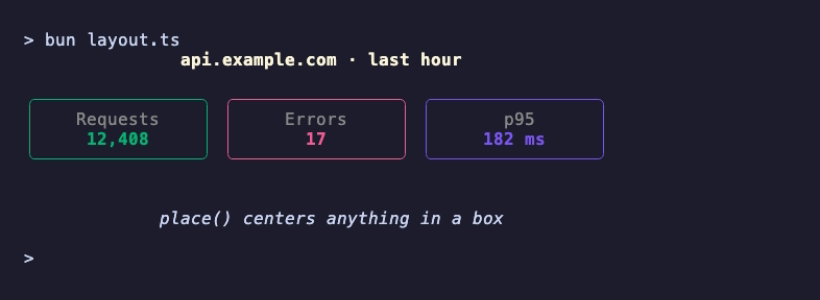
Plain strings work as spacers: the ' ' between the cards is a one-cell gap, and the '' between header and row is an empty line. There's no grid system to learn; you compose strings, and every function returns a string you can keep composing.
V – Colors That Work on Light and Dark Terminals
A color that looks good on a dark background can be unreadable on a light one. lightDark(isDark) returns a picker: you pass it a light-mode color and a dark-mode color, and it returns the right one.
The catch is knowing whether the background is dark. Go's Lip Gloss asks the terminal; Node, Bun and Deno have no portable way to do that, so the port leaves that function out and the decision is yours. A common signal is the COLORFGBG variable that many terminals set:
// adaptive.ts
import { newStyle, println, lightDark, roundedBorder } from '@oakoliver/lipgloss';

// Lip Gloss can't ask the terminal for its background color here, so decide
// yourself. Many terminals set COLORFGBG ("15;0" means a dark background).
const bg = Number(process.env.COLORFGBG?.split(';').pop());
const isDark = Number.isNaN(bg) ? true : bg < 7 || bg === 8;

const pick = lightDark(isDark);

const box = newStyle()
  .border(roundedBorder())
  .borderForeground(pick('#874BFD', '#7D56F4'))
  .foreground(pick('#1A1A1A', '#FAFAFA'))
  .background(pick('#F2EEFF', '#2A2340'))
  .padding(1, 3);

println(box.render(`This box adapts.\nBackground: ${isDark ? 'dark' : 'light'}`));
Here is the same program in a dark terminal with COLORFGBG=15;0, and in a light one with COLORFGBG=0;15:
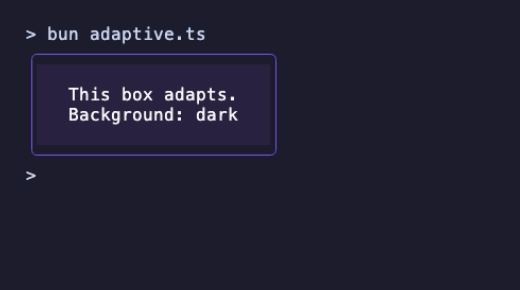
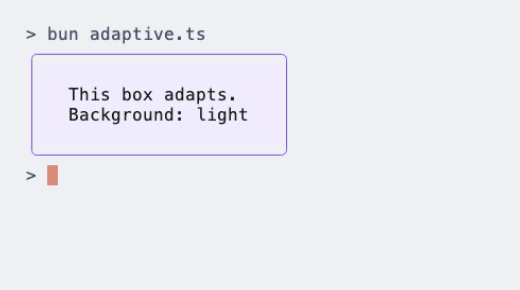
COLORFGBG isn't set everywhere, so the example falls back to dark. For a real tool, also accept a flag or a config value so users can override the guess.
VI – Putting It Together: A Status Card
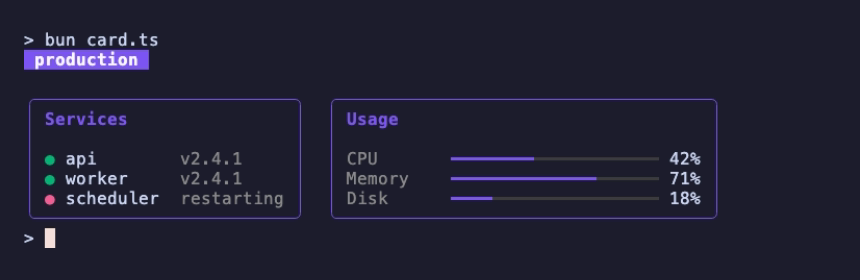
The picture at the top of this article is this program. It uses nothing beyond what the previous steps covered: a few styles, a helper that wraps content in a titled panel, and the two join functions.
// card.ts
import {
  newStyle,
  println,
  joinHorizontal,
  joinVertical,
  roundedBorder,
  Left,
  Top,
} from '@oakoliver/lipgloss';

const accent = '#7D56F4';
const muted = newStyle().foreground('#8A8A8A');
const label = newStyle().foreground('#8A8A8A').width(10);
const ok = newStyle().foreground('#04B575').render('●');
const bad = newStyle().foreground('#F25D94').render('●');

const bar = (fraction: number, width = 20) => {
  const filled = Math.round(fraction * width);
  return (
    newStyle().foreground(accent).render('━'.repeat(filled)) +
    newStyle().foreground('#3C3C3C').render('━'.repeat(width - filled))
  );
};

const panel = (title: string, body: string) =>
  newStyle()
    .border(roundedBorder())
    .borderForeground(accent)
    .padding(0, 1)
    .render(joinVertical(Left, newStyle().bold(true).foreground(accent).render(title), '', body));

const services = panel(
  'Services',
  [
    `${ok} api        ${muted.render('v2.4.1')}`,
    `${ok} worker     ${muted.render('v2.4.1')}`,
    `${bad} scheduler  ${muted.render('restarting')}`,
  ].join('\n'),
);

const usage = panel(
  'Usage',
  [
    `${label.render('CPU')}${bar(0.42)} 42%`,
    `${label.render('Memory')}${bar(0.71)} 71%`,
    `${label.render('Disk')}${bar(0.18)} 18%`,
  ].join('\n'),
);

const title = newStyle()
  .bold(true)
  .foreground('#FAFAFA')
  .background(accent)
  .padding(0, 1)
  .render('production');

println(joinVertical(Left, title, '', joinHorizontal(Top, services, '  ', usage)));
label shows a useful trick: a style with a fixed width(10) turns any string into a fixed-width column, so the bars line up without counting spaces.
This is static output. When you want it to update, react to keys or resize with the window, that's the job of Bubble Tea, which calls your view() function and redraws whatever string it returns, including strings built with Lip Gloss.
VII – What to Read Next
- The README at github.com/oakoliver/lipgloss lists the whole API: text attributes, every color format, alignment, margins, inheritance, and the color utilities (
darken,lighten,complementary,blend1D,blend2D). - The examples folder has larger programs, including the port of Lip Gloss's own layout demo and a one-screen poster with gradients and overlapping layers:
bun examples/poster.ts. - How it was built: Porting Go's Terminal UI Ecosystem to TypeScript: Glamour and Lip Gloss covers the port itself.
VIII – Requirements
- Node.js 18 or later (the package's
enginesfield). We ran these examples on Node 18.20 and 20.6 throughtsx, and on Node 26 directly. - Bun: all examples were developed and recorded on Bun 1.4.
- Deno: run with
--allow-env(deno run --allow-env hello.ts).printlnreads environment variables such asNO_COLORto decide how to print colors, and Deno asks permission for that. - A true-color terminal shows the hex colors exactly; on others,
printlnmaps them to the nearest available color.