Getting Started with Rod in TypeScript: Drive Chrome Over the DevTools Protocol
Sometimes you need a real browser from a script: to screenshot a page, fill in a form, or check that a button actually does what it says. The usual answer is a large framework that downloads its own browser. This guide takes the other route.
Our TypeScript port of go-rod is three small packages with no dependencies. @oakoliver/browser-launcher finds the Chrome you already have and starts it. @oakoliver/cdp talks to it over the Chrome DevTools Protocol (CDP), the same WebSocket protocol DevTools itself uses. @oakoliver/cdp-input turns keys and mouse buttons into the exact parameters CDP expects.
From an empty folder to a script that fills in a form, waits for the answer and saves a screenshot, in about 100 lines you can read.
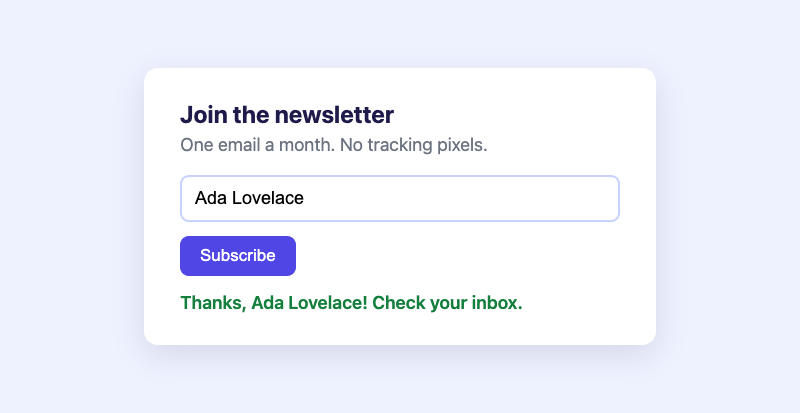
There is no high-level page.click() layer yet; you send protocol commands yourself. That's more typing than Puppeteer, but every step is visible, and the helpers you need fit on one screen.
I – Install
npm install @oakoliver/browser-launcher @oakoliver/cdp @oakoliver/cdp-input
# or
bun add @oakoliver/browser-launcher @oakoliver/cdp @oakoliver/cdp-input
You also need Chrome, Chromium or Edge installed. The launcher looks in the usual places (and on PATH), so there's nothing to configure.
The examples are TypeScript and use top-level await, so set "type": "module" in your package.json (npm pkg set type=module). Bun runs them as they are, and so does Node 24 or later. On Node 22, add --experimental-strip-types.
II – Start Chrome and Say Hello
launch() starts Chrome headless, waits for it to print its DevTools address, and returns that ws:// URL together with a Launcher you use to stop it. connect() opens the WebSocket.
// 01-hello.ts
import { launch } from "@oakoliver/browser-launcher";
import { connect } from "@oakoliver/cdp";

const { url, launcher } = await launch(); // finds Chrome, starts it headless
console.log("DevTools URL:", url);

const client = await connect(url);
const version = (await client.call("", "Browser.getVersion")) as {
  product: string;
  protocolVersion: string;
};
console.log(`Connected to ${version.product} (protocol ${version.protocolVersion})`);

await client.close();
await launcher.cleanup(); // kills Chrome, waits for it to exit, removes its profile
console.log("Clean exit.");
$ node 01-hello.ts
DevTools URL: ws://127.0.0.1:65132/devtools/browser/00acbe58-d060-4f95-942d-4ab4619284f9
Connected to Chrome/154.0.8037.93 (protocol 1.3)
Clean exit.
Every CDP command goes through one method: client.call(sessionId, method, params). It returns a promise of the command's result, typed as unknown because the packages don't ship protocol types yet, which is why the example casts it. The first argument is a session id; browser-wide commands like Browser.getVersion use an empty string.
III – Open a Page and Take a Screenshot
To work with a page you create a tab (a target), attach to it, and send page commands with the session id the attach call returns. We'll serve our own page instead of hitting the internet: save this as page.html. Its script waits 400 ms before showing a confirmation, like a real form waiting on a server.
<!-- page.html -->
<!doctype html>
<html>
<head>
  <meta charset="utf-8">
  <title>Newsletter</title>
  <style>
    body { margin: 0; height: 100vh; display: grid; place-items: center;
           font: 18px system-ui, sans-serif; background: #eef2ff; color: #1e1b4b; }
    form { width: 440px; padding: 32px 36px; border-radius: 14px; background: white;
           box-shadow: 0 10px 30px rgba(30, 27, 75, .12); }
    h1 { margin: 0 0 6px; font-size: 24px; }
    p { margin: 0 0 20px; color: #6b7280; }
    input { width: 100%; box-sizing: border-box; padding: 11px 13px; font-size: 18px;
            border: 2px solid #c7d2fe; border-radius: 9px; outline: none; }
    input:focus { border-color: #4f46e5; }
    button { margin-top: 14px; padding: 10px 20px; font-size: 17px; border: 0;
             border-radius: 9px; background: #4f46e5; color: white; }
    #thanks { margin-top: 16px; color: #15803d; font-weight: 600; }
  </style>
</head>
<body>
  <form id="signup">
    <h1>Join the newsletter</h1>
    <p>One email a month. No tracking pixels.</p>
    <input id="name" placeholder="Your name" autocomplete="off">
    <button type="submit">Subscribe</button>
  </form>
  <script>
    document.getElementById("signup").addEventListener("submit", (event) => {
      event.preventDefault();
      const name = document.getElementById("name").value;
      // Pretend to talk to a server, then show the confirmation.
      setTimeout(() => {
        const thanks = document.createElement("div");
        thanks.id = "thanks";
        thanks.textContent = `Thanks, ${name}! Check your inbox.`;
        document.getElementById("signup").append(thanks);
      }, 400);
    });
  </script>
</body>
</html>
The script below serves that file with node:http (which also works in Bun), opens it and saves a screenshot.
// 02-screenshot.ts
import { readFileSync, writeFileSync } from "node:fs";
import { createServer } from "node:http";
import type { AddressInfo } from "node:net";
import { launch } from "@oakoliver/browser-launcher";
import { connect } from "@oakoliver/cdp";

// 1. Serve page.html on a free local port.
const html = readFileSync("page.html");
const server = createServer((_req, res) => {
  res.writeHead(200, { "content-type": "text/html" }).end(html);
});
await new Promise<void>((resolve) => server.listen(0, "127.0.0.1", resolve));
const pageURL = `http://127.0.0.1:${(server.address() as AddressInfo).port}/`;

// 2. Start Chrome and connect to it.
const { url, launcher } = await launch({ windowSize: [800, 500] });
const client = await connect(url);

try {
  // 3. Open a tab and attach to it. Commands for that tab carry its sessionId.
  const { targetId } = (await client.call("", "Target.createTarget", {
    url: "about:blank",
  })) as { targetId: string };
  const { sessionId } = (await client.call("", "Target.attachToTarget", {
    targetId,
    flatten: true,
  })) as { sessionId: string };

  // 4. Navigate and wait for the load event.
  await client.call(sessionId, "Page.enable");
  const loaded = waitForEvent("Page.loadEventFired");
  await client.call(sessionId, "Page.navigate", { url: pageURL });
  await loaded;

  // 5. Screenshot.
  const { data } = (await client.call(sessionId, "Page.captureScreenshot", {
    format: "png",
  })) as { data: string };
  writeFileSync("page.png", Buffer.from(data, "base64"));
  console.log("Saved page.png");
} finally {
  await client.close();
  await launcher.cleanup();
  server.close();
}

async function waitForEvent(method: string) {
  for await (const event of client.events()) {
    if (event.method === method) return event;
  }
  throw new Error(`connection closed before ${method}`);
}
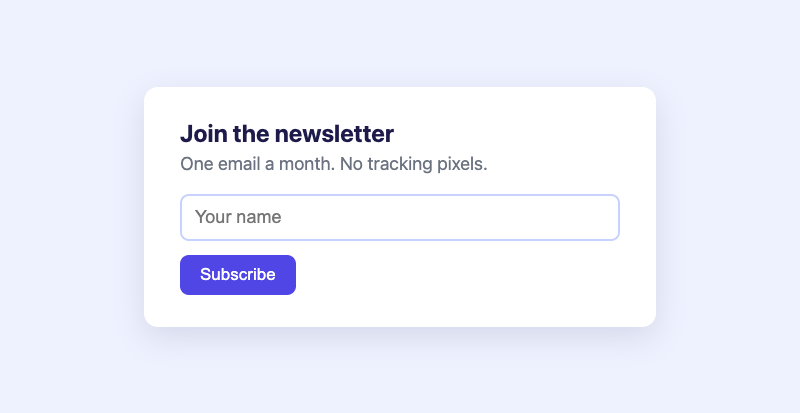
Two things to notice:
- Events arrive on the same connection.
Page.enableturns on page events, andclient.events()is an async iterator over everything Chrome sends. We start waiting forPage.loadEventFiredbefore navigating, so the event can't slip past. try/finallykeeps Chrome from outliving your script when something throws. There's more on shutting down in section V.
IV – Type, Click, Wait and Read
Here's the whole sign-up flow. It's the screenshot script plus five small helpers, and those helpers are where cdp-input comes in:
click(selector)asks the page for the element's position withRuntime.evaluate, then sends a mouse press and release at its centre.encodeMouseButton(["left"])returns thebuttonandbuttonsvalues CDP wants.type(text)sends a key-down and key-up for every character.keyFromCharmaps a character to a key on a US layout, andencodeKeyfills inkey,code,textand the virtual key code, which is what makes the page see real keystrokes andinputevents, not a value set from outside.waitFor(selector)polls every 50 ms until the element exists or 5 seconds pass. CDP has no built-in "wait for selector", so you write the loop yourself.text(selector)reads an element's text withRuntime.evaluate.
// 03-signup.ts
import { readFileSync, writeFileSync } from "node:fs";
import { createServer } from "node:http";
import type { AddressInfo } from "node:net";
import { launch } from "@oakoliver/browser-launcher";
import { connect } from "@oakoliver/cdp";
import { encodeKey, encodeMouseButton, keyFromChar } from "@oakoliver/cdp-input";

const html = readFileSync("page.html");
const server = createServer((_req, res) => {
  res.writeHead(200, { "content-type": "text/html" }).end(html);
});
await new Promise<void>((resolve) => server.listen(0, "127.0.0.1", resolve));
const pageURL = `http://127.0.0.1:${(server.address() as AddressInfo).port}/`;

const { url, launcher } = await launch({ windowSize: [800, 500] });
const client = await connect(url);
let sessionId = "";
const call = (method: string, params?: unknown) => client.call(sessionId, method, params) as Promise<any>;

try {
  const { targetId } = await client.call("", "Target.createTarget", { url: "about:blank" }) as any;
  ({ sessionId } = await client.call("", "Target.attachToTarget", { targetId, flatten: true }) as any);

  await call("Page.enable");
  const loaded = waitForEvent("Page.loadEventFired");
  await call("Page.navigate", { url: pageURL });
  await loaded;
  console.log("opened", pageURL);

  await click("#name");
  await type("Ada Lovelace");
  console.log("typed the name");

  await click("button[type=submit]");
  console.log("clicked Subscribe");

  await waitFor("#thanks");
  console.log("page says:", await text("#thanks"));

  const { data } = await call("Page.captureScreenshot", { format: "png" });
  writeFileSync("signed-up.png", Buffer.from(data, "base64"));
  console.log("saved signed-up.png");
} finally {
  await client.close();
  await launcher.cleanup();
  server.close();
}

/** Evaluate a JavaScript expression in the page and return its value. */
async function evaluate<T>(expression: string): Promise<T> {
  const { result, exceptionDetails } = await call("Runtime.evaluate", { expression, returnByValue: true });
  if (exceptionDetails) throw new Error(exceptionDetails.exception?.description ?? exceptionDetails.text);
  return result.value as T;
}

/** Click the center of the first element matching `selector`. */
async function click(selector: string) {
  const [x, y] = await evaluate<[number, number]>(`(() => {
    const r = document.querySelector(${JSON.stringify(selector)}).getBoundingClientRect();
    return [r.x + r.width / 2, r.y + r.height / 2];
  })()`);
  const [button, buttons] = encodeMouseButton(["left"]);
  await call("Input.dispatchMouseEvent", { type: "mousePressed", x, y, button, buttons, clickCount: 1 });
  await call("Input.dispatchMouseEvent", { type: "mouseReleased", x, y, button, buttons: 0, clickCount: 1 });
}

/** Type text into whatever has focus, one key down/up pair per character. */
async function type(text: string) {
  for (const ch of text) {
    const key = keyFromChar(ch);
    await call("Input.dispatchKeyEvent", encodeKey(key, "keyDown", 0));
    await call("Input.dispatchKeyEvent", encodeKey(key, "keyUp", 0));
  }
}

/** Poll until an element matching `selector` exists, or give up after `timeout` ms. */
async function waitFor(selector: string, timeout = 5000) {
  const deadline = Date.now() + timeout;
  while (!(await evaluate<boolean>(`!!document.querySelector(${JSON.stringify(selector)})`))) {
    if (Date.now() > deadline) throw new Error(`timed out waiting for ${selector}`);
    await new Promise((resolve) => setTimeout(resolve, 50));
  }
}

/** The text content of the first element matching `selector`. */
function text(selector: string) {
  return evaluate<string>(`document.querySelector(${JSON.stringify(selector)}).textContent`);
}

async function waitForEvent(method: string) {
  for await (const event of client.events()) {
    if (event.method === method) return event;
  }
  throw new Error(`connection closed before ${method}`);
}
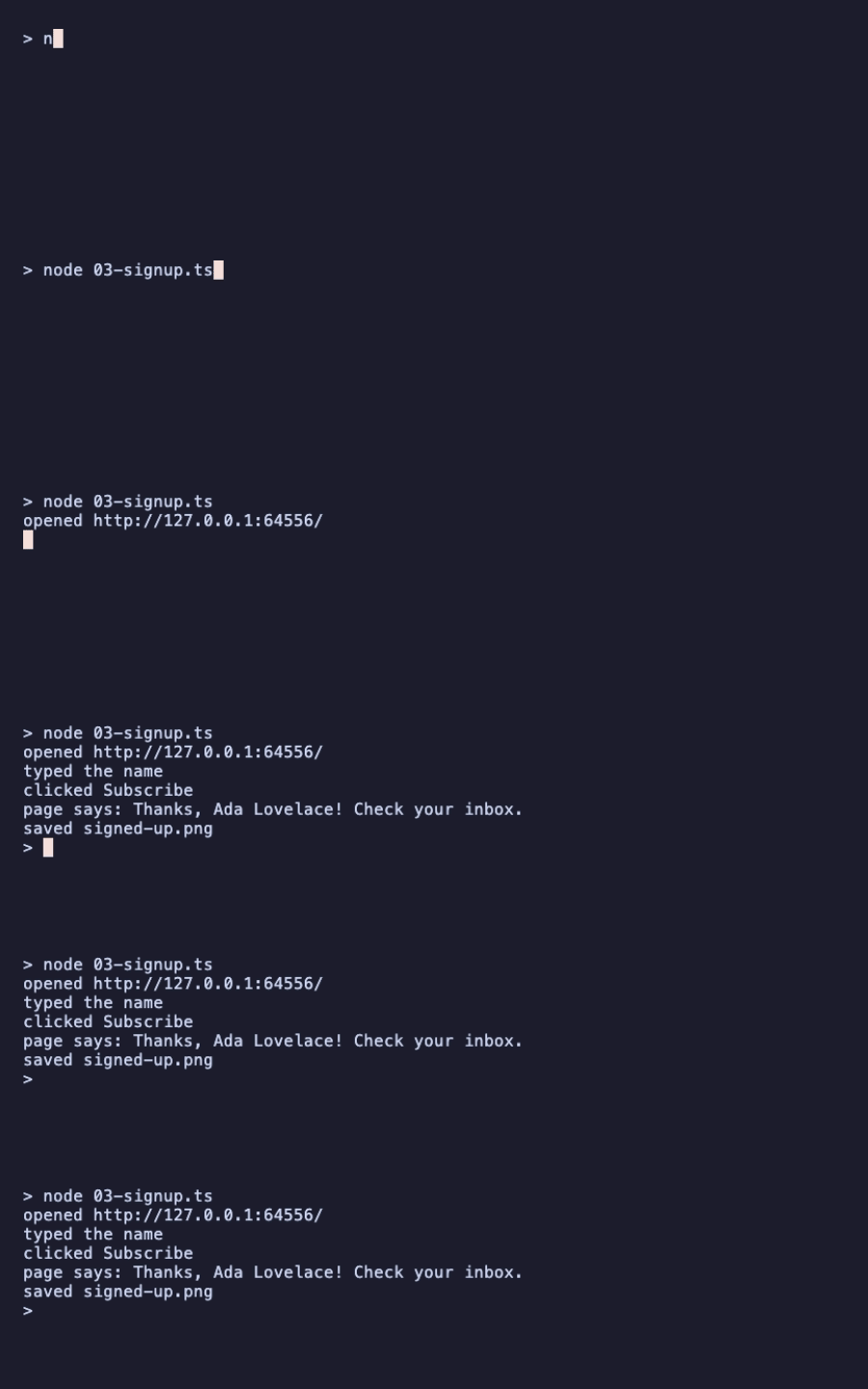
The whole run takes under a second on Bun and on Node, and the screenshot at the top of this article is the signed-up.png it saves.
Capital letters need no extra work: keyFromChar("A") already produces the text A. The modifiers argument of encodeKey (for example ModifierShift or ModifierControl) is for when the page checks event.shiftKey or for keyboard shortcuts.
V – Shutting Down Cleanly
launcher.cleanup() kills Chrome and every helper process it started (on Windows, only the browser process), waits until they have exited, and then deletes the temporary profile directory Chrome used. Always await it. The examples above call it in finally, so it runs after an exception too.
Ctrl-C is the other case. On macOS and Linux, Chrome runs in its own process group, and the launcher starts a small guard process that kills that group if your script dies. So Chrome stops even if you press Ctrl-C. Its profile directory under $TMPDIR/rod/user-data is left behind, though. To remove it too, handle the signal:
// 04-ctrl-c.ts
import { launch } from "@oakoliver/browser-launcher";

const { url, launcher } = await launch();
console.log("Chrome is running at", url);
console.log("Press Ctrl-C to stop.");

// Without this handler, Ctrl-C still stops Chrome (the launcher's guard
// process kills it), but its temporary profile directory is left behind.
process.once("SIGINT", async () => {
  await launcher.cleanup();
  console.log("\nChrome stopped and its profile removed.");
  process.exit(130);
});

await new Promise(() => {}); // stand-in for a long-running job
We checked both behaviours on Node and Bun: without the handler, Ctrl-C stops Chrome and leaves one profile directory behind; with it, nothing is left.
VI – What to Read Next
- The README at github.com/oakoliver/rod lists every
Launcheroption (window size, proxy, user data directory, extra flags) and the error typescdpexports. - The examples folder in the same repo has a live DevTools event log, screenshots at three viewport sizes, and the demo that produced the README's animation.
- The protocol itself: the Chrome DevTools Protocol viewer documents every domain and command used here (
Target,Page,Runtime,Input). - How it was built: Porting Go-Rod to TypeScript: Browser Automation from Scratch.
VII – Requirements
- Chrome, Chromium or Edge, installed where the launcher can find it. We ran everything with Chrome 154 on macOS.
- Node.js 22 or later.
@oakoliver/cdpuses the globalWebSocket, which Node 20 doesn't have: there,connect()fails withWebSocket is not defined. We ran the examples on Node 22.16 (with--experimental-strip-types), 24.16 and 26.8. - Bun: we ran every example on Bun 1.4.
- Both ESM (
import) and CommonJS (require) work; we loaded all three packages both ways on Node.