Getting Started with bm25s: Full-Text Search in TypeScript Without a Search Server
Most applications that need search don't need a search server. A list of help articles, a few thousand product descriptions, a folder of notes: they fit in memory, and what they need is a good ranking function.
BM25 is that ranking function. It's what Elasticsearch, Lucene and most "find the relevant document" systems use underneath: score each document by how often the query's words appear in it, give rare words more weight than common ones, and don't let long documents win just by being long.
bm25s is a TypeScript port of the Python bm25s library. It has no runtime dependencies and runs on Node, Bun and Deno.
In ten minutes you'll go from npm install to a command-line tool that searches a folder of Markdown notes and ranks the results.

I – Install
npm install bm25s
# or
bun add bm25s
The examples below are TypeScript files with top-level await, so set your project to ES modules first (npm pkg set type=module). Then run them with any of:
bun file.tsdeno run -A file.tsnode file.tson Node 24 or newer, which runs TypeScript directlynpx tsx file.tson Node 18 to 22
All five examples share one small corpus:
// corpus.ts
export const corpus = [
  "Sourdough needs a lively starter, flour, water and salt.",
  "Proof the dough overnight in the fridge for a sour flavour.",
  "Tomatoes need full sun and deep watering twice a week.",
  "Water tomatoes at the base: water the soil, not the leaves.",
  "Water the basil in the morning so the leaves dry by night.",
  "Season a new cast iron pan with a thin layer of oil.",
];
II – Your First Search
Searching takes three steps: tokenize the corpus, build an index from the tokens, then tokenize the query and ask for the top k documents.
// search.ts
import { BM25, tokenize } from "bm25s";
import { corpus } from "./corpus.ts";

const retriever = new BM25();
retriever.index(tokenize(corpus));

const query = "how often should I water tomatoes?";
const { documents, scores } = retriever.retrieve(tokenize([query]), { k: 3 });

console.log(`query: ${query}\n`);
documents[0].forEach((id, rank) => {
  console.log(`${rank + 1}. [${scores[0][rank].toFixed(3)}] ${corpus[id]}`);
});
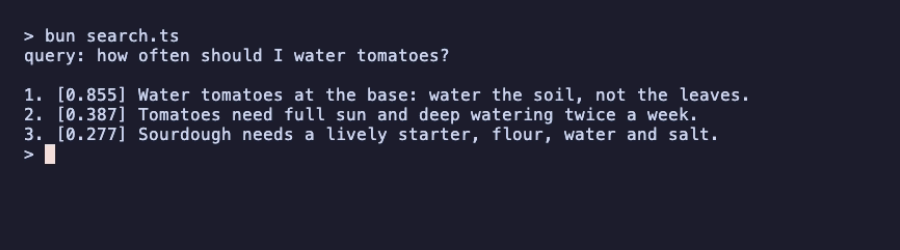
retrieve returns two parallel arrays with one row per query: documents (the indexes of the matching documents) and scores. Here we sent one query, so we read row [0].
Look at the ranking. The line that mentions both "water" and "tomatoes" wins. The line about tomatoes comes second, even though it's about watering, because it says "watering", and to the tokenizer that's a different word from "water". We'll fix that in section IV.
The question's other words had no effect. "how", "often" and "should" survive tokenization but appear in no document, so they can't change any score. "I" never becomes a token at all: the default tokenizer skips single characters.
III – Variants, k1 and b
BM25 comes in several variants that differ in how they weight rare words and long documents. bm25s implements the same five as the Python library: robertson, lucene (the default), atire, bm25l and bm25+. The two classic parameters can be changed too:
k1controls how quickly repeated words stop adding to the score.bcontrols how much longer documents are penalized:0means not at all,1means fully.
// variants.ts
import { BM25, tokenize, type BM25Method } from "bm25s";
import { corpus } from "./corpus.ts";

const query = tokenize(["water tomatoes"]);

function top3(retriever: BM25): string {
  retriever.index(tokenize(corpus));
  const { documents, scores } = retriever.retrieve(query, { k: 3 });
  return documents[0].map((id, i) => `#${id} ${scores[0][i].toFixed(2)}`).join("   ");
}

const methods: BM25Method[] = ["robertson", "lucene", "atire", "bm25l", "bm25+"];
for (const method of methods) {
  console.log(method.padEnd(16), top3(new BM25({ method })));
}

console.log();
for (const [k1, b] of [[1.5, 0.75], [0.5, 0.75], [1.5, 0]] as const) {
  console.log(`k1=${k1} b=${b}`.padEnd(16), top3(new BM25({ k1, b })));
}
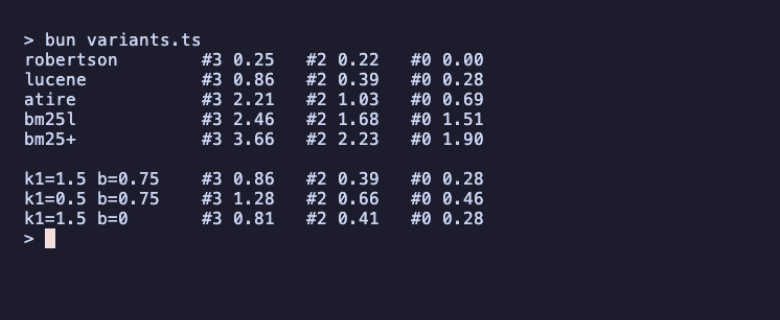
Three things to notice:
- The ranking is the same for every variant; the score scale isn't. Scores from different variants (or different corpora) can't be compared with each other. Use them to rank results, not as a confidence percentage.
robertsongives document 0 a score of exactly zero. "water" appears in half of these six documents, and Robertson's IDF formula treats a word that common as carrying no information. The other variants still give it a small weight. On a real corpus with thousands of documents this rarely matters; on six it's very visible.b=0turns off length normalization. Document 2, one of the two longest documents here, loses its length penalty and gains a little (0.39 to 0.41), while document 3 loses a little. The ranking doesn't change in this tiny corpus; on real data,bis the knob to turn when long documents rank too high or too low.
If you don't know which to pick, keep the default (lucene, k1=1.5, b=0.75). It's a good general-purpose choice, and it's what the examples here use.
IV – Stopwords and Stemming
The tokenizer lowercases text, splits it into words, and removes English stopwords by default. You can choose another of the 15 bundled lists ("de", "fr", "pt", "zh" and more), pass your own list, or set stopwords: false to keep every word.
Stemming isn't built in, but the tokenizer accepts any (word) => string function. The stemmer package on npm is a small Porter stemmer for English:
npm install stemmer
// tokenizer.ts
import { BM25, tokenize, convertTokenizedToStrings, type TokenizerOptions } from "bm25s";
import { stemmer } from "stemmer";
import { corpus } from "./corpus.ts";

const text = "Tomatoes need full sun and deep watering twice a week.";
const show = (label: string, options: TokenizerOptions) => {
  const tokens = tokenize(text, options);
  console.log(label.padEnd(22), convertTokenizedToStrings(tokens)[0].join(" "));
};

show("stopwords: false", { stopwords: false });
show("default (\"en\")", {});
show("\"en\" + Porter stemmer", { stemmer });

// The query must be tokenized with the same options as the corpus.
const options: TokenizerOptions = { stemmer };
const retriever = new BM25();
retriever.index(tokenize(corpus, options));
const { documents, scores } = retriever.retrieve(tokenize(["watering tomatoes"], options), { k: 3 });

console.log("\nquery: watering tomatoes (stemmed)");
documents[0].forEach((id, rank) => {
  console.log(`${rank + 1}. [${scores[0][rank].toFixed(3)}] ${corpus[id]}`);
});
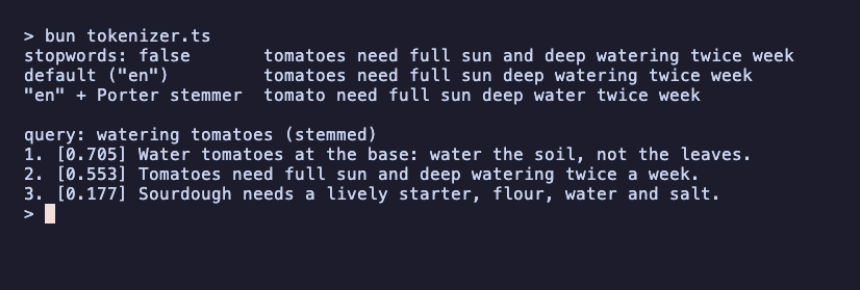
With stemming, "watering" and "water" become the same token, and the line about deep watering moves much closer to the top result.
Two details are easy to miss:
- Tokenize the corpus and the queries with the same options. If the corpus is stemmed and the query isn't, "watering" never matches "water".
- "a" disappears even with
stopwords: false. That's the splitter, not the stopword list: the default pattern only keeps tokens of two or more characters, as the Python library does. Pass your ownsplitterif single characters matter to you.
tokenize()'s return type follows its options: Tokenized by default, and the raw number[][] ids when you pass returnIds: true, so no cast is needed.
V – Save, Load, and Get Documents Back
Indexing is fast, but you still don't want to rebuild the index on every start. save writes the index to a directory, and BM25.load reads it back. Pass the original corpus when indexing and it's stored too, so results come back as your documents instead of numbers:
// save-load.ts
import { BM25, tokenize } from "bm25s";
import { corpus } from "./corpus.ts";

// Index once and store the corpus next to the index.
const retriever = new BM25<string>();
retriever.index(tokenize(corpus), { corpus });
await retriever.save("kitchen-index");

// Later, or in another process: load it back, corpus included.
const loaded = await BM25.load<string>("kitchen-index", { loadCorpus: true });
console.log(`loaded ${loaded.getNumDocs()} documents, ${loaded.getVocabSize()} terms\n`);

// documents is string[][] here, typed from BM25<string>.
const { documents, scores } = loaded.retrieve(tokenize(["cast iron"]), { k: 3 });
documents[0].forEach((doc, i) => {
  const note = scores[0][i] === 0 ? "   <- score 0: padding, not a match" : "";
  console.log(`[${scores[0][i].toFixed(3)}] ${doc}${note}`);
});

The directory holds four small files: params.json, vocab.json, matrix.bin and corpus.jsonl.
Writing new BM25<string>() tells TypeScript what the corpus holds, so documents is typed as string[][]. BM25.load<string>() does the same for a loaded index. If you'd rather have only the documents, without scores, pass returnAs: "documents".
retrieve always returns k results, even when fewer documents match. "cast iron" appears in one document, so the other two rows are documents with a score of 0. The Python library does the same. Check the score before showing a result, as the next example does.
VI – Search Your Markdown Notes
Now put it together. This script indexes every .md file under a directory, one document per file, with stemming on. It prints the best files for a query, each with the line that matches most of the query's words:
// search-notes.ts
import { readdirSync, readFileSync } from "node:fs";
import { join } from "node:path";
import { BM25, tokenize, type TokenizerOptions } from "bm25s";
import { stemmer } from "stemmer";

const [dir = ".", ...words] = process.argv.slice(2);
const query = words.join(" ");
if (!query) {
  console.error("usage: search-notes <dir> <query…>");
  process.exit(1);
}

// One document per Markdown file.
const files = readdirSync(dir, { recursive: true, encoding: "utf8" })
  .filter((f) => f.endsWith(".md"))
  .sort();
const texts = files.map((f) => readFileSync(join(dir, f), "utf8"));

const options: TokenizerOptions = { stemmer };
const retriever = new BM25<string>();
retriever.index(tokenize(texts, options), { corpus: files });

const k = Math.min(5, files.length);
const { documents, scores } = retriever.retrieve(tokenize([query], options), { k });

// Show the line with the most query terms as a snippet.
const terms = new Set(query.toLowerCase().split(/\W+/).map((w) => stemmer(w)));
const snippet = (text: string) =>
  text
    .split("\n")
    .filter((line) => line.trim() && !line.startsWith("#"))
    .map((line) => ({ line, hits: line.toLowerCase().split(/\W+/).filter((w) => terms.has(stemmer(w))).length }))
    .sort((a, b) => b.hits - a.hits)[0]?.line.trim() ?? "";

documents[0].forEach((file, i) => {
  if (scores[0][i] === 0) return; // padding, not a match
  console.log(`${scores[0][i].toFixed(2).padStart(5)}  ${file}`);
  console.log(`       ${snippet(texts[files.indexOf(file)])}`);
});
That's the recording at the top of this article. "watering the plants" finds the tomato note first, because stemming turns both "watering" and "water" into "water". "how do I roll back a deploy" finds the deploy checklist and skips everything with a score of 0.
It's about forty lines. For a real notes folder you'd add the two things the earlier sections showed: save the index and rebuild it only when files change, and split long files into sections, so a match points at a paragraph rather than a whole document.
VII – What About Speed?
bm25s began as a port aimed at beating Python, and an earlier article told that story. The current measurements are more mixed, and the benchmark section of the README shows all of them:
- Indexing is roughly two to three times faster than Python bm25s from 5,000 documents up, and slower on 1,000.
- Retrieval is faster than the Python library's numpy backend from 5,000 documents up, but slower than its numba backend at every corpus size measured.
Those figures were measured on 1.x, before the latest upstream sync, and the README says so.
So the reason to use bm25s isn't that it beats Python. It's that you get the same ranking in a JavaScript process, with no Python and no search server alongside it. In the README's benchmark, a query against 100,000 documents took about a third of a millisecond (329 µs, measured on an Apple M2 Max).
VIII – Where to Go Next
- The README covers the full API, upstream parity notes, and the benchmark scripts.
- The repository's
examples/folder has larger demos. - Full-Text Search Without Elasticsearch shows
bm25sreplacing Elasticsearch for search in a production app. - For long, structured documents, where "which section answers this?" matters more than keyword overlap, see Getting Started With pageindex.
Requirements: Node 18 or newer (tested on 18, 20, 22, 24 and 26), Bun (tested on 1.4) or Deno (tested on 2.8). There are no runtime dependencies.