Getting Started with pageindex: Tree Indexes for Reasoning-Based RAG
Ask a vector database "how fast must I acknowledge a page?" and it returns the five chunks whose embeddings sit closest to the question's. Sometimes that's the paragraph you need. Sometimes it's five paragraphs that mention "page" in passing.
PageIndex takes another route. Instead of cutting the document into chunks and embedding them, it builds a tree of the document's sections, the way a table of contents does. Then a language model reads that outline, decides which sections can answer the question, and reads only those. No embeddings, no vector store, and you can see which section the answer came from.
pageindex is a TypeScript port of the indexing half of PageIndex. It builds the tree. Searching the tree is up to you, and section VI shows how in about forty lines.
By the end of this article you'll have indexed a handbook, searched it, and answered questions from the right section, with every step before the summaries running offline.

I – Install
npm install pageindex
# or
bun add pageindex
The examples are TypeScript files with top-level await, so set your project to ES modules (npm pkg set type=module). Run them with Bun, Deno, Node 24 or newer (which runs .ts directly), or npx tsx on Node 20 and 22.
Which parts need an LLM? For Markdown, only the summaries. Turning headings into a tree and thinning it are plain code. PDFs are different: detecting and checking the table of contents is done by the model, so indexing a PDF always needs one. This article sticks to Markdown.
All the examples index this handbook (made up for the article):
<!-- handbook.md -->
# Team Handbook

This handbook describes how the platform team works. It is a living document.

## Onboarding

### Your first week

Pair with your onboarding buddy every day. Ship one small change to production
before Friday, even if it only fixes a typo.

### Accounts and access

Request access to the cloud console, the on-call tool and the source host
through the access portal. Access is reviewed every quarter.

## Engineering practices

### Code review

Every change needs one approving review. Reviewers answer within one working
day. Keep pull requests under 400 lines where possible.

### Testing

Unit tests run on every push. Integration tests run before merge to main.
A failing test on main blocks all merges until it is fixed or reverted.

### Releases

We release every weekday at 10:00. Releases are tagged and can be rolled back
by redeploying the previous tag.

## On-call

### Rotation

Each engineer is on call for one week every eight weeks. The rotation changes
on Mondays at 09:00.

### Paging and escalation

Acknowledge a page within five minutes. If you cannot resolve an incident in
thirty minutes, escalate to the secondary on-call engineer.

### Incident reviews

Write a blameless review within three working days of any customer-facing
incident. Reviews list a timeline, the impact and follow-up actions.

## Time off

### Holidays

Book holidays at least two weeks ahead and tell your on-call partner so they
can swap weeks if needed.

### Sick leave

Tell your lead as early as you can. No doctor's note is needed for the first
three days.
II – From the Command Line
The package ships a pageindex command:
npx pageindex --md handbook.md -o handbook.json
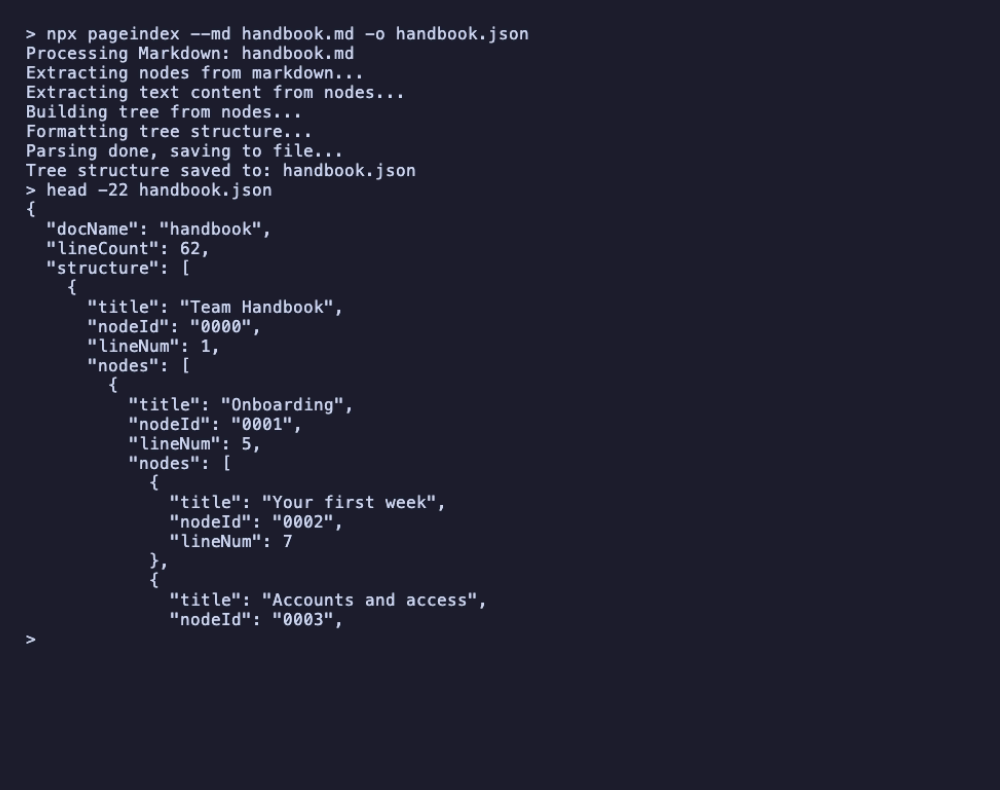
Every heading becomes a node with a nodeId, the line it starts on, and its subsections under nodes. For Markdown the CLI doesn't call a model unless you ask for summaries with --add-node-summary, so this runs with no API key. npx pageindex --help lists every option, including the PDF and OCR ones.
III – From Code
The library equivalent is mdToTree. One small helper prints a tree as an indented outline, and the remaining examples reuse it:
// outline.ts
import type { TreeNode } from "pageindex";

/** Print a tree as an indented outline: node id, line number and title. */
export function printOutline(nodes: TreeNode[], depth = 0): void {
  for (const node of nodes) {
    const id = node.nodeId ?? "----";
    const line = String(node.lineNum ?? "").padStart(3);
    const summary = node.summary || node.prefixSummary;
    const extra = summary ? `  — ${summary}` : "";
    console.log(`${id}  L${line}  ${"  ".repeat(depth)}${node.title}${extra}`);
    printOutline(node.nodes ?? [], depth + 1);
  }
}

/** Count every node in a tree. */
export const countNodes = (nodes: TreeNode[]): number =>
  nodes.reduce((n, node) => n + 1 + countNodes(node.nodes ?? []), 0);
// tree.ts
import { mdToTree } from "pageindex";
import { printOutline, countNodes } from "./outline.ts";

// Markdown summaries are off by default; spelled out here because turning
// them on is what makes Markdown indexing call an LLM.
const result = await mdToTree("handbook.md", { addNodeSummary: false });

console.log(`\n${result.docName}: ${result.lineCount} lines, ${countNodes(result.structure)} nodes\n`);
printOutline(result.structure);
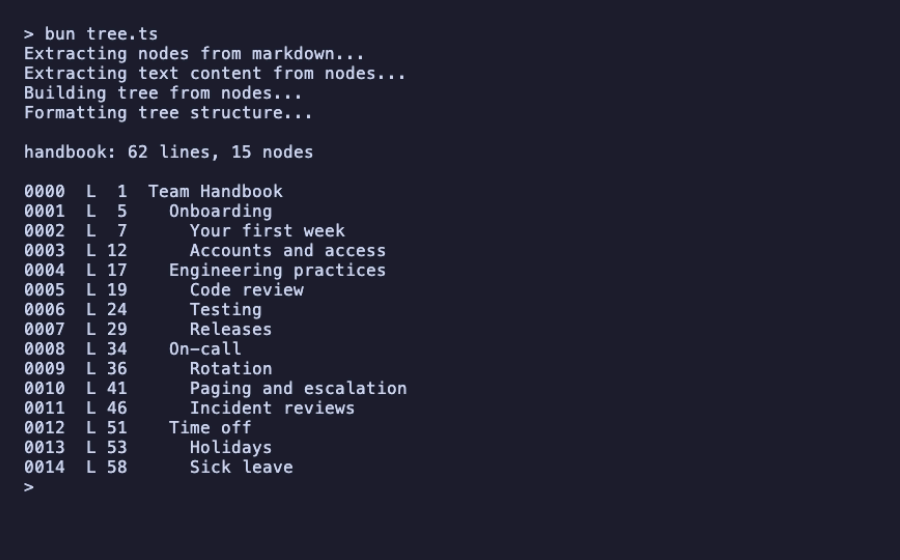
Note addNodeSummary: false. It's already the default for Markdown, in both the library and the CLI, as in upstream PageIndex. Turn it on and any section of 200 tokens or more is sent to a model, which is what section V does.
The progress lines ("Extracting nodes from markdown…") go to console.log by default. Pass a logger to send them elsewhere, or logger: () => {} to silence them.
IV – Thinning the Tree
A handbook with fifteen two-line sections gives the model a lot of small, similar choices. Thinning merges every section smaller than a token threshold into its parent:
// thinning.ts
import { mdToTree } from "pageindex";
import { printOutline, countNodes } from "./outline.ts";

// Thinning merges sections smaller than the threshold (in tokens) into
// their parent, so the model has fewer, meatier nodes to choose from.
for (const thinningThreshold of [80, 120]) {
  const { structure } = await mdToTree("handbook.md", {
    addNodeSummary: false,
    thinning: true,
    thinningThreshold,
  });
  console.log(`\nthinningThreshold ${thinningThreshold}: ${countNodes(structure)} nodes`);
  printOutline(structure);
}
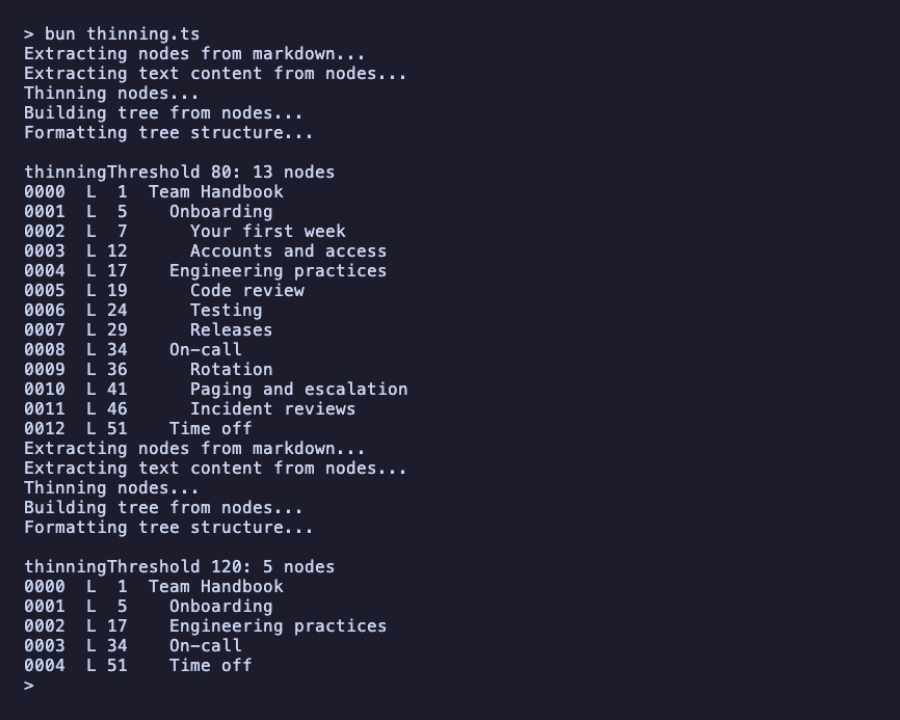
At 80 tokens, only "Time off" is small enough to fold its two subsections into itself. At 120, every chapter absorbs its subsections. The merged text stays in the parent; only the structure gets shallower.
Choose a threshold that matches your documents. A threshold that suits a 300-page manual would flatten this handbook completely. The default is 5,000 tokens.
V – Summaries From a Model
The tree becomes much more useful for search once each node has a one-line summary: the model can choose sections by what they say, not just by their titles. This is the first step that needs a language model.
pageindex talks to any OpenAI-compatible endpoint. To keep this article reproducible, it uses a tiny stand-in server that implements the endpoint and answers deterministically. It's not a model: it returns the first sentence of each section as its "summary".
// fake-llm.ts — run it with: bun fake-llm.ts
// A stand-in for an OpenAI-compatible endpoint, so the examples run offline
// and give the same answer every time. It is not a language model:
// - summary prompts get the first sentence of the section back;
// - tree-search prompts get the nodes whose title or summary shares a word
//   with the question. That is keyword overlap, not reasoning.
// Point baseUrl at Ollama, LM Studio or OpenAI to use a real model instead.

type Message = { role: string; content: string };
const words = (s: string) =>
  new Set((s.toLowerCase().match(/[a-z]{4,}/g) ?? []).map((w) => w.replace(/s$/, "")));

function answer(prompt: string): string {
  const question = prompt.match(/Question: (.*)/)?.[1];
  if (question) {
    const tree = JSON.parse(prompt.split("Document tree:\n")[1].split("\n\nReply")[0]);
    const wanted = words(question);
    const ids: string[] = [];
    type Node = { title: string; nodeId?: string; summary?: string; prefixSummary?: string; nodes?: Node[] };
    const walk = (nodes: Node[]) =>
      nodes.forEach((n) => {
        const text = `${n.title} ${n.summary ?? n.prefixSummary ?? ""}`;
        if (n.nodeId && [...words(text)].some((w) => wanted.has(w))) ids.push(n.nodeId);
        walk(n.nodes ?? []);
      });
    walk(tree);
    return JSON.stringify({ node_ids: ids });
  }
  const doc =
    prompt.match(/<user_document>\n([\s\S]*?)\n<\/user_document>/)?.[1] ??
    prompt.match(/Partial Document Text: ([\s\S]*?)\n\nDirectly return/)?.[1] ??
    "";
  const body = doc.split("\n").filter((l) => l.trim() && !l.startsWith("#")).join(" ");
  return body.match(/^.*?[.!?](\s|$)/)?.[0].trim() ?? body;
}

Bun.serve({
  hostname: "127.0.0.1",
  port: 8787,
  async fetch(req) {
    if (new URL(req.url).pathname !== "/v1/chat/completions") return new Response("not found", { status: 404 });
    const { messages } = (await req.json()) as { messages: Message[] };
    const content = answer(messages.map((m) => m.content).join("\n"));
    return Response.json({
      id: "fake",
      object: "chat.completion",
      created: 0,
      model: "fake",
      choices: [{ index: 0, finish_reason: "stop", message: { role: "assistant", content } }],
    });
  },
});
console.log("fake LLM listening on http://127.0.0.1:8787/v1");
// summaries.ts
import { mdToTree } from "pageindex";
import { printOutline } from "./outline.ts";

const { structure } = await mdToTree("handbook.md", {
  addNodeSummary: true,
  summaryTokenThreshold: 0, // summarize every section, however short
  baseUrl: "http://127.0.0.1:8787/v1",
  model: "any-local-model",
});

console.log();
printOutline(structure);
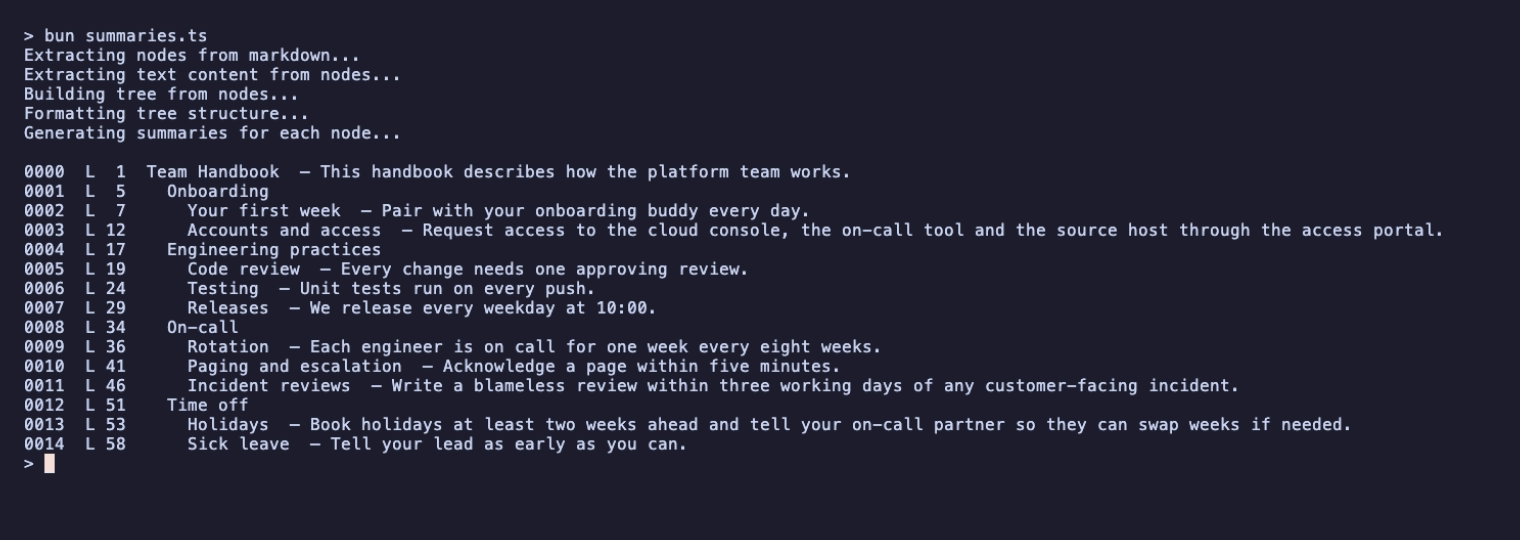
To use a real model, change baseUrl and model and nothing else:
- Ollama:
baseUrl: "http://localhost:11434/v1"and the name of a model you've pulled. - LM Studio:
baseUrl: "http://localhost:1234/v1"and the name of the model you've loaded. - OpenAI: leave
baseUrlout and setOPENAI_API_KEYin the environment.
Local servers don't need a key; pageindex sends a placeholder when none is set.
By default only sections of 200 tokens or more are summarized by the model; shorter ones use their own text as the summary. summaryTokenThreshold: 0 sends every section to the model, which is why every line above has one.
VI – Searching the Tree
Now the retrieval step that pageindex leaves to you. It has three parts:
- Build the tree with summaries and each section's text (
addNodeText: true). - Send the model the outline without the text, and ask which nodes answer the question.
- Look up those nodes and read their text.
This uses the openai client directly, so install it next to pageindex:
npm install openai
// search.ts
import OpenAI from "openai";
import { mdToTree, type TreeNode } from "pageindex";

const question = process.argv.slice(2).join(" ") || "How fast must I acknowledge a page?";
const baseURL = "http://127.0.0.1:8787/v1"; // or Ollama, LM Studio, OpenAI…
const model = "any-local-model";

// 1. Build the index, keeping each section's text for step 3.
const { structure } = await mdToTree("handbook.md", {
  addNodeSummary: true,
  summaryTokenThreshold: 0,
  addNodeText: true,
  baseUrl: baseURL,
  model,
});

// 2. Show the model the outline only (no section text) and let it pick nodes.
const outline = JSON.stringify(structure, (key, value) => (key === "text" ? undefined : value));
const llm = new OpenAI({ baseURL, apiKey: "not-needed-locally" });
const response = await llm.chat.completions.create({
  model,
  response_format: { type: "json_object" },
  messages: [{
    role: "user",
    content:
      `Question: ${question}\n\nDocument tree:\n${outline}\n\n` +
      'Reply with JSON {"node_ids": [...]} listing the nodes most likely to contain the answer.',
  }],
});
const { node_ids = [] } = JSON.parse(response.choices[0]?.message.content ?? "{}") as { node_ids?: string[] };

// 3. Read only the chosen sections.
const byId = new Map<string, TreeNode>();
const walk = (nodes: TreeNode[]) =>
  nodes.forEach((node) => {
    if (node.nodeId) byId.set(node.nodeId, node);
    walk(node.nodes ?? []);
  });
walk(structure);

console.log(`\nQ: ${question}\nchosen: ${node_ids.join(", ") || "(none)"}\n`);
for (const id of node_ids) console.log(byId.get(id)?.text?.trim(), "\n");
That's the recording at the top of this article. With the stand-in server, node selection is plain keyword overlap: "acknowledge" in the question matches the summary "Acknowledge a page within five minutes", and "release" matches the "Releases" title. A real model is the point of this step: it reads the titles and summaries and can choose a section even when the question uses entirely different words, which the stand-in can't.
The outline is the part to watch on large documents. Sending a 300-page manual's whole tree in one prompt gets expensive. The README suggests searching level by level instead: choose among the chapters, then expand only the chosen chapters' children.
VII – How It Fits Together
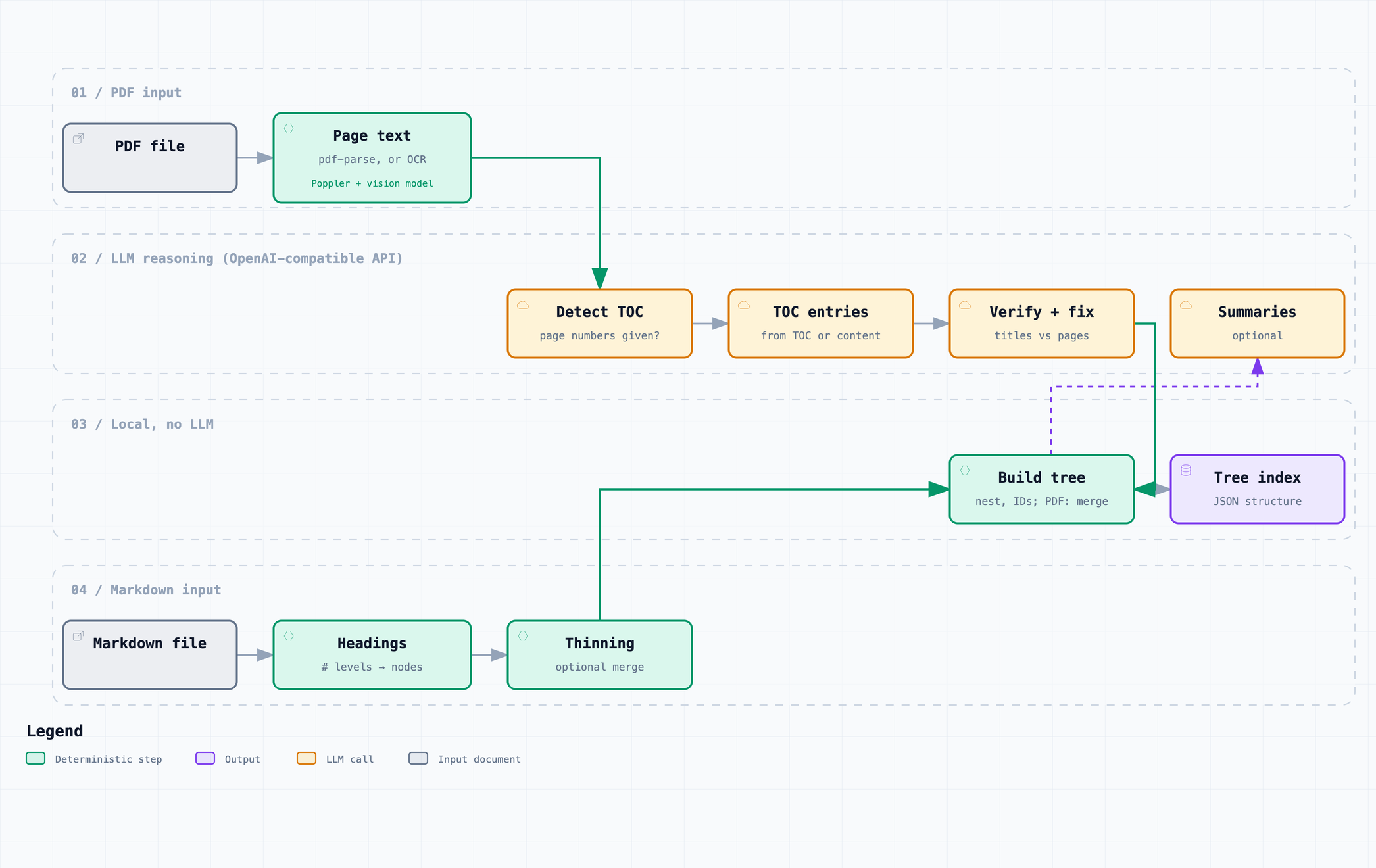
The diagram from the repository shows both paths. Markdown takes the bottom lane, which is local apart from the optional summaries. PDFs need the model from the start, to find and check the table of contents. Scanned PDFs can go through OCR first; that needs Poppler installed plus a vision model.
VIII – Where to Go Next
- The README covers PDF indexing, OCR mode, every option, and what's at parity with upstream PageIndex v0.2.19.
examples/tree-search.tsin the repository is a fuller version of section VI.- If keyword ranking over many short documents is what you need, rather than finding the right section of one long document, see Getting Started With bm25s.
Requirements: Node 20 or newer (tested on 20, 22 and 26), Bun (tested on 1.4) or Deno (tested on 2.8). Markdown indexing also runs on Node 18 (tested on 18.12 and 18.20), but PDF support needs Node 20. An OpenAI-compatible endpoint is needed only for summaries, PDFs and your own search step.