Getting Started with Bubble Tea in TypeScript: Interactive Terminal Apps in Six Small Programs
Most command-line tools print and exit. Some need to stay open: a menu you move through with the arrow keys, a progress display, a form, a dashboard. Building those by hand means raw mode, escape codes and redraw logic, and it gets messy fast.
Bubble Tea is Charm's Go framework for exactly this, and @oakoliver/bubbletea is its TypeScript port. This guide starts from an empty folder and builds six small programs, each adding one idea. You need no Go and no prior Charm experience.
Three methods, one loop: once you understand init, update and view, every Bubble Tea program reads the same way.
I – Install
Make a folder and add the package. It has no runtime dependencies.
mkdir tea-demo && cd tea-demo
npm init -y
npm pkg set type=module
npm install @oakoliver/bubbletea
With Bun, bun add @oakoliver/bubbletea does the same. The examples use top-level await, which is why the project is set to "type": "module".
To run TypeScript directly on Node, add tsx (npm install -D tsx) and use npx tsx file.ts. Bun runs .ts files as they are: bun file.ts. The recordings below use Bun, but every program in this article was also run on Node and Deno (see section VIII).
II – The Idea: Model, Update, View
A Bubble Tea program is a model with three methods:
init()returns something to do when the program starts, ornull.update(msg)receives a message (a key press, a timer tick, a window resize) and returns the next model, plus optionally a command: work to do next.view()turns the model into the text on screen.
You never redraw the screen yourself. Bubble Tea calls view() after every update and works out what changed. This pattern comes from the Elm language, which is why it's called the Elm Architecture.
Here is the smallest useful program, a counter:
// counter.ts
import { type Cmd, type Model, type Msg, KeyPressMsg, Program, Quit } from '@oakoliver/bubbletea';

class Counter implements Model {
  constructor(readonly count = 0) {}

  init(): Cmd {
    return null;
  }

  update(msg: Msg): [Model, Cmd] {
    if (msg instanceof KeyPressMsg) {
      switch (msg.toString()) {
        case 'up':
        case 'k':
          return [new Counter(this.count + 1), null];
        case 'down':
        case 'j':
          return [new Counter(this.count - 1), null];
        case 'q':
        case 'ctrl+c':
          return [this, Quit];
      }
    }
    return [this, null];
  }

  view(): string {
    return `Count: ${this.count}\n\n↑/↓ to change • q to quit\n`;
  }
}

await new Program(new Counter()).run();
bun counter.ts
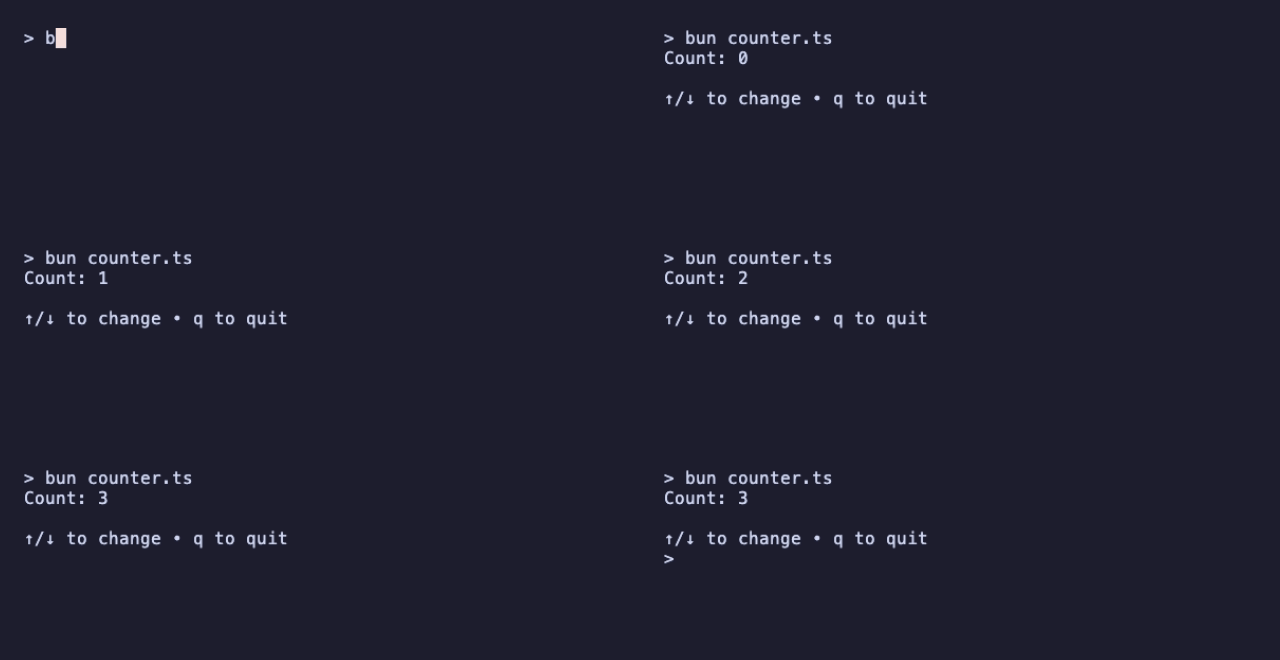
Four things to notice:
updatenever changesthis. It returns a newCounter. Keeping models immutable makes them easy to reason about, though Bubble Tea doesn't require it.- Keys arrive as
KeyPressMsg, andmsg.toString()gives a readable name:'up','q','ctrl+c','enter','space','esc'. Quitis a command. Returning it asks the program to stop.- The program runs inline: it draws below your prompt and leaves its last frame in the scrollback when it exits.
III – Handling Keys, and Getting a Result Back
run() resolves with the final model. That makes a Bubble Tea program a good way to ask the user something and then carry on with a normal script:
// menu.ts
import { type Cmd, type Model, type Msg, KeyPressMsg, Program, Quit } from '@oakoliver/bubbletea';

const choices = ['Espresso', 'Flat white', 'Cold brew', 'Tea, actually'];

class Menu implements Model {
  constructor(
    readonly cursor = 0,
    readonly chosen: string | null = null,
  ) {}

  init(): Cmd {
    return null;
  }

  update(msg: Msg): [Model, Cmd] {
    if (!(msg instanceof KeyPressMsg)) return [this, null];

    switch (msg.toString()) {
      case 'up':
      case 'k':
        return [new Menu(Math.max(0, this.cursor - 1)), null];
      case 'down':
      case 'j':
        return [new Menu(Math.min(choices.length - 1, this.cursor + 1)), null];
      case 'enter':
      case 'space':
        return [new Menu(this.cursor, choices[this.cursor]), Quit];
      case 'q':
      case 'esc':
      case 'ctrl+c':
        return [this, Quit];
    }
    return [this, null];
  }

  view(): string {
    const lines = choices.map((choice, i) => `${i === this.cursor ? '>' : ' '} ${choice}`);
    return `What are you drinking?\n\n${lines.join('\n')}\n\n↑/↓ move • enter choose • q quit\n`;
  }
}

const result = (await new Program(new Menu()).run()) as Menu;
console.log(result.chosen ? `One ${result.chosen.toLowerCase()}, coming up.` : 'Nothing today.');
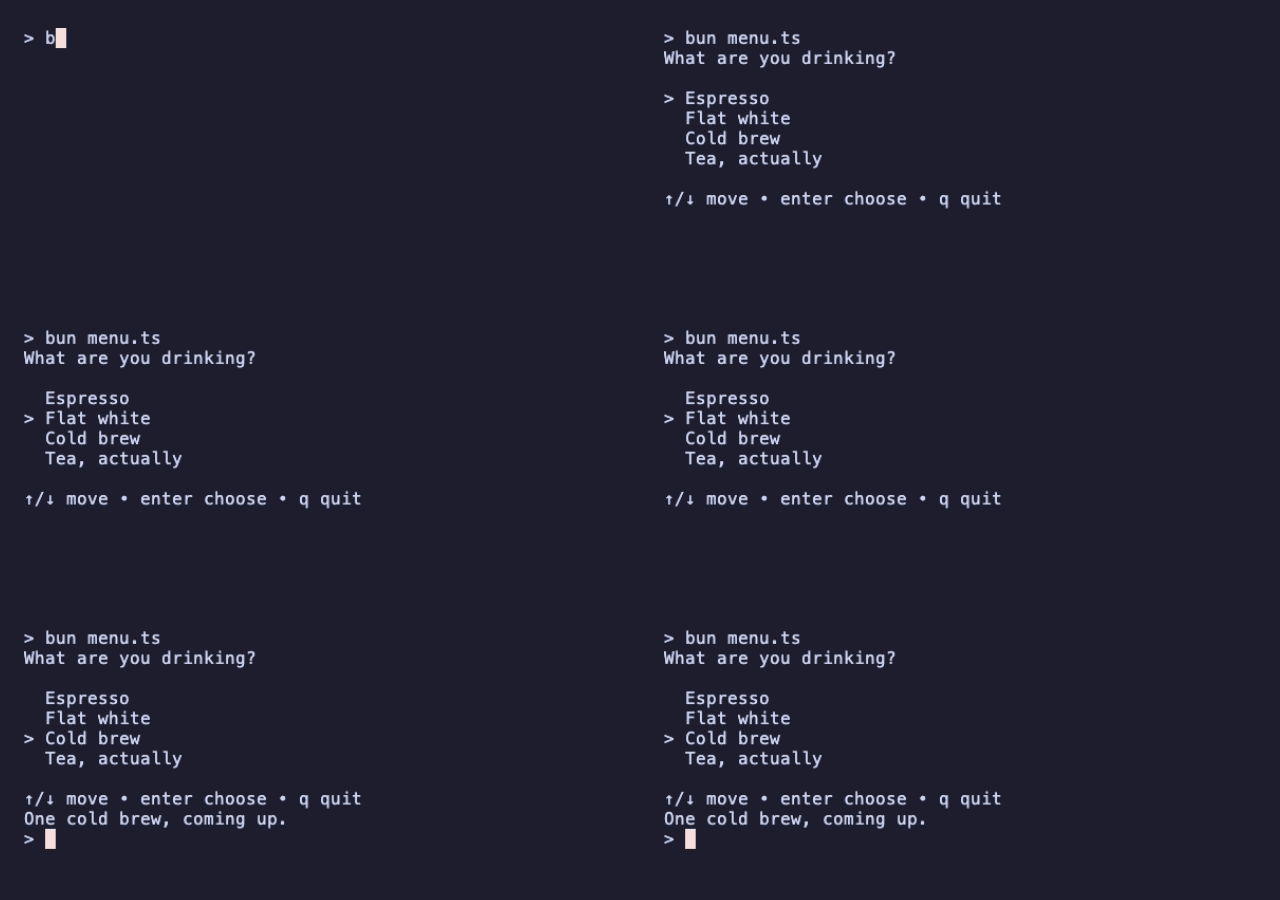
The model holds two things: where the cursor is, and what was chosen. Choosing returns the new model and Quit in the same step, so the final model already carries the answer when run() resolves.
IV – Commands and Timers
Messages don't only come from the keyboard. A command is a function that produces a message later, and Bubble Tea runs it for you. Tick(ms, fn) is a built-in command that sends fn()'s message after a delay.
A countdown re-arms its tick each time one arrives:
// timer.ts
import { type Cmd, type Model, type Msg, KeyPressMsg, Program, Quit, Tick } from '@oakoliver/bubbletea';

class TickMsg {
  constructor(readonly id: number) {}
}

// Each run of the clock gets an id, so a tick from before a pause can't
// restart it.
const tick = (id: number): Cmd => Tick(1000, () => new TickMsg(id));

class Timer implements Model {
  constructor(
    readonly remaining = 10,
    readonly running = true,
    readonly id = 0,
  ) {}

  init(): Cmd {
    return tick(this.id);
  }

  update(msg: Msg): [Model, Cmd] {
    if (msg instanceof TickMsg && msg.id === this.id && this.running) {
      const next = new Timer(this.remaining - 1, true, this.id);
      return next.remaining === 0 ? [next, Quit] : [next, tick(this.id)];
    }
    if (msg instanceof KeyPressMsg) {
      switch (msg.toString()) {
        case 'space': {
          const id = this.id + 1;
          return this.running
            ? [new Timer(this.remaining, false, id), null]
            : [new Timer(this.remaining, true, id), tick(id)];
        }
        case 'q':
        case 'ctrl+c':
          return [this, Quit];
      }
    }
    return [this, null];
  }

  view(): string {
    const bar = '█'.repeat(this.remaining) + '░'.repeat(10 - this.remaining);
    const state = this.running ? 'running' : 'paused ';
    return `${bar}  ${this.remaining}s ${state}\n\nspace pause/resume • q quit\n`;
  }
}

const done = (await new Program(new Timer()).run()) as Timer;
console.log(done.remaining === 0 ? 'Time is up!' : `Stopped with ${done.remaining}s left.`);
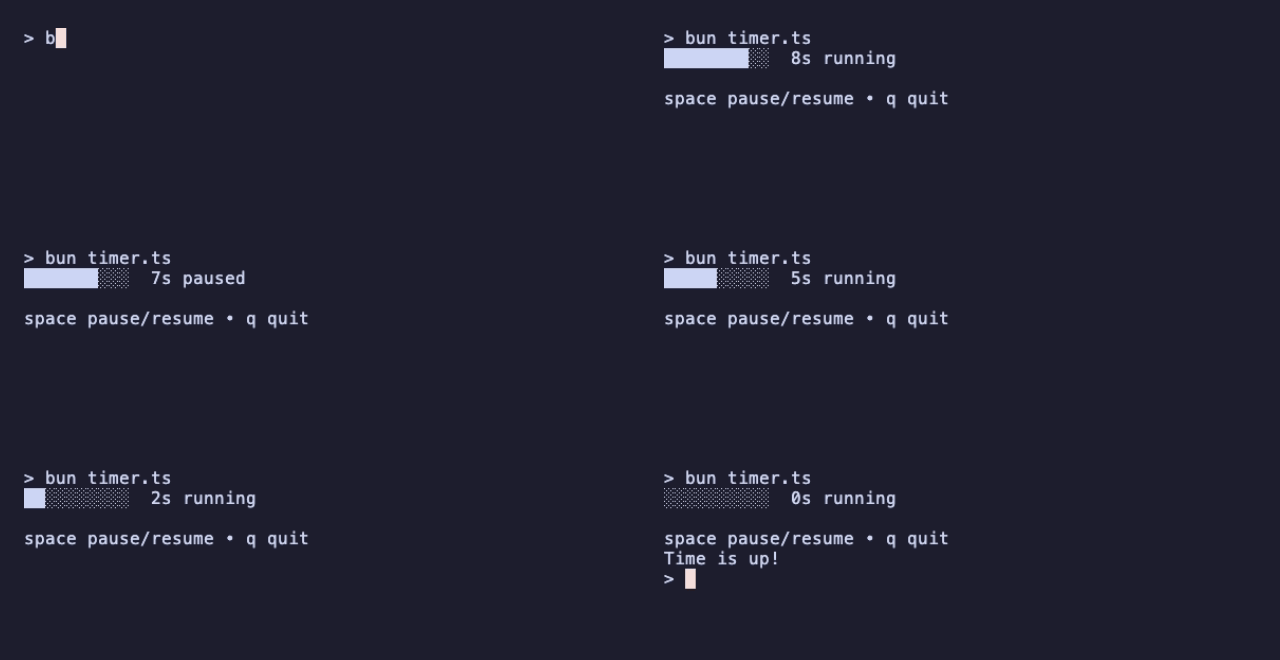
The id deals with a classic timer bug. If you pause and resume quickly, the tick from before the pause is still on its way. Without the id it would arrive, look like a fresh tick, and the clock would run twice as fast. Giving each run of the clock its own id lets update ignore stale ticks.
TickMsg is a plain class you define yourself. Any value can be a message; instanceof is the easiest way to tell them apart.
V – Full Screen and Window Size
Inline programs are good for prompts. For a dashboard or an editor, you want the alt screen: a separate full-screen buffer that disappears when the program exits and leaves your scrollback untouched.
view() can return a View instead of a string. A View carries the text plus terminal settings, such as altScreen and the window title. Bubble Tea also sends a WindowSizeMsg at startup and on every resize, so the layout can adapt:
// fullscreen.ts
import {
  type Cmd,
  type Model,
  type Msg,
  KeyPressMsg,
  Program,
  Quit,
  View,
  WindowSizeMsg,
} from '@oakoliver/bubbletea';

class Fullscreen implements Model {
  constructor(
    readonly width = 0,
    readonly height = 0,
  ) {}

  init(): Cmd {
    return null;
  }

  update(msg: Msg): [Model, Cmd] {
    if (msg instanceof WindowSizeMsg) return [new Fullscreen(msg.width, msg.height), null];
    if (msg instanceof KeyPressMsg && ['q', 'esc', 'ctrl+c'].includes(msg.toString())) {
      return [this, Quit];
    }
    return [this, null];
  }

  view(): View {
    const message = [`This terminal is ${this.width} × ${this.height}.`, 'Resize it, or press q.'];
    const top = Math.max(0, Math.floor((this.height - message.length) / 2));
    const lines = message.map((line) => ' '.repeat(Math.max(0, Math.floor((this.width - line.length) / 2))) + line);

    const view = new View('\n'.repeat(top) + lines.join('\n'));
    view.altScreen = true;
    view.windowTitle = 'fullscreen.ts';
    return view;
  }
}

await new Program(new Fullscreen()).run();
console.log('Back in the shell, with the scrollback untouched.');
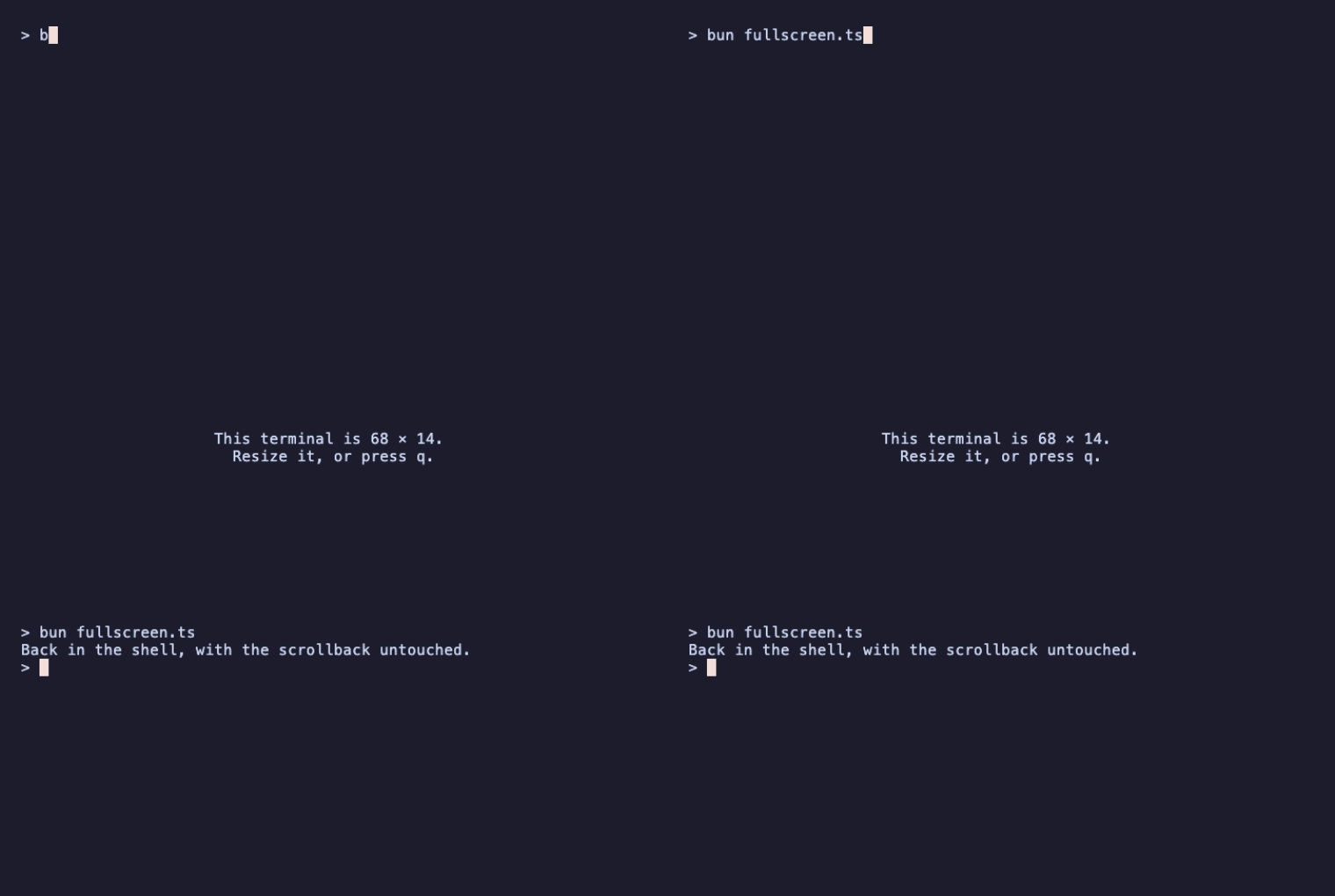
Because the alt screen is part of the view, it can change while the program runs. For example, a program can start inline and switch to full screen only when the user opens a detail page.
VI – Printing Above the Program
Sometimes you want a permanent log line, not part of the redrawn frame. Println is a command that prints a line above the program. It stays in the scrollback while the frame below keeps updating.
// downloads.ts
import { type Cmd, type Model, type Msg, Println, Program, Quit, Sequence, Tick } from '@oakoliver/bubbletea';

const files = ['README.md', 'package.json', 'src/index.ts', 'src/render.ts', 'tests/render.test.ts'];

class Downloaded {
  constructor(readonly file: string) {}
}

// Pretend each file takes a moment to fetch.
const download = (file: string): Cmd => Tick(400 + file.length * 30, () => new Downloaded(file));

class Downloads implements Model {
  constructor(readonly done = 0) {}

  init(): Cmd {
    return download(files[0]);
  }

  update(msg: Msg): [Model, Cmd] {
    if (msg instanceof Downloaded) {
      const next = new Downloads(this.done + 1);
      const printed = Println(`✓ ${msg.file}`);
      if (next.done === files.length) return [next, Sequence(printed, Quit)];
      return [next, Sequence(printed, download(files[next.done]))];
    }
    return [this, null];
  }

  view(): string {
    if (this.done === files.length) return `Fetched ${files.length} files.\n`;
    const width = 30;
    const filled = Math.round((this.done / files.length) * width);
    return `Fetching ${files[this.done]}…\n${'█'.repeat(filled)}${'░'.repeat(width - filled)} ${this.done}/${files.length}\n`;
  }
}

await new Program(new Downloads()).run();
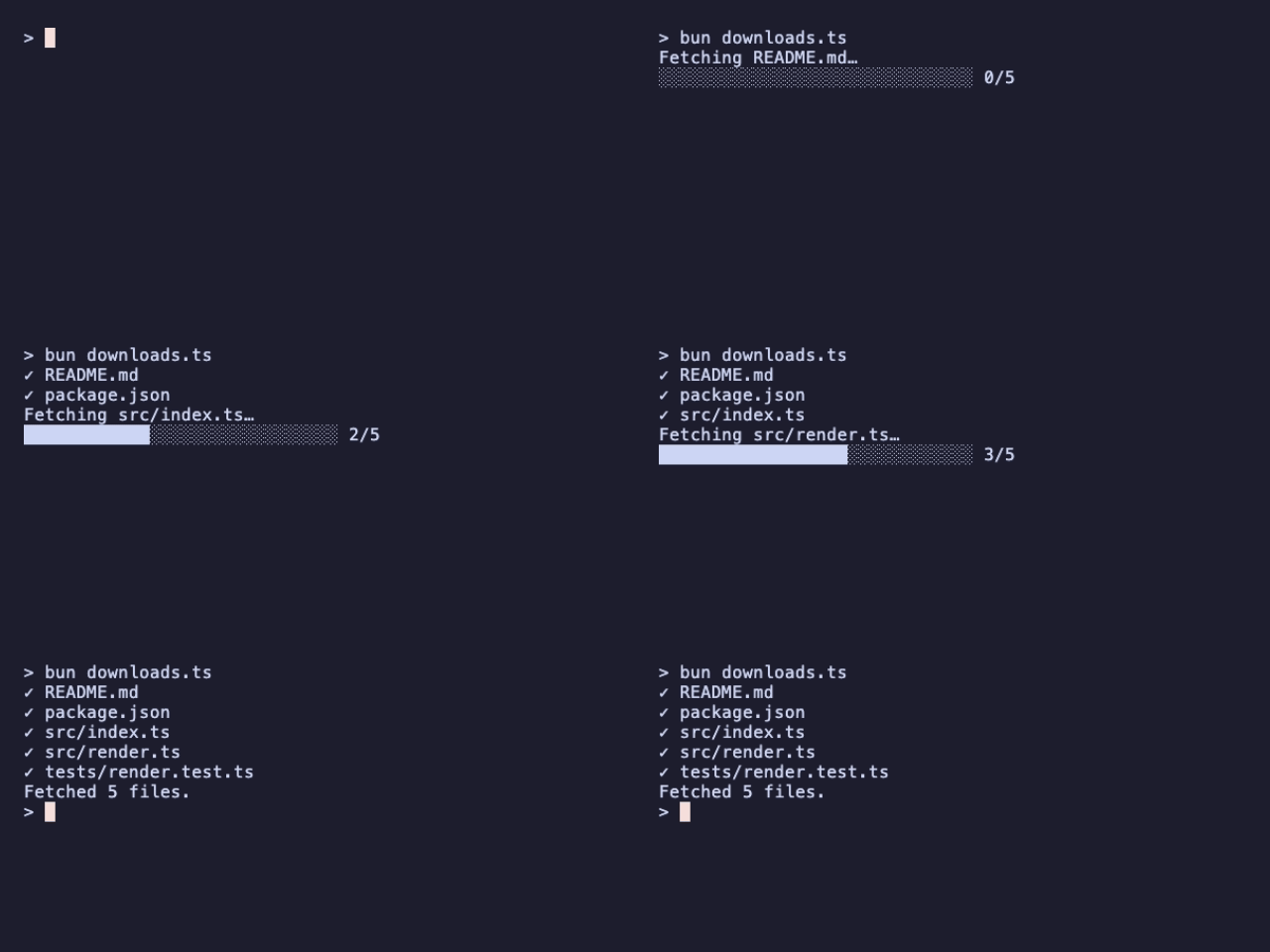
Sequence(a, b) runs commands in order, waiting for each to finish. Here it guarantees the ✓ line is printed before the next download starts. Its counterpart is Batch(a, b), which runs commands at the same time.
VII – Putting It Together: A Todo App
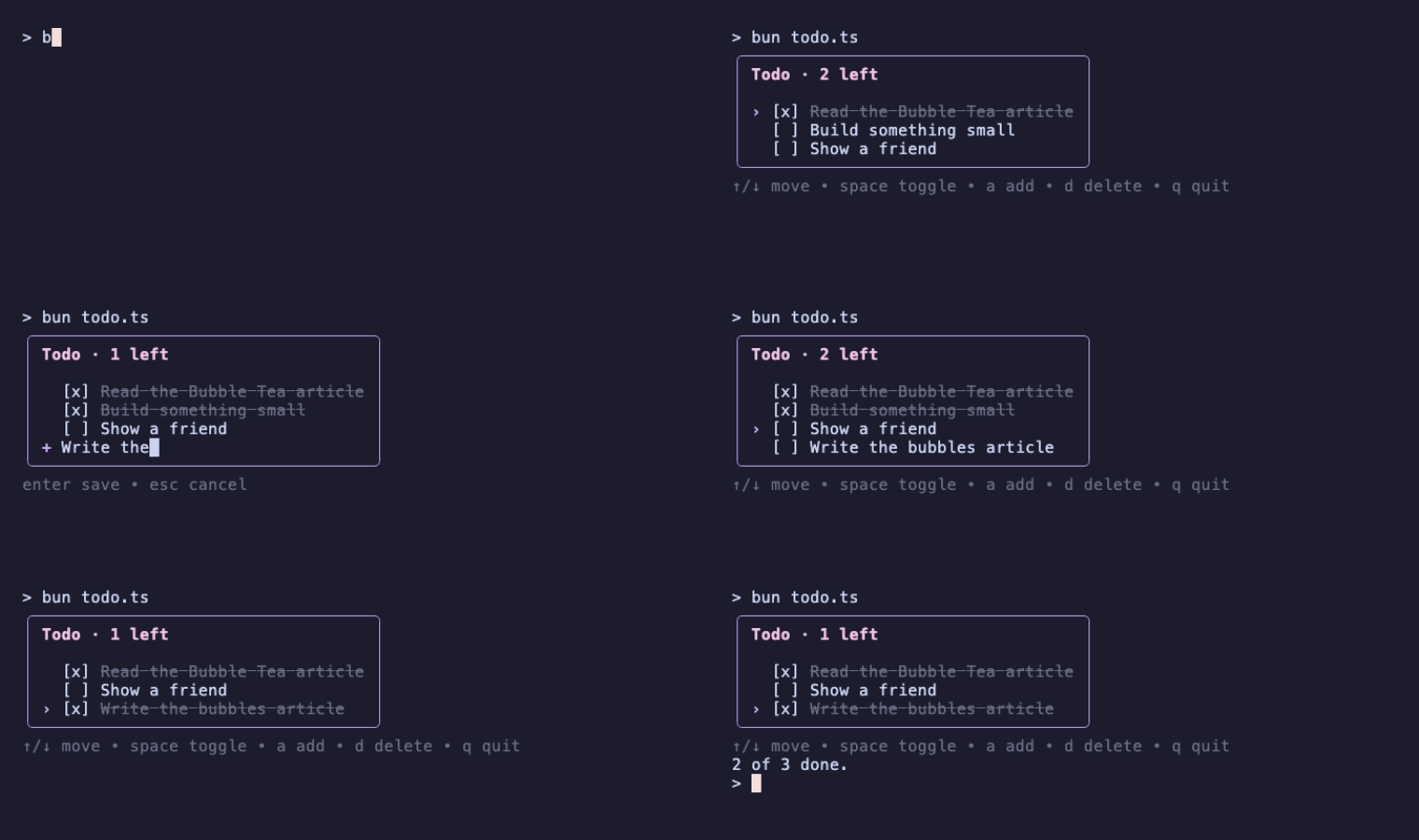
The last program combines everything so far, adds a text-entry mode, and uses Lip Gloss, the companion styling library, for colors and a border:
npm install @oakoliver/lipgloss
// todo.ts
import { type Cmd, type Model, type Msg, KeyPressMsg, Program, Quit } from '@oakoliver/bubbletea';
import { newStyle, roundedBorder } from '@oakoliver/lipgloss';

interface Todo {
  title: string;
  done: boolean;
}

const title = newStyle().bold(true).foreground('#F5C2E7');
const cursorStyle = newStyle().foreground('#CBA6F7').bold(true);
const doneStyle = newStyle().foreground('#6C7086').strikethrough(true);
const help = newStyle().foreground('#6C7086');
const box = newStyle().border(roundedBorder()).borderForeground('#CBA6F7').padding(0, 1);

class Todos implements Model {
  constructor(
    readonly todos: Todo[],
    readonly cursor = 0,
    readonly draft: string | null = null, // non-null while adding a todo
  ) {}

  init(): Cmd {
    return null;
  }

  update(msg: Msg): [Model, Cmd] {
    if (!(msg instanceof KeyPressMsg)) return [this, null];
    const key = msg.toString();
    if (key === 'ctrl+c') return [this, Quit];
    return this.draft === null ? this.browse(key) : this.edit(key, msg.text);
  }

  private browse(key: string): [Model, Cmd] {
    const { todos, cursor } = this;
    switch (key) {
      case 'up':
      case 'k':
        return [new Todos(todos, Math.max(0, cursor - 1)), null];
      case 'down':
      case 'j':
        return [new Todos(todos, Math.min(todos.length - 1, cursor + 1)), null];
      case 'space':
        return [new Todos(todos.map((t, i) => (i === cursor ? { ...t, done: !t.done } : t)), cursor), null];
      case 'd': {
        const rest = todos.filter((_, i) => i !== cursor);
        return [new Todos(rest, Math.min(cursor, rest.length - 1)), null];
      }
      case 'a':
        return [new Todos(todos, cursor, ''), null];
      case 'q':
        return [this, Quit];
    }
    return [this, null];
  }

  private edit(key: string, text: string): [Model, Cmd] {
    const { todos, cursor, draft } = this;
    switch (key) {
      case 'enter': {
        if (!draft?.trim()) return [new Todos(todos, cursor), null];
        const next = [...todos, { title: draft.trim(), done: false }];
        return [new Todos(next, next.length - 1), null];
      }
      case 'esc':
        return [new Todos(todos, cursor), null];
      case 'backspace':
        return [new Todos(todos, cursor, draft!.slice(0, -1)), null];
    }
    // Printable keys carry their character in `text` (space included).
    return text ? [new Todos(todos, cursor, draft + text), null] : [this, null];
  }

  view(): string {
    const rows = this.todos.map((todo, i) => {
      const pointer = i === this.cursor && this.draft === null ? cursorStyle.render('›') : ' ';
      const check = todo.done ? '[x]' : '[ ]';
      const label = todo.done ? doneStyle.render(todo.title) : todo.title;
      return `${pointer} ${check} ${label}`;
    });
    if (rows.length === 0) rows.push(help.render('  Nothing to do. Press a to add something.'));
    if (this.draft !== null) rows.push(`${cursorStyle.render('+')} ${this.draft}█`);

    const keys =
      this.draft === null
        ? '↑/↓ move • space toggle • a add • d delete • q quit'
        : 'enter save • esc cancel';
    const left = this.todos.filter((t) => !t.done).length;
    return `${box.render(`${title.render(`Todo · ${left} left`)}\n\n${rows.join('\n')}`)}\n${help.render(keys)}\n`;
  }
}

const final = (await new Program(
  new Todos([
    { title: 'Read the Bubble Tea article', done: true },
    { title: 'Build something small', done: false },
    { title: 'Show a friend', done: false },
  ]),
).run()) as Todos;

console.log(`${final.todos.filter((t) => t.done).length} of ${final.todos.length} done.`);
There are two modes in one model: when draft is null the keys navigate, otherwise they edit. Each mode gets its own small method, which keeps update readable as an app grows. Typed characters come from msg.text, which is empty for keys like the arrows.
For real text entry you'd use the ready-made text input from Bubbles, which handles the cursor, editing keys, scrolling and paste. The follow-up guide, Getting Started with Bubbles, covers it.
VIII – Requirements
The six programs above were run on:
- Bun 1.4
- Node.js 18.20, 20.18 and 26.8 (via
npx tsx) - Deno 2.8 (
deno run -A file.tsin a project where the packages were installed with npm)
On Node 14 the package fails to load, because the build uses syntax that Node 14 doesn't support. Use an actively maintained Node release.
The package ships ESM and CommonJS builds with TypeScript types. You need a real terminal: Bubble Tea reads raw key presses, so piping input into these programs doesn't work.
IX – Where to Go Next
- The repository: the README covers everything this guide skipped: mouse input,
Batch,Every, external control withp.send(), cancellation withAbortSignal, and the program options. - The
examples/folder in the repository has more runnable programs, including a full-screen dashboard. - Getting Started with Bubbles: ready-made components (spinners, text inputs, lists, tables) that plug into the same
update/viewloop. - Porting Go's Bubble Tea to TypeScript: how the port was built, and how it stays faithful to the Go original.