Getting Started with kb: A Knowledge Base an LLM Writes for You
Most of what you read ends up in a folder you never open again: saved articles, PDFs, meeting notes. A wiki would make it useful, but nobody has time to write one.
kb splits the job. You collect sources with kb ingest. An LLM reads them with kb compile and writes wiki articles: Markdown files with YAML frontmatter and [[wikilinks]] between related topics, the same format Obsidian uses. Then you search the wiki offline with kb find, check its links with kb lint, ask it questions with kb query, and browse it in a terminal workspace, KB Studio.
We described how kb was built in Building kb. This article is about using it.
Five commands take you from a folder of notes to a linked wiki you can search and browse. Only one of them, compile, needs an LLM, and every picture below is the real output of the command shown.

I – Install
kb runs on Bun, so install Bun first, then kb:
bun add -g @oakoliver/kb
kb --help
npm install -g @oakoliver/kb also works. The kb command it installs is a small Node launcher that hands off to Bun, so Bun still has to be on your PATH; if it isn't, kb tells you how to install it instead of failing with a stack trace.
II – Create a Knowledge Base and Add Sources
kb init creates the folder structure. kb ingest copies a source into raw/ and records it in a manifest:
kb init bakery && cd bakery
kb ingest ../notes/sourdough-starter.md
kb ingest ../notes/hydration.md
kb status
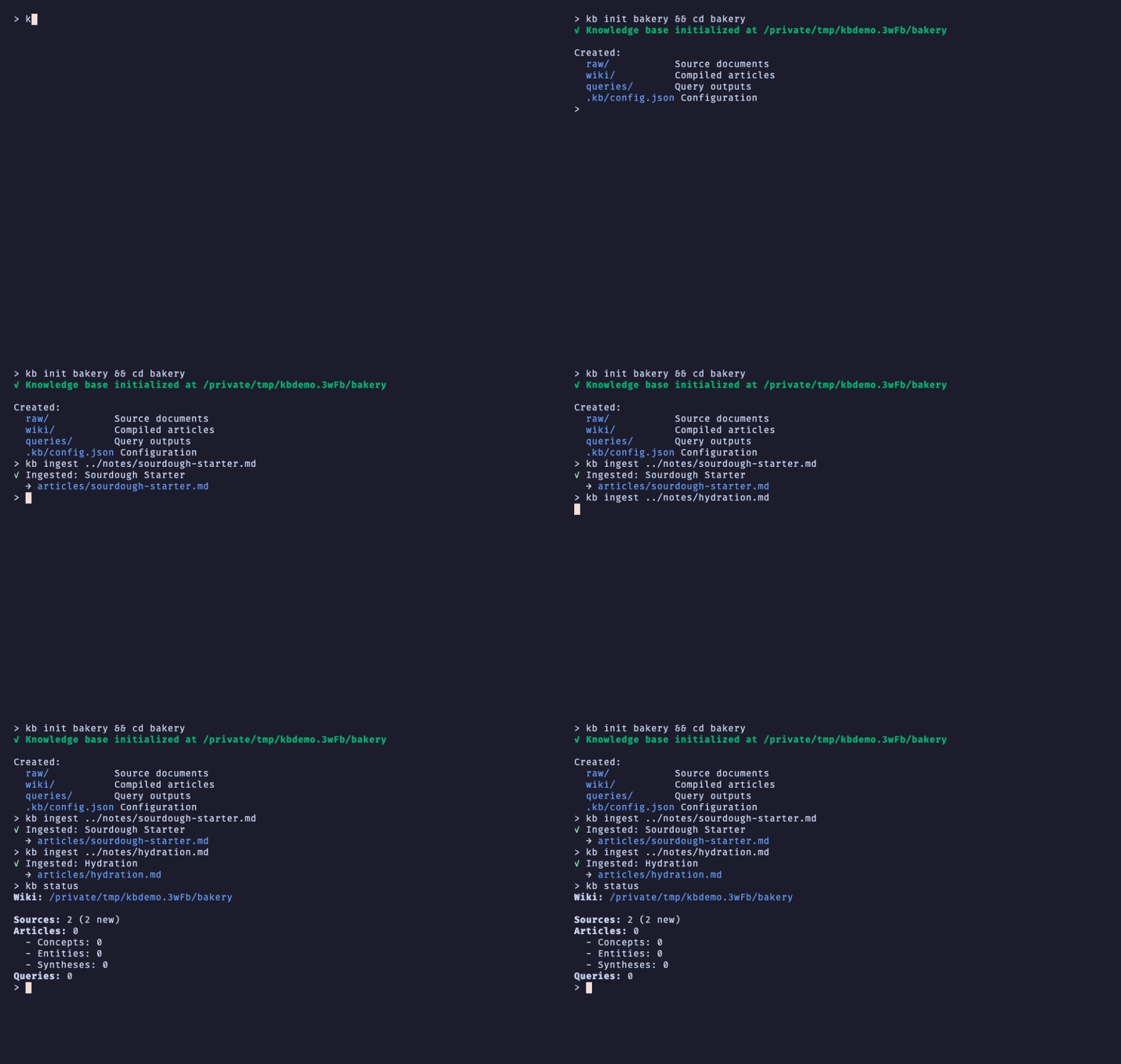
The two notes are short Markdown files about baking. The starter note links to [[Hydration]] and to [[Autolyse]], a topic there's no note about yet. That missing link comes back in section V.
Besides local files, kb's README lists web pages (kb ingest https://…), PDFs and git repositories as sources. Nothing has been written to the wiki yet: status shows 2 new sources and 0 articles.
III – Compile: Where the LLM Comes In
kb compile sends each new or changed source to an LLM, twice: once to extract the concepts in it, once to write an article from them. It then writes the article to wiki/, adds frontmatter (title, type, sources, related articles), updates a link graph, and regenerates wiki/_index.md. Sources that haven't changed since the last compile are skipped.
This is the step that needs a model. kb reads the provider from .kb/config.json, which kb init fills in for you:
- Anthropic: set
ANTHROPIC_API_KEY. This is the default. - OpenAI: set
OPENAI_API_KEY.initpicks OpenAI when only that key is set. - A local model: set
"provider": "lmstudio"and a"baseUrl"for any OpenAI-compatible server, such as LM Studio (the default ishttp://localhost:1234/v1). No key needed.
For this article I didn't use a real model. I pointed kb at a fake OpenAI-compatible server, under 30 lines of Bun, that answers every request by sending the source text straight back with a note saying so. So the articles below are your notes passed through kb's real pipeline, not summaries an LLM wrote. With a real provider, the body would be the model's article instead.
{
  "version": 1,
  "llm": {
    "provider": "lmstudio",
    "model": "fake-model",
    "baseUrl": "http://127.0.0.1:4123/v1"
  },
  "wiki": {
    "linkStyle": "wikilink"
  }
}
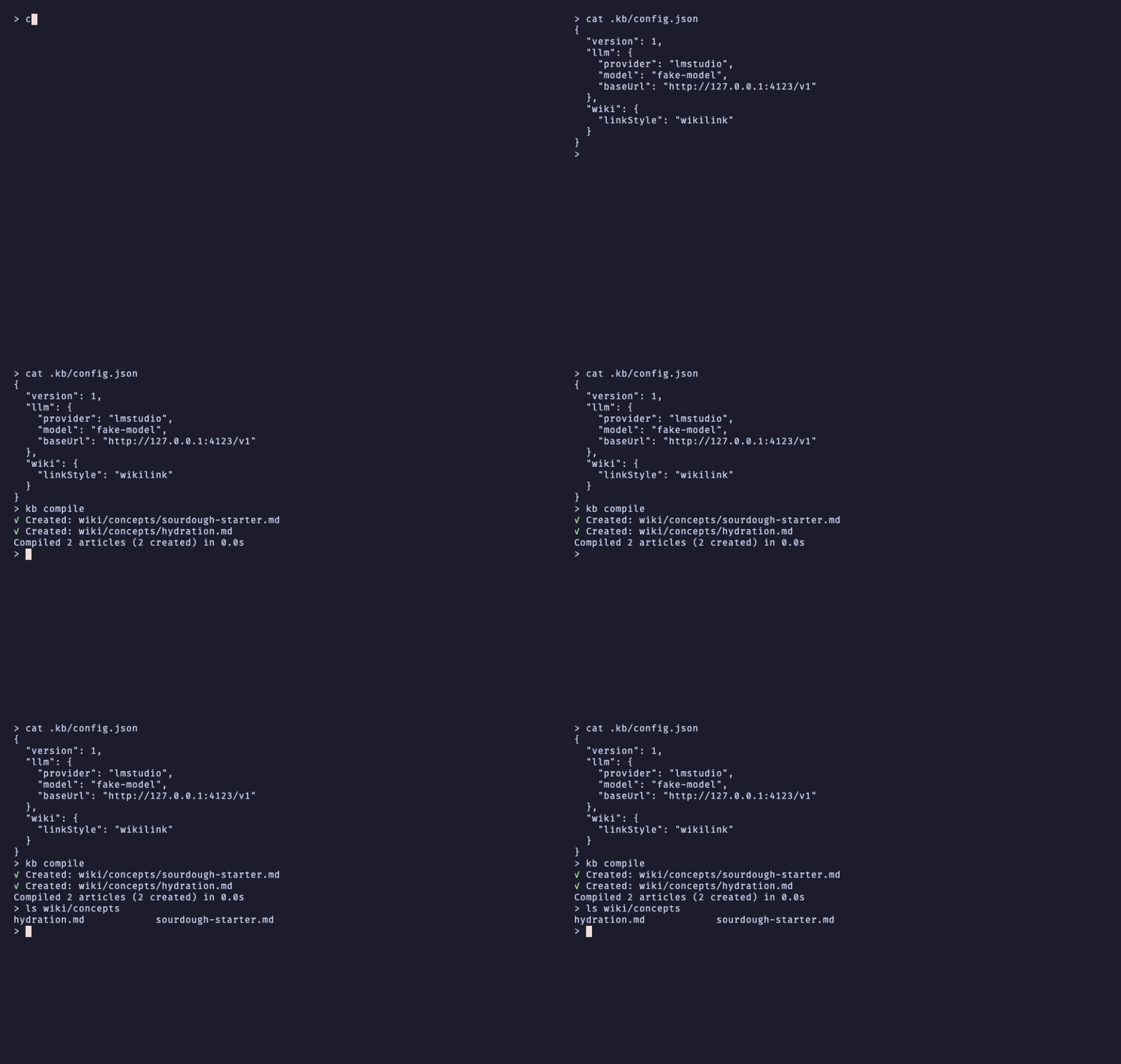
Each compiled article is a plain Markdown file you can open in any editor or in Obsidian:
---
title: "Hydration"
type: concept
created: 2026-10-03T09:59:08.196Z
updated: 2026-10-03T09:59:08.196Z
sources:
  - articles/hydration.md
related:
  - "[[Sourdough Starter]]"
---

> Written by a fake LLM server: this is the source text, not a summary.

# Hydration

Hydration is the weight of water in a dough divided by the weight of
flour. …
The related: list is built from the article's [[wikilinks]] and written in the same [[…]] form, so Obsidian shows it as links too, and sources: points back to what it was compiled from.
IV – Search Without an LLM: find
kb find searches the wiki with BM25 keyword ranking. It runs entirely offline, so it's fast and free:
kb find "starter feeding"
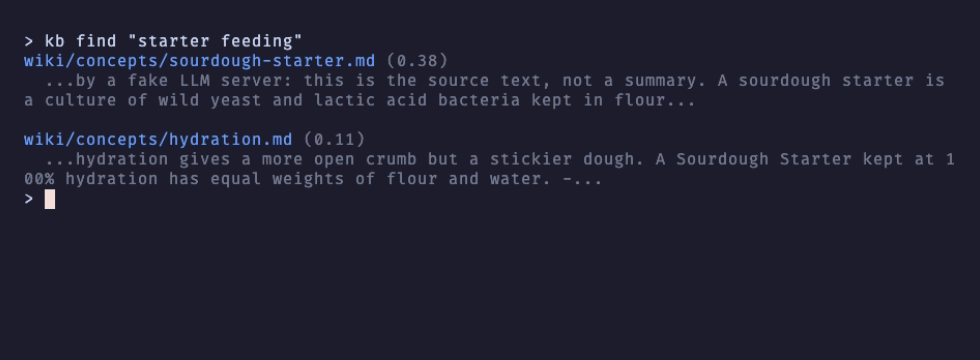
Each result shows the article, its score and a snippet. Use --limit to change the number of results (10 by default). When kb's output is piped, it prints JSON instead, so kb find "…" | jq works in scripts; --json forces JSON even in a terminal.
To ask a question in plain language instead of matching keywords, there's kb query "How do I know my starter is ready?". It sends the relevant articles to the LLM and answers with citations, so like compile it needs a provider. Answers are saved to queries/, and kb promote turns a good one into a wiki article.
V – Keep the Wiki Healthy: lint
As a wiki grows, links break. kb lint checks every article for broken wikilinks, orphan and stale articles, and invalid frontmatter:
kb lint
kb ingest ../notes/autolyse.md && kb compile
kb lint

The starter note's [[Autolyse]] link pointed nowhere, so lint reports it twice: once in the article's text and once in the related: list that compile built from it. Adding a note about it and compiling again creates the missing article, and compile only processes the one new source.
If you'd rather drop the link than write the article, kb lint --fix removes related: entries that point to missing articles (it prints ✓ Fixed: removed [[Autolyse]] from related in …). Broken links inside an article's text are always just reported, never rewritten, because only you know whether the fix is a new article or a different link. The exit code is non-zero when lint finds errors, so it fits in CI.
VI – Browse It: KB Studio
kb studio
KB Studio is a full-screen workspace in the terminal. The recording at the top of this article shows the basics:
| Key | Action |
|---|---|
↑/↓, Enter |
Move in the Explorer and open an article |
Tab, then Enter |
Jump to the next wikilink in the document and follow it |
Alt+← |
Go back |
Ctrl+P |
Quick open an article by name |
Ctrl+Shift+P |
Command palette (compile, lint, …) |
Ctrl+B / Ctrl+J |
Toggle the sidebar / the bottom panel |
Ctrl+Q |
Quit |
Studio needs an interactive terminal of at least 80×24 and a Nerd Font for its icons. Documents are wrapped to the width of the document pane, and re-wrapped when you resize the terminal or toggle the sidebar; the recording above is about 100 columns wide.
VII – What to Read Next
- The kb README lists every command and flag, and its
docs/folder covers how compilation works, input and output formats, and troubleshooting. - Building kb explains the design, from the manifest to the link graph.
- kb's search is built on bm25s, and its terminal UI on our ports of Bubble Tea, Bubbles and Lip Gloss; the Bubble Tea guide is the place to start if you want to build something similar.
VIII – Requirements
- Bun (
engines: bun >= 1.0). I ran everything here with Bun 1.4 on macOS. kb's code uses Bun's APIs, so it needs Bun even when installed with npm: the npm launcher runs it under Bun, or tells you how to install Bun. - An LLM provider for
compileandqueryonly: an Anthropic or OpenAI API key, or a local OpenAI-compatible server with thelmstudioprovider.init,ingest,find,lint,status,promoteandstudiowork without one. - For KB Studio: a terminal of at least 80×24 and a Nerd Font.