Getting Started with Wish in TypeScript: SSH Apps in Six Small Programs
Most programs people reach over the network speak HTTP. SSH is a fine alternative for a whole class of them: it encrypts everything, it identifies people by their keys, and the client is already installed on every developer machine. ssh to a server and you can get a menu, a game, a chat room or a Git remote instead of a shell.
Wish is Charm's Go library for building these servers, and @oakoliver/wish is its TypeScript port. This guide starts from an empty folder and builds six small programs, each adding one idea. You need no Go, and no SSH server on your machine: the program is the server.
An SSH app is a function of a session: it reads what the client sends, writes what the client sees, and ends with an exit code.
I – Install
mkdir ssh-demo && cd ssh-demo
npm init -y
npm pkg set type=module
npm install @oakoliver/wish
With Bun, bun add @oakoliver/wish. Sections V and VI also use Bubble Tea and Lip Gloss:
npm install @oakoliver/bubbletea @oakoliver/lipgloss
The programs are TypeScript files with top-level await. Bun runs them as they are (bun hello.ts), and so does a recent Node.js (node hello.ts): every program here was run on Bun 1.4.4 and Node.js 26.8. To connect, use the ssh you already have.
Unlike the other Charm ports in this series, this package has one runtime dependency, ssh2, which implements the SSH protocol itself.
II – A Server, a Session, Middleware
// hello.ts
import { NewServer, Println, WithAddress, WithHostKeyPath, WithMiddleware, logging } from '@oakoliver/wish';

const server = NewServer(
  WithAddress('127.0.0.1:2222'),
  WithHostKeyPath('.ssh/host_ed25519'),
  WithMiddleware(
    (next) => (session) => {
      Println(session, `Hello, ${session.user()}!`);
      Println(session, `You ran: ${session.rawCommand() || '(no command)'}`);
      return next(session);
    },
    logging.Middleware(),
  ),
);

await server.listen();
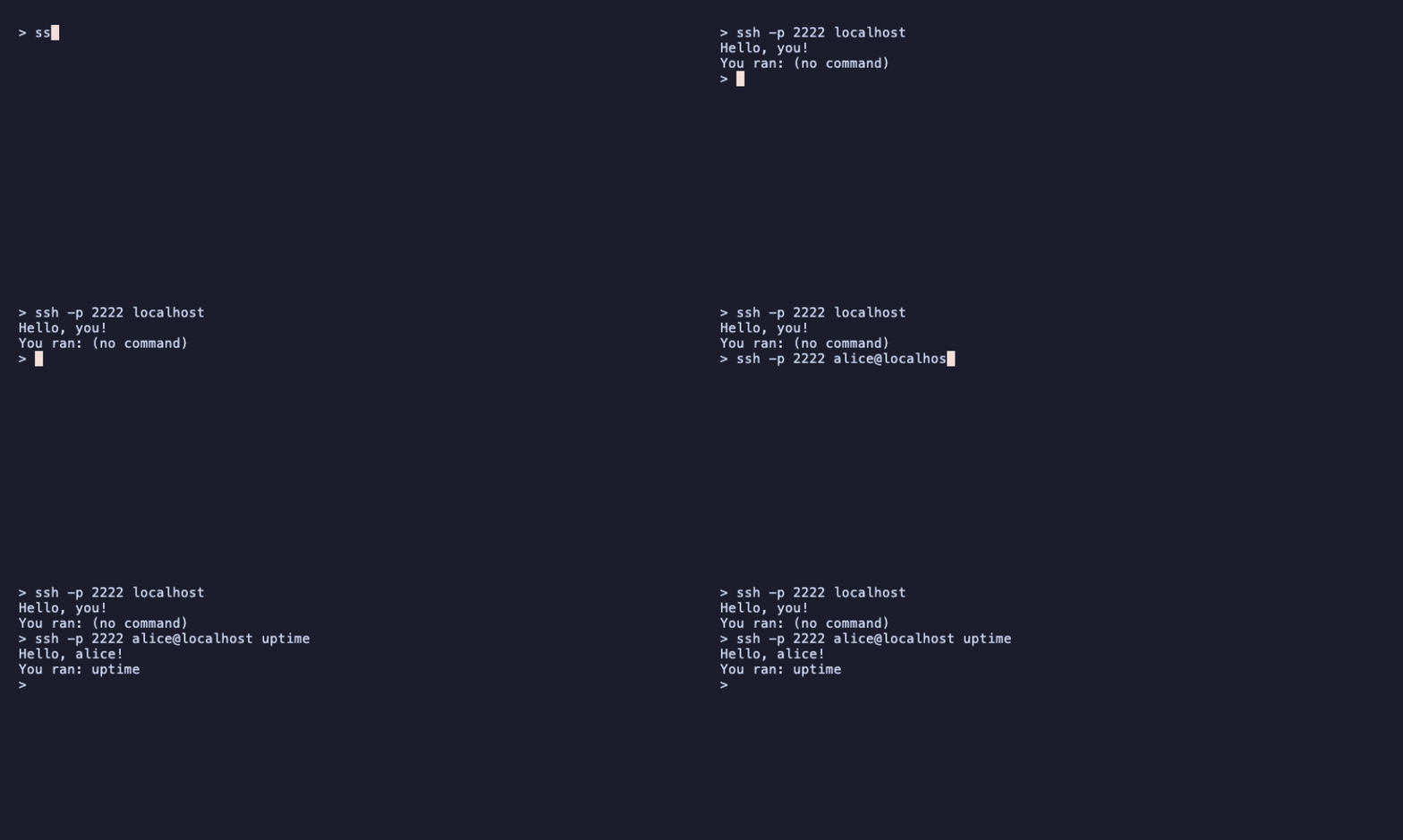
console.log('Listening. Try: ssh -p 2222 localhost');
node hello.ts          # or: bun hello.ts
ssh -p 2222 localhost  # in another terminal
Three ideas are in these eighteen lines.
- The server needs its own key.
WithHostKeyPathcreates an ed25519 key pair at that path the first time and reuses it afterwards. It is the server's identity: clients remember it, and warn loudly if it changes. Keep the file. - A session is one
sshinvocation.session.user()is the name before the@,session.rawCommand()is whatever came after the host, and writing to the session (Printlndoes) sends text to the client. When the handler returns, the client gets exit status 0. - Middleware wraps the next handler. Each one does its work and calls
next(session).WithMiddlewarecomposes them so that the last one runs first: hereloggingruns, then the greeting. The logger prints each connect and disconnect on the server. Forssh -p 2222 you@localhost uptime:
2026/11/01 15:35:46 INFO you connect 127.0.0.1:54115 false [uptime]  0 0 SSH-2.0-OpenSSH_10.3
2026/11/01 15:35:46 INFO 127.0.0.1:54115 disconnect 160µs
That is the user, the client's address, whether it logged in with a key, the command, the terminal type and size (none: a command gets no terminal unless you ask with ssh -t), the client's version, and how long the session took.
The first time you connect, ssh asks whether to trust the server's key. While you experiment, add -o StrictHostKeyChecking=no -o UserKnownHostsFile=/dev/null to skip that, so a regenerated key doesn't trigger the "host key changed" warning.
This server has no authentication handler, and like upstream wish it lets everyone in. That is fine on 127.0.0.1, which is why the address says so. Section VII is about what to change before you use any other address.
III – Who's There: Public Keys
SSH clients log in with a key pair. The server sees the public half and can decide who gets in:
// keys.ts
import { NewServer, Println, WithAddress, WithAuthorizedKeys, WithHostKeyPath, WithMiddleware } from '@oakoliver/wish';

const server = NewServer(
  WithAddress('127.0.0.1:2222'),
  WithHostKeyPath('.ssh/host_ed25519'),
  // Only the keys in this file get in. It is read again on every login.
  WithAuthorizedKeys('authorized_keys'),
  WithMiddleware((next) => (session) => {
    const key = session.publicKey();
    Println(session, `Welcome, ${session.user()}.`);
    Println(session, `You logged in with ${key?.type()} ${key?.fingerprint()}`);
    return next(session);
  }),
);

await server.listen();
console.log('Listening. Try: ssh -p 2222 localhost');
WithAuthorizedKeys takes a file in the format OpenSSH uses for ~/.ssh/authorized_keys, one public key per line. Put your own key in it:
cp ~/.ssh/id_ed25519.pub authorized_keys   # or whichever public key you use
node keys.ts
ssh -p 2222 you@localhost
Welcome, you.
You logged in with ssh-ed25519 SHA256:JgvVGG7UpSzpMHsfWVdlWKrvZzuQMjAQf5niCpWTk/0
A key that is not in the file gets Permission denied (publickey) and never reaches your handler. The file is read on every login, so adding a line lets someone in without a restart.
session.publicKey() is the key the client proved it holds, and fingerprint() is the same SHA256 fingerprint ssh-keygen -l prints. That makes it a good user ID, much better than session.user(), which the client can set to anything. For other rules, WithPublicKeyAuth((ctx, key) => ...) lets you decide yourself (it may be async), and WithPasswordAuth and WithKeyboardInteractiveAuth cover the other login methods.
IV – Commands, Input and Exit Codes
ssh host something runs something on the server. With wish, you decide what that means:
// commands.ts
import {
  type Session,
  Fatalf,
  NewServer,
  Println,
  WithAddress,
  WithHostKeyPath,
  WithMiddleware,
  accesscontrol,
  logging,
} from '@oakoliver/wish';

const commands: Record<string, (session: Session, args: string[]) => Promise<void> | void> = {
  time: (session) => Println(session, new Date().toISOString()),
  shout: (session, args) => Println(session, args.join(' ').toUpperCase() + '!'),
  // Counts the lines piped in: printf 'a\nb\n' | ssh -p 2222 localhost lines
  lines: async (session) => {
    let count = 0;
    for await (const chunk of session) count += String(chunk).split('\n').length - 1;
    Println(session, count);
  },
};

const server = NewServer(
  WithAddress('127.0.0.1:2222'),
  WithHostKeyPath('.ssh/host_ed25519'),
  WithMiddleware(
    (next) => async (session) => {
      const [name, ...args] = session.command();
      if (!name) {
        await Fatalf(session, 'usage: ssh -p 2222 localhost <%s>\n', Object.keys(commands).join('|'));
        return;
      }
      await commands[name](session, args);
      return next(session);
    },
    accesscontrol.Middleware(...Object.keys(commands)),
    logging.Middleware(),
  ),
);

await server.listen();
console.log('Listening. Try: ssh -p 2222 localhost time');
ssh -p 2222 localhost time
2026-11-01T15:21:22.905Z

ssh -p 2222 localhost shout hello there
HELLO THERE!

printf 'a\nb\nc\n' | ssh -p 2222 localhost lines
3

ssh -p 2222 localhost rm -rf /
Command is not allowed: rm
session.command() splits the command line the way a shell would. The session is also a stream of what the client sends, so for await (const chunk of session) reads piped input until the client closes it. Fatalf writes to the client's stderr and ends the session with exit status 1, which ssh passes on: scripts can check $?.
The accesscontrol middleware refuses any command that is not listed, before the dispatcher sees it. Remember the order: logging runs first, then accesscontrol, then the dispatcher.
Nothing here starts a shell or runs a program. If you do want to run one, Command(session, 'git', 'status') runs it with the session as its input and output; pass a fixed program name, never a string from the client.
V – A Bubble Tea App for Every Session
Now the part wish is known for: a full terminal app over SSH. Each person who connects gets their own Bubble Tea program. The model is an ordinary one:
// counter.ts
import { type Cmd, KeyPressMsg, type Model, type Msg, Quit, WindowSizeMsg } from '@oakoliver/bubbletea';
import { newStyle } from '@oakoliver/lipgloss';

const accent = newStyle().foreground('#cba6f7').bold(true);
const dim = newStyle().foreground('#6c7086');

export class Counter implements Model {
  user: string;
  count = 0;
  width = 0;
  height = 0;

  constructor(user: string) {
    this.user = user;
  }

  init(): Cmd {
    return null;
  }

  update(msg: Msg): [Model, Cmd] {
    if (msg instanceof WindowSizeMsg) {
      this.width = msg.width;
      this.height = msg.height;
    }
    if (msg instanceof KeyPressMsg) {
      const key = msg.toString();
      if (key === 'up' || key === 'k') this.count++;
      if (key === 'down' || key === 'j') this.count--;
      if (key === 'q' || key === 'ctrl+c') return [this, Quit];
    }
    return [this, null];
  }

  view(): string {
    return [
      `Hi ${accent.render(this.user)}, your terminal is ${this.width}×${this.height}.`,
      '',
      `Count: ${accent.render(String(this.count))}`,
      '',
      dim.render('↑/↓ to change • q to quit'),
      '',
    ].join('\n');
  }
}
and the server hands every session a new one:
// tea.ts
import { NewServer, WithAddress, WithHostKeyPath, WithMiddleware, activeterm, logging } from '@oakoliver/wish';
import * as bubbletea from '@oakoliver/wish/bubbletea';
import { Counter } from './counter.ts';

const server = NewServer(
  WithAddress('127.0.0.1:2222'),
  WithHostKeyPath('.ssh/host_ed25519'),
  WithMiddleware(
    bubbletea.Middleware((session) => [new Counter(session.user()), []]),
    activeterm.Middleware(),
    logging.Middleware(),
  ),
);

await server.listen();
console.log('Listening. Try: ssh -p 2222 localhost');
node tea.ts
ssh -p 2222 ana@localhost
After pressing ↑ three times in a 60×15 terminal:
Hi ana, your terminal is 60×15.

Count: 3

↑/↓ to change • q to quit
The middleware connects the program to the session: keys from the client become KeyPressMsgs, the client's terminal size arrives as WindowSizeMsg (again on every resize), and the output goes back over SSH. It also reads the client's TERM and COLORTERM and converts colours the client's terminal can't show: the purple above becomes the closest of 256 colours on a 256-colour terminal.
activeterm refuses sessions without a terminal: ssh -p 2222 localhost somecommand asks for none, and gets Requires an active PTY instead of a program that can't draw.
VI – Sharing State Between Sessions
One process serves every session, so sharing state is just sharing a variable. The only extra step is telling the other programs to redraw. MiddlewareWithProgramHandler lets you build each Program yourself and keep it:
// shared.ts
import { type Cmd, KeyPressMsg, type Model, type Msg, NewProgram, type Program, Quit } from '@oakoliver/bubbletea';
import { newStyle } from '@oakoliver/lipgloss';
import { NewServer, type Session, WithAddress, WithHostKeyPath, WithMiddleware, activeterm, logging } from '@oakoliver/wish';
import * as bubbletea from '@oakoliver/wish/bubbletea';

// State shared by every session: one process, one event loop.
const state = { presses: 0, last: 'nobody', online: new Set<string>() };
const programs = new Set<Program>();

// Any value can be a message. This one only says "something changed".
class Changed {}
const broadcast = () => {
  for (const p of programs) p.send(new Changed());
};

const big = newStyle().foreground('#f9e2af').bold(true);
const dim = newStyle().foreground('#6c7086');

class Button implements Model {
  user: string;

  constructor(user: string) {
    this.user = user;
  }

  init(): Cmd {
    return null;
  }

  update(msg: Msg): [Model, Cmd] {
    if (msg instanceof KeyPressMsg) {
      const key = msg.toString();
      if (key === 'q' || key === 'ctrl+c') return [this, Quit];
      if (key === 'space') {
        state.presses++;
        state.last = this.user;
        broadcast();
      }
    }
    return [this, null]; // Changed needs no handling: the view reads the shared state.
  }

  view(): string {
    return [
      `The button has been pressed ${big.render(String(state.presses))} times.`,
      `Last press: ${state.last}`,
      `Online: ${[...state.online].join(', ')}`,
      '',
      dim.render('space to press • q to quit'),
      '',
    ].join('\n');
  }
}

function programFor(session: Session): Program {
  const name = session.user();
  const program = NewProgram(new Button(name), ...bubbletea.MakeOptions(session));
  programs.add(program);
  state.online.add(name);
  broadcast();
  program.wait().finally(() => {
    programs.delete(program);
    state.online.delete(name);
    broadcast();
  });
  return program;
}

const server = NewServer(
  WithAddress('127.0.0.1:2222'),
  WithHostKeyPath('.ssh/host_ed25519'),
  WithMiddleware(bubbletea.MiddlewareWithProgramHandler(programFor), activeterm.Middleware(), logging.Middleware()),
);

await server.listen();
console.log('Listening. Open two terminals and run: ssh -p 2222 <name>@localhost');
Open two terminals and connect as two people:
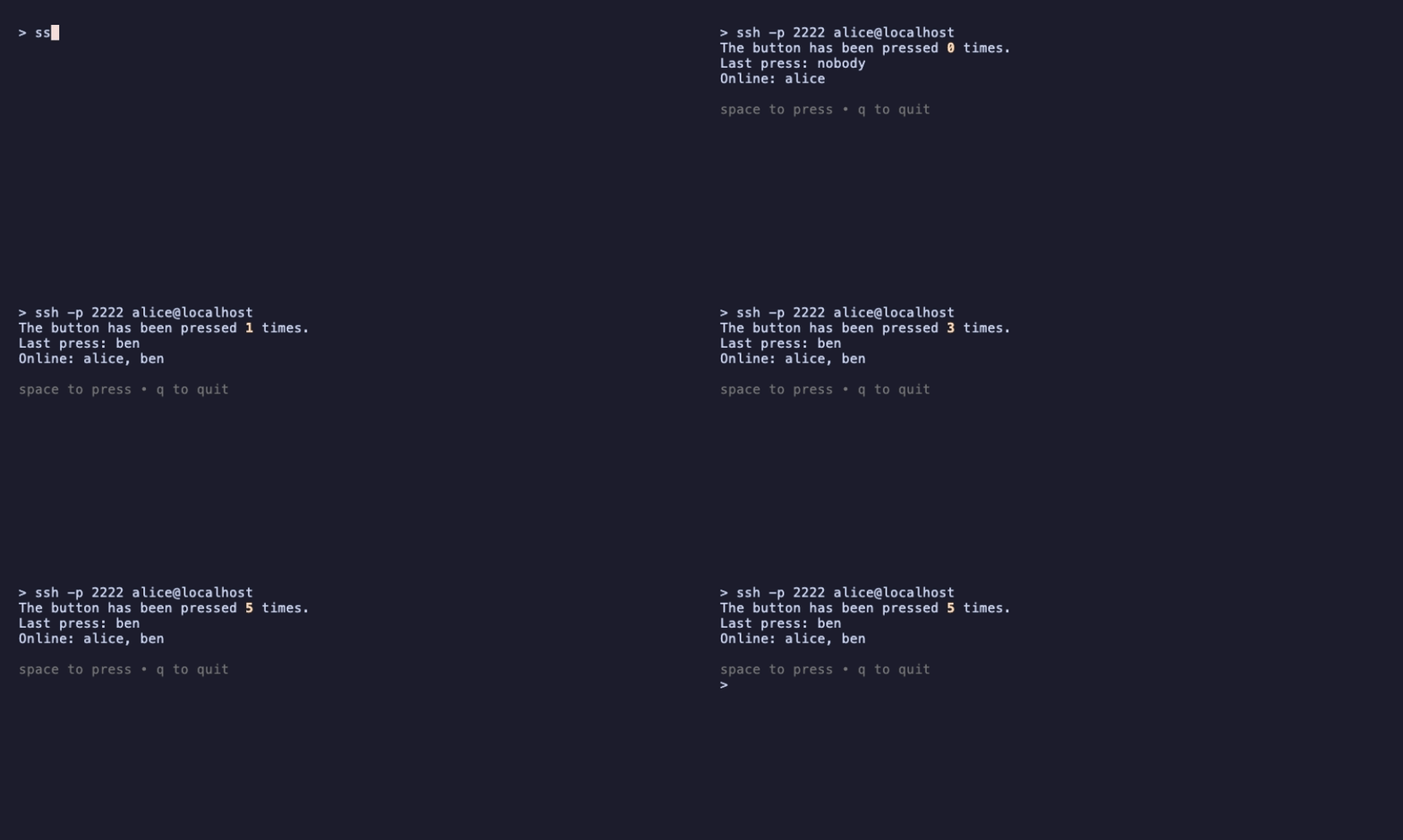
program.send(new Changed()) puts a message in that program's queue, like a key press. The model ignores it, but every message ends with a redraw, and the view reads the shared state. bubbletea.MakeOptions(session) gives the program everything the plain middleware would: input, output, size, environment and colour profile.
program.wait() resolves when the program ends, however it ends: q, a closed terminal or a dropped connection. That is where the session is removed. The repository's examples build a chat room and a multiplayer game on exactly this pattern.
VII – Running One Safely
As soon as a server listens on a public address, scanners will find it. Here is the counter again, configured to be exposed:
// safe.ts
import {
  NewServer,
  WithAddress,
  WithAuthorizedKeys,
  WithHandshakeTimeout,
  WithHostKeyPath,
  WithIdleTimeout,
  WithMaxTimeout,
  WithMiddleware,
  activeterm,
  logging,
  ratelimiter,
  recover,
} from '@oakoliver/wish';
import * as bubbletea from '@oakoliver/wish/bubbletea';
import { Counter } from './counter.ts';

const host = process.env.HOST ?? '127.0.0.1';
const port = Number(process.env.PORT ?? 2222);

const server = NewServer(
  WithAddress(`${host}:${port}`),
  WithHostKeyPath(process.env.HOST_KEY ?? '.ssh/host_ed25519'),
  WithAuthorizedKeys(process.env.AUTHORIZED_KEYS ?? 'authorized_keys'),
  WithHandshakeTimeout(10_000), // 10 s to finish logging in
  WithIdleTimeout(10 * 60_000), // 10 min without traffic
  WithMaxTimeout(2 * 60 * 60_000), // 2 h at most
  WithMiddleware(
    bubbletea.Middleware((session) => [new Counter(session.user()), []]),
    activeterm.Middleware(),
    recover.Middleware(),
    ratelimiter.Middleware(ratelimiter.NewRateLimiter(1, 5, 10_000)), // 1 session/s per IP, bursts of 5
    logging.StructuredMiddleware(),
  ),
);

process.once('SIGTERM', async () => {
  await server.shutdown(AbortSignal.timeout(30_000)).catch(() => server.close());
  process.exit(0);
});

await server.listen();
console.log(`Listening on ${host}:${port}`);
What each part is for:
WithAuthorizedKeys: only listed keys get in. A server with no authentication handler accepts everyone, and logs a warning if it listens on anything but loopback that way.- Timeouts. Without them a client can open a connection and hold it forever. The handshake timeout closes connections that never finish logging in, the idle timeout those that go quiet, the maximum timeout everything else. Failed logins are also capped at 6 per connection.
ratelimiterlimits new sessions per IP address. It runs after the login, so it limits sessions, not raw TCP connections; put connection limits in front (a firewall, or your load balancer) if you expect floods.recovercatches an error thrown by the handlers after it and ends only that session. The server does the same for errors that reach it, and a crashing Bubble Tea model ends only its own session. Neither can catch an error thrown later from a timer or event listener you set up: handle those where you set them up.shutdownonSIGTERMstops accepting connections and waits up to 30 seconds for open sessions.- Treat what users send as hostile. If one user's text is shown to another, strip escape sequences and control characters first, or one user can move another's cursor or rewrite their screen.
Then run it as an unprivileged user. With systemd, a unit like this one (it passes systemd-analyze verify) keeps the host key in /var/lib/wish-app, which StateDirectory creates for the service user:
[Unit]
Description=My wish app
After=network.target

[Service]
User=wishapp
Group=wishapp
WorkingDirectory=/opt/wish-app
Environment=HOST=0.0.0.0 PORT=2222
Environment=HOST_KEY=/var/lib/wish-app/host_ed25519
Environment=AUTHORIZED_KEYS=/etc/wish-app/authorized_keys
ExecStart=/usr/bin/node safe.ts
Restart=on-failure
StateDirectory=wish-app
NoNewPrivileges=yes
ProtectSystem=strict
ProtectHome=yes
PrivateTmp=yes

[Install]
WantedBy=multi-user.target
Create the user with useradd --system --user-group wishapp, and use a Node.js that runs TypeScript files directly (or run the program with Bun). Port 22 needs privileges; keep the app on 2222 and forward 22 to it in your firewall, rather than running it as root.
In a container, the same idea:
FROM node:24-slim
WORKDIR /app
COPY package.json package-lock.json ./
RUN npm ci --omit=dev
COPY counter.ts safe.ts authorized_keys ./
# The host key lives on a volume, owned by the unprivileged user.
RUN mkdir /data && chown node:node /data
VOLUME /data
USER node
ENV HOST=0.0.0.0 PORT=2222 HOST_KEY=/data/host_ed25519 AUTHORIZED_KEYS=/app/authorized_keys
EXPOSE 2222
CMD ["node", "safe.ts"]
docker build -t wish-app .
docker run -d -p 2222:2222 -v wish-data:/data wish-app
The program runs as the image's node user, and the host key survives restarts on the wish-data volume. Inside the container it listens on 0.0.0.0, because that is how published ports reach it; -p 127.0.0.1:2222:2222 keeps it on the host's loopback while you test.
VIII – Requirements
The programs above were run on:
- Node.js 26.8 (
node file.ts), and in thenode:24-slimimage for the container - Bun 1.4.4 (
bun file.ts) - with OpenSSH 10.3 as the client
A smaller check (a command session and a Bubble Tea session against the installed package) also passed on Node.js 18.20, 20.18, 22.16 and 24.16. Those versions can't run .ts files themselves; compile the programs first, or use Bun. The package declares Node.js 20 or later and ships ESM and CommonJS builds with TypeScript types. On Bun, the chacha20-poly1305 cipher is not available, because Bun's crypto lacks ChaCha20; SSH clients pick AES-GCM instead without any setting.
IX – Where to Go Next
- The repository: the README lists every option and middleware, the mapping from Go's API, and what the port does not do (real PTYs, SFTP, port forwarding).
- The
examples/folder: upstream's examples (banners, multiple login methods, a Git server, SCP) and two larger programs, a chat room and a game with a shared leaderboard. - Getting Started with Bubble Tea and Getting Started with Bubbles: everything you can put in a session.
- Porting Go's Wish to TypeScript: how the port was built on
ssh2, and the key-generation bug it turned up. - Package: @oakoliver/wish on npm, source at github.com/oakoliver/wish.