Getting Started with Bubblezone in TypeScript: Clickable Buttons, Tabs and Sliders for Terminal Apps
Bubble Tea can tell you that the mouse was clicked at column 31, row 7. It can't tell you what was at column 31, row 7. Your view() builds one big string out of styled boxes, joined, padded and wrapped, and by the time it's done, nobody remembers where the "Save" button ended up.
Bubblezone fixes that without doing any arithmetic. You wrap a piece of your view in a name; the library finds out where it landed on screen, and later you ask "was this click inside save?" @oakoliver/bubblezone is the TypeScript port of Liam Stanley's Go library of the same name. This guide builds four small programs with it.
You mark what you draw, scan the finished view once, and ask get(id).inBounds(msg) when the mouse moves. You never compute a coordinate.
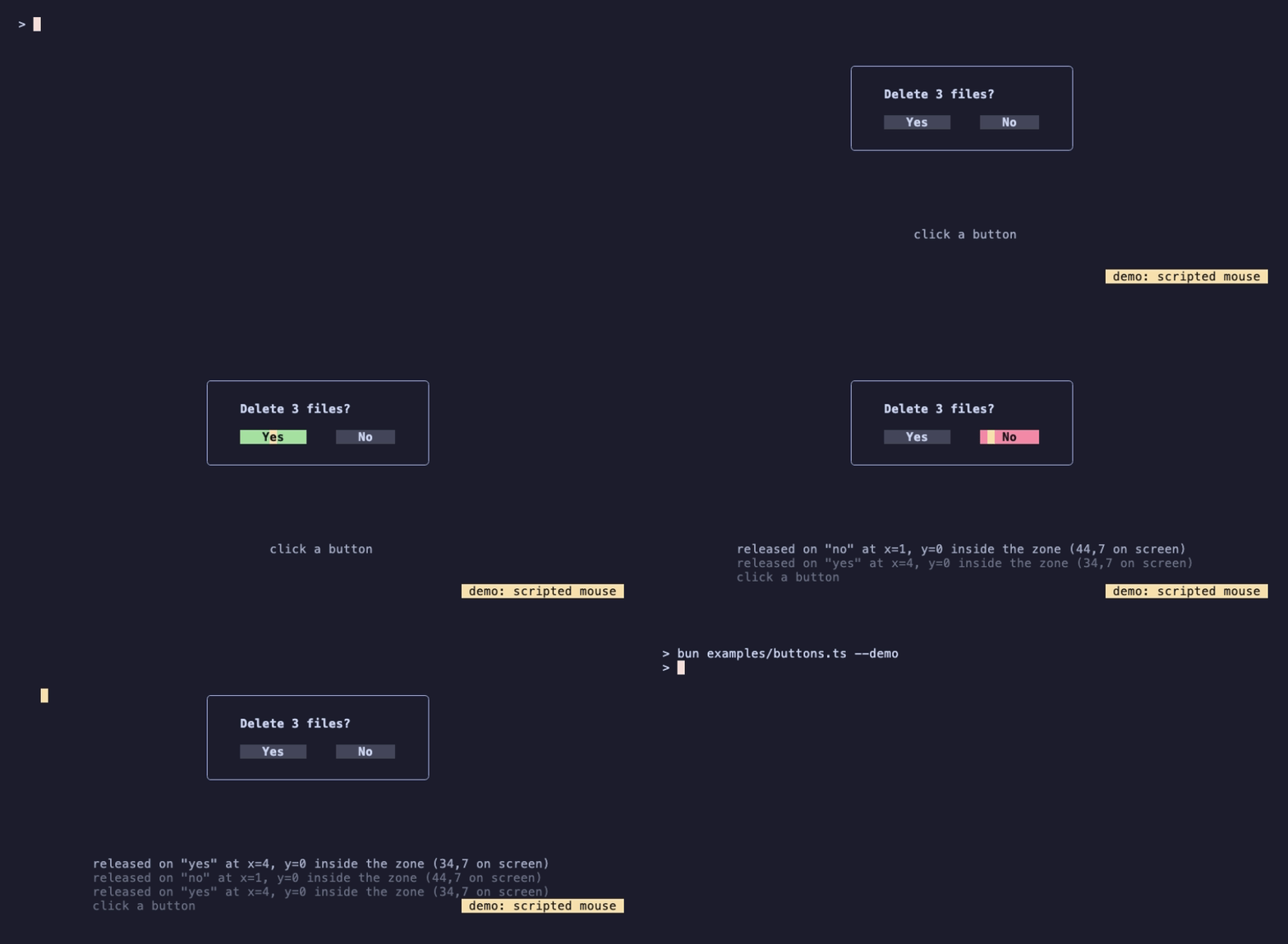
That recording is examples/buttons.ts --demo from the repository. A terminal recorder can't click, so --demo sends real mouse messages to the program, aimed at zones by name. The programs below are the same idea without the scripting.
If you haven't used Bubble Tea before, read Getting Started with Bubble Tea first, and Getting Started with Lip Gloss for the styling calls. This guide assumes you know what init, update and view are.
I – Install
Bubblezone has one required peer dependency, Bubble Tea, and one optional one, Lip Gloss, which the programs here use to draw:
mkdir zones-demo && cd zones-demo
npm init -y
npm pkg set type=module
npm install @oakoliver/bubblezone @oakoliver/bubbletea @oakoliver/lipgloss
With Bun: bun add @oakoliver/bubblezone @oakoliver/bubbletea @oakoliver/lipgloss. Bubble Tea is a peer dependency so that your program and bubblezone share one copy of it. That matters for one function, anyInBoundsAndUpdate, and the porting article shows exactly what goes wrong with two copies.
Run the examples with bun file.ts, or on Node with npx tsx file.ts (after npm install -D tsx). They need a real terminal that reports mouse events, which most do.
II – A Button
// button.ts
import {
  type Cmd, type Model, type Msg,
  KeyPressMsg, MouseButton, MouseMode, MouseReleaseMsg, Program, Quit, View,
} from '@oakoliver/bubbletea';
import { newStyle } from '@oakoliver/lipgloss';
import * as zone from '@oakoliver/bubblezone';

zone.NewGlobal();

class App implements Model {
  message = 'Click the button.';

  init(): Cmd {
    return null;
  }

  update(msg: Msg): [Model, Cmd] {
    if (msg instanceof KeyPressMsg && ['q', 'ctrl+c'].includes(msg.toString())) return [this, Quit];

    if (msg instanceof MouseReleaseMsg && msg.button === MouseButton.Left) {
      const button = zone.get('save');
      if (button.inBounds(msg)) {
        const [x, y] = button.pos(msg);
        this.message = `Saved! You clicked cell (${x}, ${y}) of the button.`;
      } else {
        this.message = `Missed: (${msg.x}, ${msg.y}) is outside the button.`;
      }
    }
    return [this, null];
  }

  view(): View {
    const button = newStyle().padding(0, 3).bold(true).foreground('#11111B').background('#A6E3A1').render('Save');
    const page = `\n  ${zone.mark('save', button)}\n\n  ${this.message}\n\n  q to quit`;

    const view = new View(zone.scan(page)); // markers out, zones recorded
    view.altScreen = true;
    view.mouseMode = MouseMode.CellMotion;
    return view;
  }
}

const app = (await new Program(new App()).run()) as App;
console.log(app.message);
Three calls do all the work:
zone.mark('save', button)wraps the rendered button in two invisible markers. They are private ANSI escape sequences, so they take up no width: Lip Gloss'swidth()still says the button is 10 cells wide, and padding and joins behave as before.zone.scan(page)goes through the finished page, takes the markers out and remembers where each pair ended up. Call it on the outermost view only. It returns the string to show.zone.get('save')returns the remembered zone.inBounds(msg)is true when the mouse event's cell is inside it, andpos(msg)is the cell relative to the zone's top-left corner.
The program prints its last message when it exits, and I ran it in a pseudo-terminal, sending real mouse escape sequences (the ones a terminal sends) and reading the screen back. A click on the S of Save at screen cell (5, 1) printed (3, 0): the button has three cells of padding, so S is its fourth cell. A click on the button's left edge, (2, 1), printed (0, 0). A click one cell further left, at (1, 1), printed Missed: (1, 1) is outside the button.
Two things to know about view.mouseMode. MouseMode.CellMotion reports clicks, releases, the wheel, and motion while a button is held. MouseMode.AllMotion also reports motion with no button held, which hover needs. Zones are screen cells, so set view.altScreen = true as well.
zone.NewGlobal() creates one app-wide manager, so you don't have to pass it around. get is never null: for a name that isn't on screen it returns an empty zone whose inBounds() is false, so zone.get('x').inBounds(msg) is always safe to write.
III – A Tab Bar With Hover
// tabs.ts
import {
  type Cmd, type Model, type Msg,
  KeyPressMsg, MouseButton, MouseMode, MouseMotionMsg, MouseReleaseMsg, Program, Quit, View,
} from '@oakoliver/bubbletea';
import { joinHorizontal, newStyle, Top } from '@oakoliver/lipgloss';
import * as zone from '@oakoliver/bubblezone';

zone.NewGlobal();

const TABS = ['Overview', 'Logs', 'Settings'];
const BODY = ['3 services, all healthy.', '14:02:11 GET /orders 200', 'Theme: dark. Notifications: on.'];

class App implements Model {
  active = 0;
  hover = -1;

  init(): Cmd {
    return null;
  }

  tabAt(msg: MouseMotionMsg | MouseReleaseMsg): number {
    return TABS.findIndex((_, i) => zone.get(`tab-${i}`).inBounds(msg));
  }

  update(msg: Msg): [Model, Cmd] {
    if (msg instanceof KeyPressMsg && ['q', 'ctrl+c'].includes(msg.toString())) return [this, Quit];
    if (msg instanceof MouseMotionMsg) this.hover = this.tabAt(msg);
    if (msg instanceof MouseReleaseMsg && msg.button === MouseButton.Left) {
      const i = this.tabAt(msg);
      if (i >= 0) this.active = i;
    }
    return [this, null];
  }

  view(): View {
    const tabs = TABS.map((name, i) => {
      const style = newStyle().padding(0, 2);
      if (i === this.active) return zone.mark(`tab-${i}`, style.bold(true).background('#CBA6F7').foreground('#11111B').render(name));
      if (i === this.hover) return zone.mark(`tab-${i}`, style.background('#45475A').render(name));
      return zone.mark(`tab-${i}`, style.background('#313244').render(name));
    });
    const page = `\n ${joinHorizontal(Top, ...tabs.flatMap((t) => [t, ' ']))}\n\n  ${BODY[this.active]}\n\n  q to quit`;

    const view = new View(zone.scan(page));
    view.altScreen = true;
    view.mouseMode = MouseMode.AllMotion; // hover needs motion without a button held
    return view;
  }
}

const app = (await new Program(new App()).run()) as App;
console.log(`Last tab: ${TABS[app.active]}`);
The same two ideas, repeated. Each tab is tab-0, tab-1, tab-2. On motion, tabAt() asks every tab's zone whether the pointer is inside it, and the tab under the pointer is drawn a shade lighter. On a release, the same question picks the active tab.
I checked it the same way: moving the pointer over Logs turned its background from #313244 to #45475A; a click showed the log line; a click on Settings showed the settings; a click on empty space below the tabs changed nothing.
Three tabs means three get() calls per mouse event. That's fine. Section VIII has the measured cost of the part that isn't: scan().
IV – A Slider: Where Inside the Zone?
// slider.ts
import {
  type Cmd, type Model, type Msg,
  KeyPressMsg, MouseButton, MouseMode, MouseMotionMsg, MouseClickMsg, Program, Quit, View,
} from '@oakoliver/bubbletea';
import { newStyle } from '@oakoliver/lipgloss';
import * as zone from '@oakoliver/bubblezone';

zone.NewGlobal();

const WIDTH = 40;

class App implements Model {
  volume = 50;

  init(): Cmd {
    return null;
  }

  update(msg: Msg): [Model, Cmd] {
    if (msg instanceof KeyPressMsg && ['q', 'ctrl+c'].includes(msg.toString())) return [this, Quit];

    const pressed = msg instanceof MouseClickMsg || (msg instanceof MouseMotionMsg && msg.button === MouseButton.Left);
    if (pressed && msg.button === MouseButton.Left) {
      const bar = zone.get('bar');
      if (bar.inBounds(msg)) {
        const [x] = bar.pos(msg); // 0..WIDTH-1, relative to the bar
        this.volume = Math.round((x / (WIDTH - 1)) * 100);
      }
    }
    return [this, null];
  }

  view(): View {
    const filled = Math.round((this.volume / 100) * (WIDTH - 1)) + 1;
    const on = newStyle().foreground('#A6E3A1').render('█'.repeat(filled));
    const off = newStyle().foreground('#45475A').render('░'.repeat(WIDTH - filled));
    const page = `\n  Volume ${String(this.volume).padStart(3)}%\n\n  ${zone.mark('bar', on + off)}\n\n  click or drag on the bar, q to quit`;

    const view = new View(zone.scan(page));
    view.altScreen = true;
    view.mouseMode = MouseMode.CellMotion; // motion while a button is held
    return view;
  }
}

const app = (await new Program(new App()).run()) as App;
console.log(`Volume: ${app.volume}`);
inBounds() answers whether. pos() answers where: it returns [x, y] relative to the zone's top-left cell, so the slider never has to know which column its bar starts at. A click on cell 19 of the 40-cell bar set the volume to round(19 / 39 * 100) = 49. Dragging with the button held, which arrives as MouseMotionMsg with button === MouseButton.Left, followed the pointer to the last cell and set 100. Dragging past the end of the bar left the value alone, because outside the zone inBounds() is false.
The bar is one line, on purpose. A zone is a box, and boxes work best on one-line things.
V – Components That Repeat: Prefixes and anyInBounds
// counters.ts
import {
  type Cmd, type Model, type Msg,
  KeyPressMsg, MouseButton, MouseMode, MouseReleaseMsg, Program, Quit, View,
} from '@oakoliver/bubbletea';
import { joinHorizontal, newStyle, roundedBorder, Top } from '@oakoliver/lipgloss';
import * as zone from '@oakoliver/bubblezone';

zone.NewGlobal();

class Counter {
  readonly id = zone.newPrefix(); // "zone_1__", "zone_2__", ...
  n = 0;

  constructor(readonly name: string) {}

  /** Handles a zone the mouse is inside. Returns true if it was one of ours. */
  hit(msg: zone.MsgZoneInBounds): boolean {
    if (!msg.zone.id.startsWith(this.id)) return false;
    const local = msg.zone.id.slice(this.id.length); // "plus" or "minus"
    if (local === 'plus') this.n++;
    if (local === 'minus') this.n--;
    return true;
  }

  view(): string {
    const button = (id: string, label: string) =>
      zone.mark(this.id + id, newStyle().padding(0, 1).background('#45475A').render(label));
    const body = `${this.name}: ${this.n}\n\n${button('minus', ' − ')} ${button('plus', ' + ')}`;
    return newStyle().border(roundedBorder()).padding(0, 1).render(body);
  }
}

class App implements Model {
  counters = [new Counter('apples'), new Counter('pears')];

  init(): Cmd {
    return null;
  }

  update(msg: Msg): [Model, Cmd] {
    if (msg instanceof KeyPressMsg && ['q', 'ctrl+c'].includes(msg.toString())) return [this, Quit];

    if (msg instanceof MouseReleaseMsg && msg.button === MouseButton.Left) {
      // Sends this model a MsgZoneInBounds for every zone under the mouse...
      return zone.anyInBoundsAndUpdate(this, msg);
    }
    if (msg instanceof zone.MsgZoneInBounds) {
      // ...and each child claims the ones with its prefix.
      for (const c of this.counters) c.hit(msg);
    }
    return [this, null];
  }

  view(): View {
    const page = `\n${joinHorizontal(Top, ...this.counters.flatMap((c) => [c.view(), '  ']))}\n\n  q to quit`;
    const view = new View(zone.scan(page));
    view.altScreen = true;
    view.mouseMode = MouseMode.CellMotion;
    return view;
  }
}

const app = (await new Program(new App()).run()) as App;
console.log(app.counters.map((c) => `${c.name}=${c.n}`).join(' '));
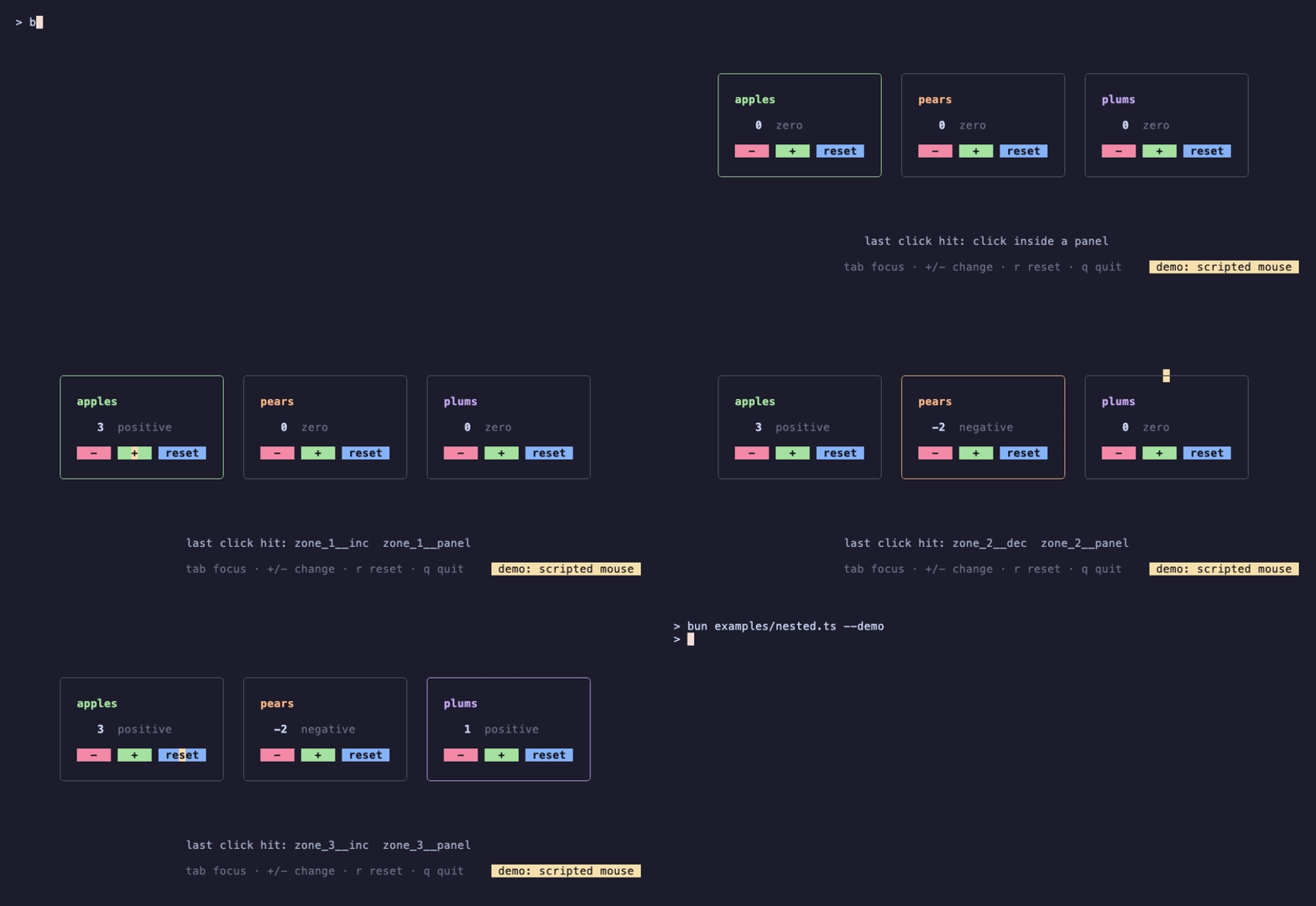
Recording of examples/nested.ts --demo, a three-counter version of this program.
Two counters have a plus button each. If both marked 'plus', they'd share one zone and the last one drawn would win. zone.newPrefix() returns a string that is unique for every call (zone_1__, zone_2__), so each counter builds its zone names as prefix + 'plus'.
The second idea is zone.anyInBoundsAndUpdate(model, msg). Instead of asking get() for each button, you hand it the mouse event, and it calls model.update() once for every zone the pointer is inside, with a MsgZoneInBounds carrying zone and event. The zones come in alphabetical order, and the commands from all the calls are combined with Batch. Each child claims the zones with its prefix. This is how a parent can forward mouse events without knowing what its children contain.
Clicking + on apples twice and on pears once, then − on pears twice, ended with apples=2 pears=-1.
VI – Without the Global: Passing a Manager
The global manager is convenient in an application. In a library, take a manager as an argument instead, so your component works whatever the host program does:
// manager.ts: a component that takes its manager instead of using the global one
import * as zone from '@oakoliver/bubblezone';

class Menu {
  readonly prefix: string;

  constructor(
    private readonly zones: zone.Manager,
    readonly items: string[],
  ) {
    this.prefix = zones.newPrefix();
  }

  view(): string {
    return this.items.map((item, i) => this.zones.mark(this.prefix + i, `  ${item}  `)).join('\n');
  }

  itemAt(msg: { x: number; y: number }): number {
    return this.items.findIndex((_, i) => this.zones.get(this.prefix + i).inBounds(msg));
  }
}

const zones = zone.New();
const menu = new Menu(zones, ['Open', 'Save', 'Quit']);
zones.scan(menu.view());
console.log(menu.itemAt({ x: 3, y: 1 }), menu.itemAt({ x: 3, y: 5 }));
That prints 1 -1: the second item's zone is under (3, 1), and nothing is at (3, 5). zone.New() makes a separate manager; the global functions are the same methods on the default one.
VII – What Breaks a Zone
A zone is the box between the cell where its first marker landed and the cell where its last one did. Four things make that box wrong or empty. This program prints each one:
// breaks.ts
import { newCompositor, newLayer, newStyle } from '@oakoliver/lipgloss';
import * as zone from '@oakoliver/bubblezone';

zone.NewGlobal();
const box = (id: string) => {
  const z = zone.get(id);
  return z.isZero() ? 'not found' : `from (${z.startX}, ${z.startY}) to (${z.endX}, ${z.endY})`;
};

// 1. A zone that wraps onto a second line.
zone.scan(newStyle().width(12).render('see ' + zone.mark('link', 'the full docs') + ' for more'));
console.log('wrapped:   ', box('link'), zone.get('link').inBounds({ x: 5, y: 0 }));

// 2. A zone inside a Lip Gloss layer.
const base = newStyle().render('.'.repeat(30) + '\n' + '.'.repeat(30));
zone.scan(newCompositor(newLayer(base), newLayer(zone.mark('dialog', ' OK ')).x(5).y(1).z(1)).render());
console.log('compositor:', box('dialog'));

// 3. Scanning twice: the child scans, the root has nothing left to find.
const child = zone.scan(zone.mark('child', 'inner'));
zone.scan('row: ' + child);
console.log('two scans: ', box('child'));

// 4. Marking the same ID twice: the last one wins.
zone.scan(zone.mark('twin', 'aaa') + '\n' + zone.mark('twin', 'bbb'));
console.log('same id:   ', box('twin'));
Its output:
wrapped:    from (4, 0) to (3, 1) false
compositor: not found
two scans:  not found
same id:    from (0, 1) to (2, 1)
- Wrapped text. The link starts at column 4 on row 0 and ends at column 3 on row 1. The end is left of the start, so there is no box, and
inBounds()isfalseeverywhere. Keep clickable things to one line, or do your own check. This is the limit of the approach, not a bug. - A Lip Gloss layer.
newCompositor(...).render()drops private escape sequences, markers included, so a zone inside a layer is never found. Upstream's README warns about the compositor too. If you draw a dialog over a page, build the page with plain strings and put the dialog on top by cutting and joining lines (the repository'sexamples/_kit.tshas asplice()for that), and render the page under it without zones so that only the dialog takes clicks. - Scanning twice. The first
scan()takes the markers out, so the second finds nothing, and everyscan()forgets the zones it didn't see. Scan once, at the root. - The same name twice. The last one on screen wins.
Cutting is less dangerous than upstream's README suggests. With Lip Gloss 1.1.3, maxWidth(), truncate() and sliceAnsi() keep the markers where they were, so a cut zone shrinks to the part still visible; a zone cut off entirely becomes empty, and nothing is in bounds. Wrapping is the one that bites.
A last measured detail: unlike upstream, which stores zones on a background goroutine, this port stores them before scan() returns. get() immediately after scan() is correct, which makes zones easy to test: build a view, scan it, assert on get('x'), with no waiting.
VIII – What It Costs
scan() runs on every frame, so I measured it, on views built with Lip Gloss with a rounded border, styled labels and a marked zone per label:
| View | Zones | Size of the view | scan() |
The same view with no markers |
|---|---|---|---|---|
| 80×24 | 10 | 3,673 bytes | 4.8 µs | 2.0 µs |
| 120×40 | 60 | 9,921 bytes | 24.0 µs | 4.8 µs |
| 200×60 | 600 | 40,889 bytes | 436.6 µs | 15.7 µs |
Median of 5 rounds on an Apple M5 Max with Bun 1.4.4, run alone on a quiet machine; the slowest round for the 10-zone view took 6.7 µs, and for the other two views every round was within 10 % of the median. Wrapping 600 labels in mark() takes 14 µs in total. So a screen with 10 zones spends about 5 microseconds on zones per frame, and an absurd screen with 600 of them spends under half a millisecond. bench/scan.ts in the repository reproduces the table.
Everything in scan() is one pass over the string. A frame at 60 fps has a budget of about 16.7 ms.
IX – Requirements
I ran the four programs from this guide, plus the checks quoted above, in a pseudo-terminal with real mouse escape sequences, on:
- Bun 1.4
- Node.js 20.18, 22.16 and 26.8, through
npx tsx - Deno 2.8, with
deno run -A file.tsin a project where the packages were installed with npm
18 checks pass on each. The package ships ESM and CommonJS builds with TypeScript types. The version ported is lrstanley/bubblezone at commit d3a8f5f (v2.0.0 plus CI changes), written for Bubble Tea v2, which @oakoliver/bubbletea 1.2.x matches.
X – Where to Go Next
- The repository: the README lists what is and isn't ported.
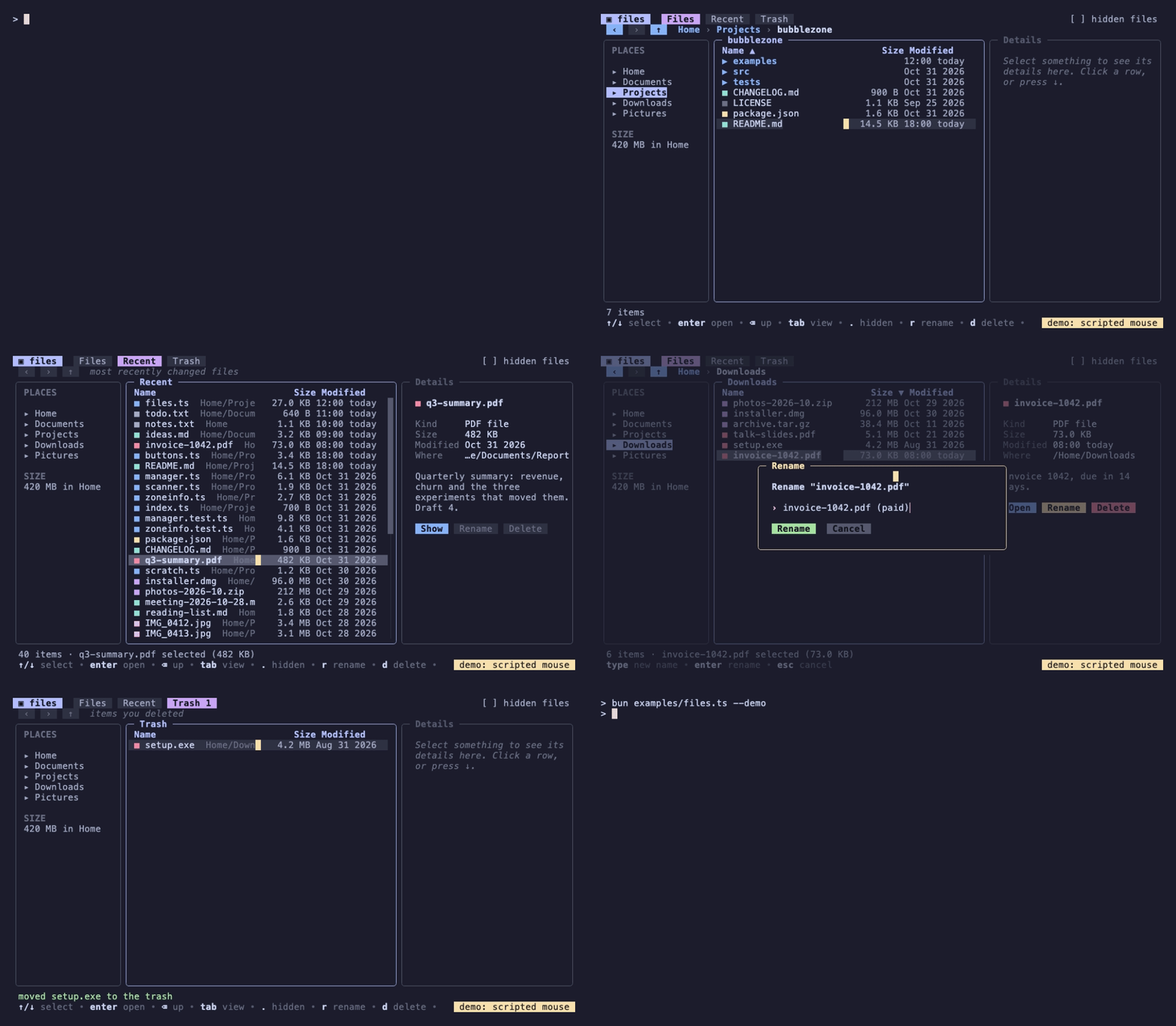
examples/has five programs; run any of them with--demoto watch the scripted mouse. examples/files.tsis a file manager where tabs, the path, sidebar places, sortable column headers, rows, a context menu and dialogs are all zones.examples/console.tsis a dashboard where each card is a zone with buttons inside it.
- Getting Started with Bubbles: the components that zones pair well with. The repository's
examples/list.tsmakes the rows of a Bubbles list clickable. - Porting Bubblezone to TypeScript: how the port was done, and where it differs from the Go original.
- Package: @oakoliver/bubblezone on npm, source at github.com/oakoliver/bubblezone.