Getting Started with the Charm Ports Together: A Multi-User Terminal Dashboard over SSH in TypeScript
Five more of Charm's Go libraries now have TypeScript ports. ntcharts draws charts in the terminal. Bubblezone tells you what the mouse clicked. Wish serves a program over SSH. Freeze turns terminal output into an image. teatest tests a Bubble Tea program without a terminal. Each has its own guide, with small programs that use one library at a time.
This guide uses all five in one program: an ops dashboard, a "station", that several people share over SSH. They see the same services and alerts, see each other's pointers, and acknowledge alerts together. Each step adds one library, and each library does the part it was made for.
ntcharts draws, bubblezone says what is under the mouse, wish gives every person their own program on one shared state, freeze turns a frame into an image, and teatest checks all of it with the bytes a real terminal would send.
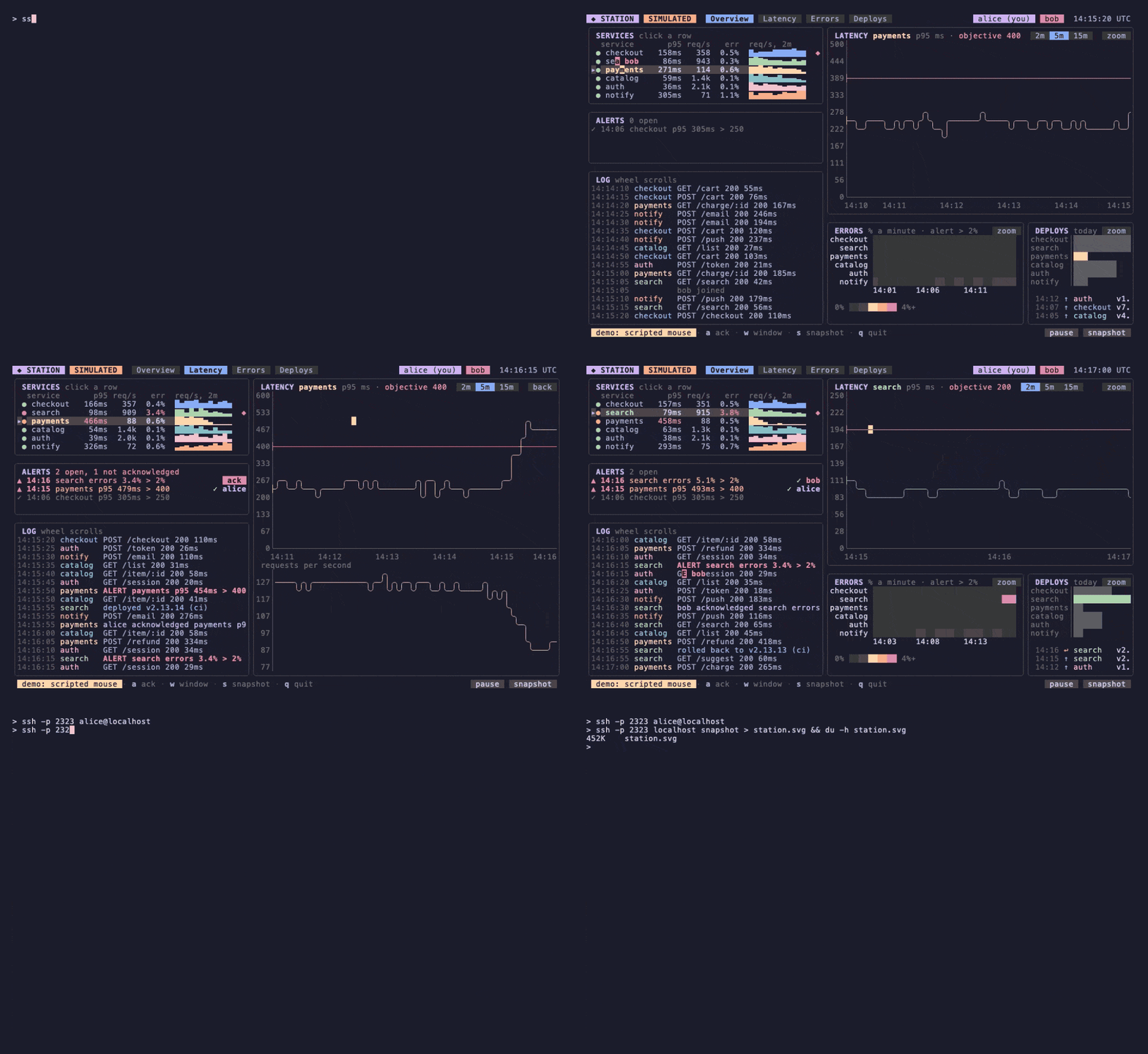
That recording is the full example, examples/station in the Bubble Tea repository, served over SSH. A recorder can't click, so the pointers are scripted: the server moves them along a script, aimed at zones by name, and every click goes through the same hit-testing as a real one. The program built below is a smaller version of it: about 400 lines in seven files, and a test file. Every listing is a complete file or says exactly what changes, and every one was run.
You should know Bubble Tea (init, update, view, messages and commands) and the basics of Lip Gloss (styles, borders, joinHorizontal). Bubbles isn't used directly, but ntcharts builds its key bindings on it.
I – The Charts
Start with a project and every package the station will use:
mkdir station && cd station
npm init -y
npm pkg set type=module
npm install @oakoliver/bubbletea @oakoliver/lipgloss @oakoliver/bubbles \
  @oakoliver/ntcharts @oakoliver/bubblezone @oakoliver/wish @oakoliver/freeze @oakoliver/teatest
With Bun: bun add with the same names. Bubble Tea, Lip Gloss and Bubbles are peer dependencies of the newer ports, so the whole program shares one copy of each. That matters more here than in a small program: wish and teatest each create Bubble Tea programs, and a second copy of Bubble Tea would have its own message classes, which the first copy doesn't recognise. Run the files with bun file.ts, or node file.ts on Node.js 26, which strips the types itself.
The data
The station needs something to watch. Three invented services follow a seeded random walk: the same seed gives the same numbers on every run, which section V depends on. At the end of the ten minutes of history, the payments database slows down, so there is an alert to acknowledge.
// world.ts: three invented services on a seeded random walk, shared by everyone watching.
export const SERVICES = [
  { name: 'checkout', p95: 140, slo: 250, color: '#89B4FA' },
  { name: 'search', p95: 90, slo: 200, color: '#A6E3A1' },
  { name: 'payments', p95: 230, slo: 400, color: '#F9E2AF' },
];

export interface Sample {
  t: number; // ms since the epoch
  p95: number; // ms
  err: number; // percent
}

/** Someone looking at the station: what they selected and where their pointer is. */
export interface Viewer {
  name: string;
  color: string;
  selected: number;
  hover: { zone: string; dx: number; dy: number } | null;
}

const COLORS = ['#CBA6F7', '#F38BA8', '#74C7EC'];

export class World {
  now = Date.UTC(2026, 10, 1, 14, 0);
  samples: Sample[][] = SERVICES.map(() => []);
  deploys = [4, 6, 2];
  ackedBy: string | null = null;
  viewers: Viewer[] = [];
  listeners = new Set<() => void>();
  private seed = 7;

  constructor() {
    for (let i = 0; i < 120; i++) this.step(); // ten minutes of history
  }

  /** mulberry32: the same seed gives the same numbers. */
  private rand(): number {
    let t = (this.seed = (this.seed + 0x6d2b79f5) | 0);
    t = Math.imul(t ^ (t >>> 15), 1 | t);
    t = (t + Math.imul(t ^ (t >>> 7), 61 | t)) ^ t;
    return ((t ^ (t >>> 14)) >>> 0) / 4294967296;
  }

  /** Five seconds pass. */
  step(): void {
    this.now += 5000;
    const n = this.samples[0].length;
    SERVICES.forEach((def, i) => {
      const slow = i === 2 && n >= 110 ? 220 : 0; // the payments database slows down
      const burst = i === 1 && n % 40 > 30 ? 4 : 0; // search fails in bursts
      const p95 = def.p95 * (0.9 + 0.2 * this.rand()) + slow;
      const err = 0.3 + this.rand() + burst;
      this.samples[i].push({ t: this.now, p95, err });
      if (this.samples[i].length > 120) this.samples[i].shift();
    });
    this.changed();
  }

  last(i: number): Sample {
    return this.samples[i].at(-1)!;
  }

  /** The payments alert: open while its p95 is over the objective. */
  alerting(): boolean {
    return this.last(2).p95 > SERVICES[2].slo;
  }

  ack(who: Viewer): void {
    if (!this.alerting() || this.ackedBy) return;
    this.ackedBy = who.name;
    this.changed();
  }

  join(name: string): Viewer {
    const v = { name, color: COLORS[this.viewers.length % COLORS.length], selected: 0, hover: null };
    this.viewers.push(v);
    this.changed();
    return v;
  }

  leave(v: Viewer): void {
    this.viewers = this.viewers.filter((x) => x !== v);
    this.changed();
  }

  changed(): void {
    for (const fn of this.listeners) fn();
  }
}
The World is the one thing everyone will share in section III. It already knows about viewers (a name, a colour, a selected service and a pointer) and has a set of listeners to call when anything changes.
Why ntcharts
A dashboard is mostly charts, and charts in a terminal are fiddly: scale the values to rows, pick tick labels, join box-drawing characters where a line turns, split cells into braille dots. ntcharts does all of that, and it fits Bubble Tea in the simplest way possible: every chart ends as a string, which is what a Bubble Tea view is made of. The station uses four kinds:
// charts.ts: the station's charts, built from the World. Each one is a string in the end.
import { newStyle } from '@oakoliver/lipgloss';
import * as barchart from '@oakoliver/ntcharts/barchart';
import * as runes from '@oakoliver/ntcharts/canvas/runes';
import * as heatmap from '@oakoliver/ntcharts/heatmap';
import * as tslc from '@oakoliver/ntcharts/linechart/timeserieslinechart';
import * as sparkline from '@oakoliver/ntcharts/sparkline';
import { SERVICES, type World } from './world.ts';

const axis = newStyle().foreground('#585B70');
const label = newStyle().foreground('#6C7086');
const hhmm = (t: number) => new Date(t).toISOString().slice(11, 16);

/** A service's p95 latency over ten minutes, with its objective as a red line. */
export function latencyChart(world: World, s: number, w: number, h: number): tslc.Model {
  const chart = tslc.New(w, h,
    tslc.WithAxesStyles(axis, label),
    tslc.WithXLabelFormatter((_i, v) => hhmm(v * 1000)), // time labels come in seconds
    tslc.WithYLabelFormatter((_i, v) => v.toFixed(0)),
  );
  const xs = world.samples[s];
  for (const x of xs) chart.push({ time: new Date(x.t), value: x.p95 });
  const from = new Date(xs[0].t);
  const to = new Date(xs.at(-1)!.t);
  chart.pushDataSet('slo', { time: from, value: SERVICES[s].slo });
  chart.pushDataSet('slo', { time: to, value: SERVICES[s].slo });
  chart.setTimeRange(from, to);
  chart.setViewTimeRange(from, to);
  const top = Math.max(SERVICES[s].slo, ...xs.map((x) => x.p95)) * 1.2;
  chart.setYRange(0, top);
  chart.setViewYRange(0, top);
  chart.setStyle(newStyle().foreground(SERVICES[s].color));
  chart.setLineStyle(runes.ArcLineStyle);
  chart.setDataSetStyle('slo', newStyle().foreground('#F38BA8'));
  chart.drawDataSets(['slo', 'default']);
  return chart;
}

/** The last `w` latencies of a service, one column each. */
export function latencySparkline(world: World, s: number, w: number): string {
  const sl = sparkline.New(w, 1, sparkline.WithStyle(newStyle().foreground(SERVICES[s].color)));
  const xs = world.samples[s].slice(-w).map((x) => x.p95);
  const floor = Math.min(...xs) * 0.8; // bars start from zero; a floor makes the changes visible
  sl.pushAll(xs.map((v) => v - floor));
  sl.draw();
  return sl.view();
}

/** Error rate per service (rows) and minute (columns), the last ten minutes. */
export function errorHeatmap(world: World): heatmap.Model {
  const hm = heatmap.New(9 + 10 * 3, SERVICES.length + 2, // labels, then 10 minutes of 3 cells; 2 rows of time labels
    heatmap.WithValueRange(0, 5),
    heatmap.WithCellSize(3, 1),
    heatmap.WithColorScale(['#313244', '#45475A', '#F9E2AF', '#FAB387', '#F38BA8']),
  );
  hm.setYLabels(SERVICES.map((d) => d.name).reverse()); // rows count up from the bottom
  hm.setXLabels(Array.from({ length: 10 }, (_, m) => (m % 3 === 0 ? `-${10 - m}m` : '')));
  SERVICES.forEach((_, s) => {
    for (let m = 0; m < 10; m++) {
      const minute = world.samples[s].slice(m * 12, m * 12 + 12);
      const avg = minute.reduce((a, x) => a + x.err, 0) / minute.length;
      hm.push(heatmap.NewHeatPointInt(m, SERVICES.length - 1 - s, avg));
    }
  });
  hm.draw();
  return hm;
}

/** Deploys today, one horizontal bar per service; the selected one in its colour. */
export function deployBars(world: World, selected: number, w: number, ...opts: barchart.Option[]): barchart.Model {
  const bc = barchart.New(w, SERVICES.length, barchart.WithHorizontalBars(), barchart.WithBarGap(0), barchart.WithStyles(axis, label), ...opts);
  bc.pushAll(SERVICES.map((d, s) => ({
    label: d.name,
    values: [{ name: d.name, value: world.deploys[s], style: newStyle().foreground(s === selected ? d.color : '#585B70') }],
  })));
  bc.setHorizontal(true); // measures the space the labels need
  bc.draw();
  return bc;
}
- A time series chart for latency, because the X axis is time. It formats its own tick labels; the formatter gets the time in seconds, not milliseconds. The objective is a second data set of two points, a flat red line.
drawDataSets(['slo', 'default'])draws it first, so the latency line is drawn over it. - Sparklines for the service rows: one character per sample, no axes. Their bars start at zero, and a latency of 131 ms next to one of 140 ms would look the same, so the chart gets the values minus a floor.
- A heatmap for errors: one row per service, one column per minute. Its width includes the labels (9 cells here, the longest name and a space) and its height two rows for the time labels. Rows count up from the bottom, as on any chart, so the labels go in reverse and payments, the last service, is row 0.
- A bar chart for deploys, with horizontal bars so the service names fit. Call
setHorizontal(true)after the data is in: that is where it measures how much room the labels need, as in the Go original.
The ...opts on deployBars will carry a zone manager in section II. Before any Bubble Tea, print the charts:
// print.ts: the charts, printed once. No Bubble Tea yet.
import { joinHorizontal, joinVertical, Left, newStyle, roundedBorder, Top } from '@oakoliver/lipgloss';
import { deployBars, errorHeatmap, latencyChart, latencySparkline } from './charts.ts';
import { SERVICES, World } from './world.ts';

const world = new World();
const title = newStyle().foreground('#CBA6F7').bold(true);
const box = (name: string, body: string) =>
  newStyle().border(roundedBorder()).borderForeground('#45475A').padding(0, 1).render(`${title.render(name)}\n${body}`);

const rows = SERVICES.map((d, s) => `${d.name.padEnd(9)}${String(Math.round(world.last(s).p95)).padStart(4)}ms  ${latencySparkline(world, s, 20)}`);
console.log(
  joinVertical(Left,
    joinHorizontal(Top, box('SERVICES', rows.join('\n')), box('PAYMENTS p95, ms', latencyChart(world, 2, 50, 10).view())),
    joinHorizontal(Top, box('ERRORS %', errorHeatmap(world).view()), box('DEPLOYS TODAY', deployBars(world, 2, 30).view())),
  ),
);
bun print.ts
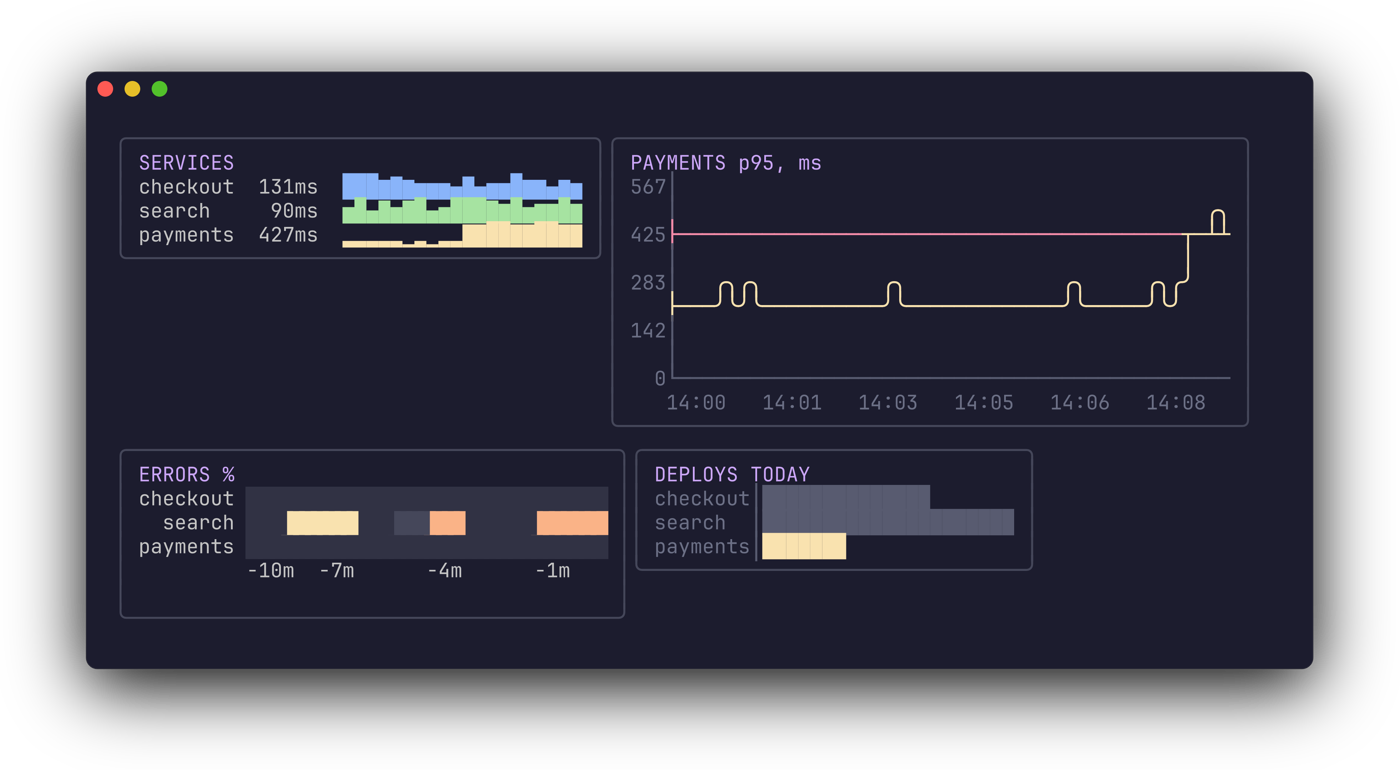
That picture is the program's output turned into a PNG by freeze, which section IV uses for snapshots.
II – The Mouse
Now the charts go into a Bubble Tea program, and the mouse comes in. Bubble Tea reports a click as a cell: column 31, row 7. It can't say what is drawn there, because view() returns one big string, built from boxes that Lip Gloss joined and padded. Bubblezone answers that question. You wrap a part of the view in zone.mark(id, text), run the finished view through scan() once, and later ask zone.get(id).inBounds(msg). No coordinates are computed by hand.
// station.ts: one Bubble Tea model per person watching. The World is shared; the zones are not.
import {
  type Cmd, KeyPressMsg, type Model, MouseButton, MouseMode, MouseReleaseMsg, type Msg, Quit, View, WindowSizeMsg,
} from '@oakoliver/bubbletea';
import * as zone from '@oakoliver/bubblezone';
import { joinHorizontal, joinVertical, Left, newStyle, roundedBorder, Top } from '@oakoliver/lipgloss';
import * as barchart from '@oakoliver/ntcharts/barchart';
import { deployBars, errorHeatmap, latencyChart, latencySparkline } from './charts.ts';
import { SERVICES, type Viewer, type World } from './world.ts';

/** Sent to every program when the World changes. */
export class WorldChanged {}

const dim = newStyle().foreground('#6C7086');
const title = newStyle().foreground('#CBA6F7').bold(true);
const box = (name: string, body: string, width: number) =>
  newStyle().border(roundedBorder()).borderForeground('#45475A').width(width).render(`${title.render(name)}\n${body}`);

export class Station implements Model {
  zm = zone.New(); // one manager per viewer: everyone's layout is different
  width = 0;
  height = 0;
  bars: barchart.Model | null = null;

  world: World;
  me: Viewer;

  constructor(world: World, me: Viewer) {
    this.world = world;
    this.me = me;
  }

  init(): Cmd {
    return null;
  }

  update(msg: Msg): [Model, Cmd] {
    if (msg instanceof WindowSizeMsg) [this.width, this.height] = [msg.width, msg.height];
    if (msg instanceof KeyPressMsg) {
      const key = msg.toString();
      if (key === 'q' || key === 'ctrl+c') return [this, Quit];
      if (key === 'down') this.select((this.me.selected + 1) % SERVICES.length);
      if (key === 'up') this.select((this.me.selected + SERVICES.length - 1) % SERVICES.length);
      if (key === 'a') this.world.ack(this.me);
    }
    if (msg instanceof MouseReleaseMsg && msg.button === MouseButton.Left) this.click(msg);
    return [this, null]; // WorldChanged needs nothing: view() reads the World
  }

  click(msg: MouseReleaseMsg): void {
    // a service row
    SERVICES.forEach((_, s) => {
      if (this.zm.get(`svc:${s}`).inBounds(msg)) this.select(s);
    });
    // the heatmap: its rows are the services, so the row under the pointer is the service
    const heat = this.zm.get('heat');
    if (heat.inBounds(msg)) {
      const [, y] = heat.pos(msg);
      if (y < SERVICES.length) this.select(y);
    }
    // the bar chart marks its own zone, and knows which bar a cell belongs to
    if (this.bars) {
      const bars = this.zm.get(this.bars.zoneID());
      if (bars.inBounds(msg)) {
        const [x, y] = bars.pos(msg);
        const s = SERVICES.findIndex((d) => d.name === this.bars!.barDataFromPoint({ x, y }).label);
        if (s >= 0) this.select(s);
      }
    }
    if (this.zm.get('ack').inBounds(msg)) this.world.ack(this.me);
  }

  select(s: number): void {
    this.me.selected = s;
    this.world.changed(); // the others see the selection too
  }

  /** The screen, after scan(): no markers left, and every zone's position recorded. */
  frame(): string {
    const { world, me } = this;
    const sel = me.selected;
    const people = world.viewers.map((v) => newStyle().background(v.color).foreground('#11111B').render(` ${v.name} `)).join(' ');
    const header = `${title.render(' STATION')} ${dim.render('invented data ·')} ${people}`;

    const rows = SERVICES.map((d, s) => {
      const mark = s === sel ? '▸' : ' ';
      const ms = `${String(Math.round(world.last(s).p95)).padStart(4)}ms`;
      return this.zm.mark(`svc:${s}`, `${mark} ${d.name.padEnd(9)}${ms}  ${latencySparkline(world, s, 20)}`);
    });
    let alert = dim.render('no alerts');
    if (world.alerting()) {
      const button = this.zm.mark('ack', newStyle().background('#F38BA8').foreground('#11111B').render(' ack '));
      alert = newStyle().foreground('#F38BA8').render('▲ payments p95 over 400ms ') + (world.ackedBy ? `✓ ${world.ackedBy}` : button);
    }
    const left = joinVertical(Left, box('SERVICES', rows.join('\n'), 42), box('ALERTS', alert, 42));

    this.bars = deployBars(world, sel, 28, barchart.WithZoneManager(this.zm));
    const right = joinVertical(Left,
      box(`${SERVICES[sel].name.toUpperCase()} p95, ms`, latencyChart(world, sel, 70, 10).view(), 72),
      joinHorizontal(Top, box('ERRORS %', this.zm.mark('heat', errorHeatmap(world).view()), 41), box('DEPLOYS TODAY', this.bars.view(), 31)),
    );
    const help = dim.render(' click a row, the heatmap or a bar · ↑/↓ · a ack · q quit');
    return this.zm.scan([header, joinHorizontal(Top, left, right), help].join('\n'));
  }

  view(): View {
    const v = new View(this.frame());
    v.altScreen = true;
    v.mouseMode = MouseMode.CellMotion;
    return v;
  }
}
and the program that runs it in your terminal:
// main.ts: the station in this terminal.
import { NewProgram } from '@oakoliver/bubbletea';
import { Station, WorldChanged } from './station.ts';
import { World } from './world.ts';

const world = new World();
const station = new Station(world, world.join('you'));
const program = NewProgram(station);
world.listeners.add(() => program.send(new WorldChanged()));
setInterval(() => world.step(), 500).unref(); // five seconds of station time every 500 ms

await program.run();
process.exit(0);
bun main.ts
How each click finds its target:
- One manager per station, from
zone.New(), not the global one bubblezone also offers. In section III, every person gets their ownStationwith their own window size and layout. A shared manager would mix up their zones. - Service rows are zones called
svc:0,svc:1andsvc:2. A row is one line, which suits bubblezone: a zone is the box from its first cell to its last, so a zone should not wrap. - The heatmap is one zone,
heat.pos(msg)returns the cell inside the zone, relative to its top-left corner, and since every heatmap row is one service, the row is the service. The labels are inside the zone too, so a click on a name works as well. - The bar chart marks its own zone. Given a manager through
barchart.WithZoneManager, ntcharts wraps its view in a zone with an ID it chooses (zoneID()), andbarDataFromPointturns a cell of the chart into the bar drawn there. It returns the label for any cell in the bar's row, so a click to the right of a short bar still counts. scan()runs once, at the root, inframe(). It strips the markers and records where every zone ended up.frame()is separate fromview()because sections III and IV need the frame without anything drawn on top.
The mouse mode is CellMotion: clicks, the wheel, and motion while a button is held. Section V clicks every one of these with the bytes a terminal sends.
III – Serving It Over SSH
The station works in one terminal. To share it, every person needs their own program (their own window size, their own selection, their own zones) on top of one shared World. An SSH server inside the same process gives exactly that: each SSH session gets a Bubble Tea program, and the World is a variable they all read. That is what wish is for.
// server.ts: one World, one Bubble Tea program per SSH session.
import { NewProgram, type Program } from '@oakoliver/bubbletea';
import { NewServer, type Session, WithAddress, WithHostKeyPath, WithMiddleware, logging } from '@oakoliver/wish';
import * as bubbletea from '@oakoliver/wish/bubbletea';
import { Station, WorldChanged } from './station.ts';
import { World } from './world.ts';

const world = new World();
setInterval(() => world.step(), 500);

// A user name is shown to everyone: no escape sequences or control characters in it.
const clean = (s: string) => s.replace(/[\x00-\x1f\x7f-\x9f]/g, '').slice(0, 12) || 'anon';

function programFor(session: Session): Program | null {
  const [, , hasTerminal] = session.pty();
  if (!hasTerminal) return null;
  const me = world.join(clean(session.user()));
  const program = NewProgram(new Station(world, me), ...bubbletea.MakeOptions(session));
  const changed = () => program.send(new WorldChanged());
  world.listeners.add(changed);
  void program.wait().finally(() => {
    world.listeners.delete(changed);
    world.leave(me);
  });
  return program;
}

const server = NewServer(
  WithAddress('127.0.0.1:2323'),
  WithHostKeyPath('.ssh/station_ed25519'),
  WithMiddleware(bubbletea.MiddlewareWithProgramHandler(programFor), logging.Middleware()),
);
await server.listen();
console.log('ssh -p 2323 <your name>@localhost');
MiddlewareWithProgramHandlerlets you build each session'sProgramyourself, so you can keep a reference to it.bubbletea.MakeOptions(session)connects it to the session: keys and mouse reports from the client, output back to it, the client's window size and its colour profile. Wish converts colours the client can't show to the closest ones it can.- A session without a terminal (
ssh host somecommand) returnsnullhere and goes on to the next handler. Section IV puts something there. - Each program adds a listener to the
World. When anything changes, every program gets aWorldChangedmessage; theStationignores it, but every message ends with a redraw, andframe()reads the shared state.program.wait()resolves however the session ends,qor a dropped connection, and the viewer leaves. - There is no authentication: any SSH client gets in, and the user name is only a name. That is why the server listens on
127.0.0.1. Read the wish guide's section on running one safely before binding it anywhere else. User names are shown to everyone, so control characters are removed first.
Other people's pointers
The selection and the acknowledgement are already shared: they live in the World. The pointer is the interesting part. Every person has a different window, so "column 31, row 7" means nothing on someone else's screen. A zone does: it is the same row or button for everyone, wherever their layout put it. So a pointer is stored as a zone and a cell inside that zone, and each station draws it relative to the same zone on its own screen.
Three changes to station.ts. Import MouseMotionMsg from Bubble Tea and sliceAnsi from Lip Gloss, and handle motion in update, before the click:
    if (msg instanceof MouseMotionMsg) this.pointAt(msg);
    if (msg instanceof MouseReleaseMsg && msg.button === MouseButton.Left) this.click(msg);
Add two methods:
  /** Where my pointer is, as a zone and a cell inside it: the same in everyone's layout. */
  pointAt(msg: MouseMotionMsg): void {
    const ids = ['ack', 'heat', ...SERVICES.map((_, s) => `svc:${s}`), this.bars?.zoneID() ?? ''];
    const id = ids.find((i) => this.zm.get(i).inBounds(msg));
    const [dx, dy] = id ? this.zm.get(id).pos(msg) : [0, 0];
    this.me.hover = id ? { zone: id.startsWith('zone_') ? 'bars' : id, dx, dy } : null;
    this.world.changed();
  }

  /** Draws everyone else's pointer: a tag in their colour, with their name. */
  pointers(frame: string): string {
    const lines = frame.split('\n');
    for (const v of this.world.viewers) {
      if (v === this.me || !v.hover) continue;
      const z = this.zm.get(v.hover.zone === 'bars' ? this.bars!.zoneID() : v.hover.zone);
      if (z.isZero()) continue; // not on my screen
      const x = z.startX + v.hover.dx;
      const y = z.startY + v.hover.dy;
      const tag = newStyle().background(v.color).foreground('#11111B').render(`◂ ${v.name}`);
      lines[y] = sliceAnsi(lines[y], 0, x) + tag + sliceAnsi(lines[y], x + v.name.length + 2);
    }
    return lines.join('\n');
  }
and draw the pointers in view(), with the mouse mode that reports motion without a button held:
    const v = new View(this.pointers(this.frame()));
    v.altScreen = true;
    v.mouseMode = MouseMode.AllMotion; // motion without a button: the others see my pointer move
One detail: the bar chart's zone ID comes from bubblezone's newPrefix(), a counter, so it differs from one station to the next. The pointer stores it as bars and each station looks up its own. The pointer is drawn after scan(), over the finished frame, so it can't move any zone.
bun server.ts
ssh -p 2323 ana@localhost     # in one terminal
ssh -p 2323 ben@localhost     # in another
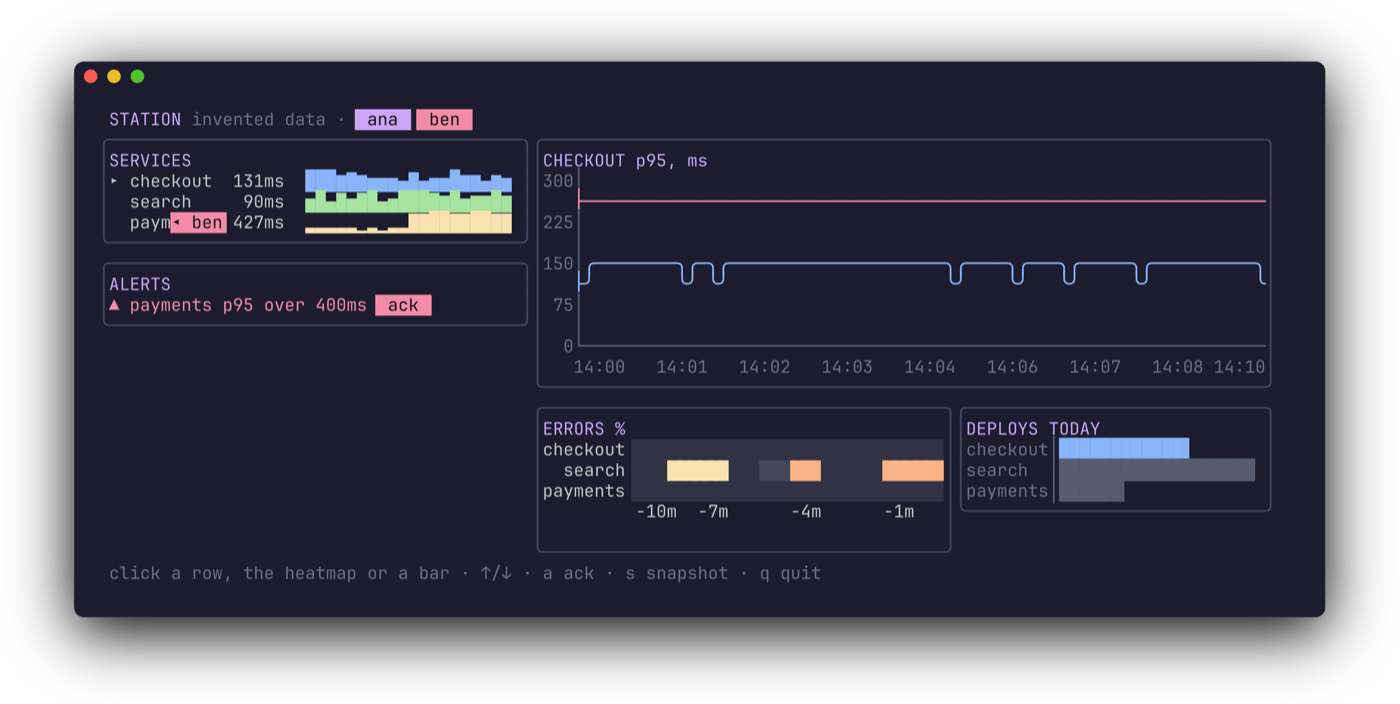
I ran it with two clients, ana at 116×30 and a second one moving the pointer over a row and clicking it: ana's screen showed ◂ ben on that row. When ben presses a, ana's alert box says ✓ ben.
IV – Snapshots
A frame of the station is terminal output already: text with colour escape sequences, once scan() has removed the zone markers. Turning terminal output into an image is what freeze does, so a snapshot is one call:
// snapshot.ts: a frame of the station, as an SVG image in a window.
import { renderSVG } from '@oakoliver/freeze';

export function toSVG(frame: string): string {
  return renderSVG({
    code: frame,
    language: 'ansi', // terminal output: the escape sequences are the colours
    config: 'full', // window buttons, rounded corners, a shadow
    background: '#1E1E2E',
  });
}
language: 'ansi' tells freeze to read the escape sequences as colours instead of highlighting code. config: 'full' adds the window buttons, the rounded corners and the shadow. The SVG embeds the JetBrains Mono font, so it looks the same in every browser; that font is most of the file.
In the terminal, s writes station.svg. Over SSH it shouldn't: that would fill the server's disk with other people's files. So the Station gets a flag, set only by main.ts. In station.ts, import writeFileSync from node:fs and toSVG from ./snapshot.ts, and replace the fields after bars and the constructor with:
  note = '';

  world: World;
  me: Viewer;
  canWrite: boolean;

  /** `canWrite`: `s` saves station.svg here. Not over SSH: that would write to the server's disk. */
  constructor(world: World, me: Viewer, canWrite = false) {
    this.world = world;
    this.me = me;
    this.canWrite = canWrite;
  }
handle the key in update, after a:
      if (key === 's' && this.canWrite) {
        writeFileSync('station.svg', toSVG(this.frame()));
        this.note = 'wrote station.svg · ';
      }
show the note in the help line:
const help = dim.render(` ${this.note}click a row, the heatmap or a bar · ↑/↓ · a ack · s snapshot · q quit`);
and in main.ts, create the station with new Station(world, world.join('you'), true).
Over SSH, a snapshot is a command instead. A session that runs ssh host snapshot has no terminal, and wish hands it to the middleware: this one renders a station that nobody is looking at and writes the SVG to the client's standard output. In server.ts, import WindowSizeMsg from Bubble Tea, the Middleware type from wish and toSVG, and add:
// `ssh -p 2323 localhost snapshot > station.svg`: a command, no terminal, an image on stdout.
const snapshot: Middleware = (next) => async (session) => {
  if (session.command()[0] !== 'snapshot') return next(session);
  const watcher = { name: 'snapshot', color: '#CDD6F4', selected: 2, hover: null }; // not in the World
  const station = new Station(world, watcher);
  station.update(new WindowSizeMsg(116, 30));
  session.write(toSVG(station.frame()));
};
and put it in the chain. Middleware composes so that the last one runs first, so snapshot goes before the Bubble Tea handler:
  // the last runs first: logging, then snapshot, then Bubble Tea
  WithMiddleware(bubbletea.MiddlewareWithProgramHandler(programFor), snapshot, logging.Middleware()),
ssh -p 2323 localhost snapshot > station.svg
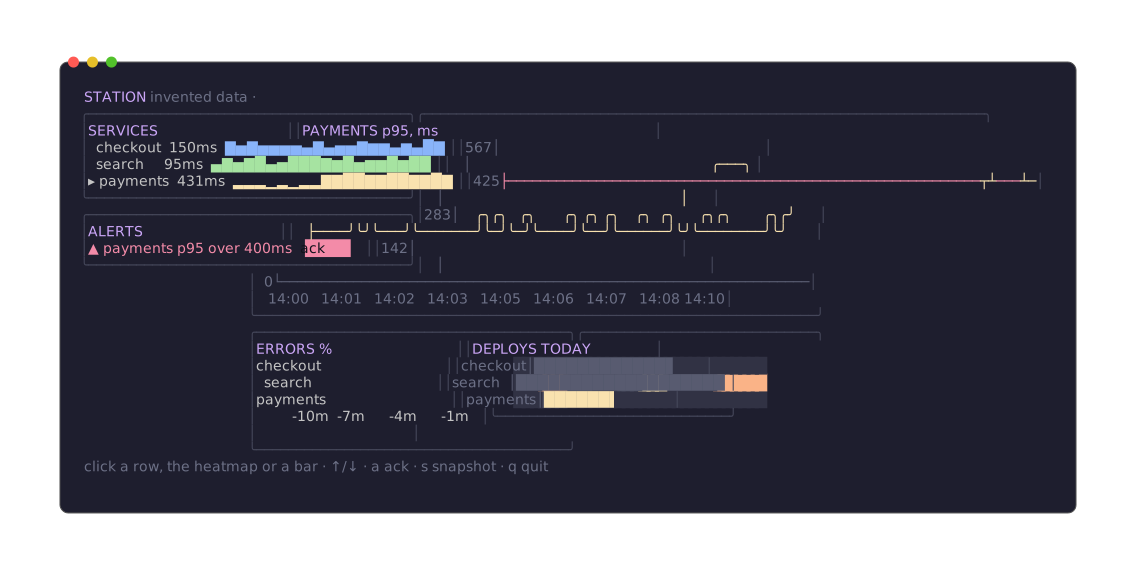
That is the file the command wrote, 424 KB. Drawing an SVG of this frame takes 5.3 ms. A PNG needs the optional @resvg/resvg-js, which npm installs with freeze where a prebuilt binary exists: renderPNG with the same options draws at four times the size, 4,553×2,292 pixels, in 820 ms, and at 1× (pass the image's own width and height) in 170 ms. Those are medians on an Apple M5 Max with Bun 1.4.4 and nothing else running. resvg draws synchronously, and on a server every session shares one event loop, so for that long nobody's screen updates. The full example draws PNGs at 1× over SSH and keeps 4× for the local key.
V – Tests
The last library checks the rest. teatest runs a Bubble Tea program at a fixed size without a terminal, lets the test send it keys, text and raw input, waits for output, and compares what the program wrote with a golden file. Raw input is what makes it fit here: a click in a terminal is a few bytes (ESC [ < 0 ; 31 ; 7 M for a press of the left button at column 31, row 7, and the same ending in m for the release), and a test can write exactly those bytes. They go through Bubble Tea's input parser and then bubblezone's hit-testing, like a real click.
// station.test.ts: run with `bun test`; UPDATE_GOLDEN=1 bun test writes the golden files.
import { expect, test } from 'bun:test';
import { NewTestModel, RequireEqualOutput, type TestModel, WaitFor, WithInitialTermSize } from '@oakoliver/teatest';
import { Station, WorldChanged } from './station.ts';
import { World } from './world.ts';

function open(world: World, name: string): [TestModel, Station] {
  const station = new Station(world, world.join(name));
  const tm = NewTestModel(station, WithInitialTermSize(116, 30));
  world.listeners.add(() => tm.send(new WorldChanged()));
  return [tm, station];
}

/** A left click as a terminal sends it: an SGR mouse press and release, 1-based. */
function click(tm: TestModel, station: Station, zoneId: string, dx = 0, dy = 0): void {
  const z = station.zm.get(zoneId);
  const [x, y] = [z.startX + dx + 1, z.startY + dy + 1];
  tm.writeInput(`\x1b[<0;${x};${y}M\x1b[<0;${x};${y}m`);
}

const shows = (text: string) => (out: Buffer) => out.toString().includes(text);

test('the first screen', async () => {
  const [tm] = open(new World(), 'ana');
  tm.press('q');
  RequireEqualOutput((await tm.finalOutput()).read(), 'first-screen');
});

test('clicks select a service: a row, a heatmap row, a bar', async () => {
  const [tm, station] = open(new World(), 'ana');
  await WaitFor(tm.output(), shows('DEPLOYS'));

  click(tm, station, 'svc:2', 4); // the payments row
  await WaitFor(tm.output(), shows('PAYMENTS p95'));
  click(tm, station, 'heat', 12, 1); // the heatmap's second row: search
  await WaitFor(tm.output(), shows('SEARCH p95'));
  click(tm, station, station.bars!.zoneID(), 12, 0); // the first bar: checkout
  await WaitFor(tm.output(), shows('CHECKOUT p95'));
  tm.press('q');

  expect((await tm.finalModel<Station>()).me.selected).toBe(0);
});

test("ben acknowledges the alert; ana's screen says so", async () => {
  const world = new World(); // payments is over its objective at the end of the history
  const [ana] = open(world, 'ana');
  const [ben, b] = open(world, 'ben');
  await WaitFor(ana.output(), shows('ben'));
  await WaitFor(ben.output(), shows(' ack '));

  click(ben, b, 'ack', 1);
  await WaitFor(ana.output(), shows('✓ ben'));
  ana.press('q');
  ben.press('q');

  expect(world.ackedBy).toBe('ben');
  RequireEqualOutput((await ana.finalOutput()).read(), 'acked-by-ben');
});
UPDATE_GOLDEN=1 bun test   # the first time: writes testdata/*.golden
bun test
bun test v1.4.4-canary.1 (5c6d4e24c)

 3 pass
 0 fail
 2 expect() calls
Ran 3 tests across 1 file. [449.00ms]
- Wait before you click. Zones are recorded in
view(), so the test waits forDEPLOYSbefore its first click. After each click it waits for the result, which also means the next zone positions are current. - Coordinates come from the zones.
click()asks the station's own manager where a zone is and converts to the 1-based coordinates a terminal reports. Nothing in the test knows the layout. - Two programs, one world. The last test runs ana and ben as two programs on one
World, the same way the server does. ben clicksack, and the test waits for✓ benin ana's output. - Nothing depends on the clock. The
Worldis seeded and only moves when something callsstep(). The station has no timers: the clock lives inmain.tsandserver.ts. So there is nothing to filter, and the golden files hold the same bytes on every run. I ran the suite eight times in a row; it passed every time.
A golden file holds the raw output, escape sequences included, so a changed colour fails the test too. When a change is intended, UPDATE_GOLDEN=1 bun test rewrites the files; read the diff before you commit them.
VI – The Full Example
examples/station in the Bubble Tea repository is the same design with more of everything:
- Six services and a scripted incident every minute: a slow payments database, then a bad search release and its rollback. Alerts open after three bad samples and resolve after three good ones; the alert list keeps the resolved ones, and a log shows requests, deploys, alerts and who acknowledged what.
- Tabs and zoom. Overview, Latency, Errors and Deploys. In the latency view a streaming line chart adds requests per second; the wheel over the latency chart changes its window (2, 5 or 15 minutes); the wheel over the log scrolls it.
- Presence. Each person's selection is a mark in their colour on that service's row, and pointers carry over between windows of different sizes, as in section III.
- Snapshots as SVG and 4× PNG locally; over SSH,
snapshot,snapshot pngandsnapshot 160x44. - A rate limiter and an idle timeout from wish's middleware.
- 11 tests, including an SSH
snapshotthrough a real client, a session with a terminal joining the shared world, and a pointer that crosses from a 100×28 window to a 120×34 one.
git clone https://github.com/oakoliver/bubbletea && cd bubbletea
bun install
bun add --no-save @oakoliver/bubblezone @oakoliver/ntcharts @oakoliver/wish @oakoliver/freeze @oakoliver/teatest @oakoliver/lipgloss @oakoliver/bubbles
bun examples/station/main.ts --serve          # then: ssh -p 2323 you@localhost
bun test ./examples/station/station.test.ts
VII – Requirements
The programs in this guide were run on:
- Bun 1.4.4: every file, the server with two SSH clients, and the tests
- Node.js 26.8.1 (
node file.ts):print.ts,main.ts, andserver.tswith an OpenSSH 10.3 client and with two clients that moved a pointer and clicked - Deno 2.8.3:
print.ts, withdeno run -A print.ts
with @oakoliver/bubbletea 1.2.2, @oakoliver/lipgloss 1.1.3, @oakoliver/bubbles 1.2.2, and version 1.0.0 of ntcharts, bubblezone, wish, freeze and teatest. The tests use bun test; teatest also works with node:test and Vitest, as its guide shows. Run the station in a terminal of at least 116×30.
VIII – Where to Go Next
Each library has a guide of its own, with the parts this one skipped:
- Getting Started with ntcharts: streaming and wave line charts, braille and candlesticks, log scales, charts that zoom and pan with the keyboard and the wheel.
- Getting Started with Bubblezone: hover, sliders, prefixes for components that repeat, and the four things that break a zone.
- Getting Started with Wish: public keys, commands and exit codes, and how to make a server safe to expose.
- Getting Started with Freeze: code screenshots, themes, line ranges and presets.
- Getting Started with teatest: waits that fail with a readable message, virtual time for programs that run on a clock, and other test runners.
- Getting Started with Bubble Tea, Lip Gloss and Bubbles: the framework, the styling and the components underneath all of it.