Porting Go's Freeze to TypeScript: Code and Terminal Screenshots, Byte for Byte
Freeze is Charm's tool for pictures of code. Give it a file and it draws the code with syntax highlighting inside a window with buttons, a border and a shadow, as SVG or PNG. Give it a command and it runs it in a terminal and draws the output, colours included. It's small: about 1,800 lines of Go (plus 430 of tests) on top of chroma (the highlighter), etree (an XML library), kong (flags), huh (the interactive form) and resvg (the rasterizer).
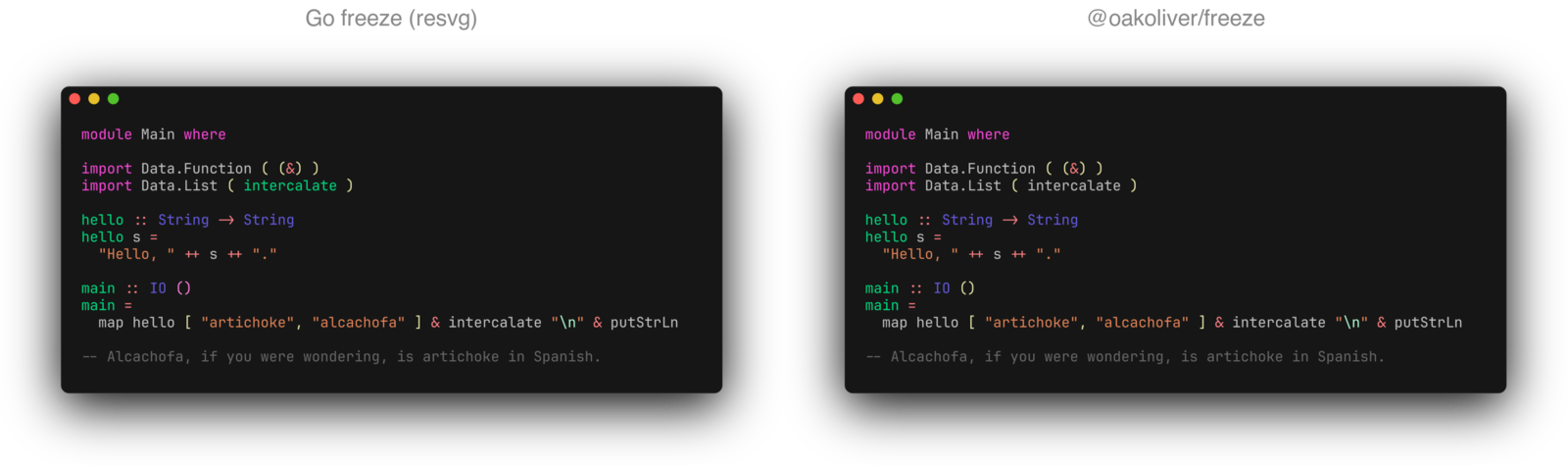
@oakoliver/freeze is the TypeScript port, and for terminal output its SVGs are byte-for-byte identical to the Go binary's.
I – What Shipped
@oakoliver/freeze 1.0.0, a port of freeze v0.2.2 plus the two --execute fixes on main since the release. It's a freeze command with all of upstream's flags and a library:
npm install -g @oakoliver/freeze
freeze main.go --config full -o main.png
import { renderSVG } from '@oakoliver/freeze';
const svg = renderSVG({ file: 'main.go', config: 'full', theme: 'dracula' });
4,355 lines of TypeScript in 22 source files, 391 of them generated from chroma. 100 tests with 302 expects, including upstream's whole TestFreezeConfigurations table of 29 golden SVGs and 8 more goldens I rendered with the Go binary. Three runtime dependencies: our ports of Lip Gloss and Huh, and highlight.js. One optional one, @resvg/resvg-js, for PNG and WebP. SVG output needs no native code.
II – How Freeze Makes an Image
Freeze doesn't draw the SVG itself. It asks chroma's SVG formatter for a bare document, parses that back into a tree with etree, and edits the tree:
flowchart LR
    Input["code / command output"]
    Chroma["chroma: lex + SVG formatter"]
    Etree["etree: parse"]
    Edit["freeze: move, resize, add window, shadow, clip, line numbers"]
    ANSI["ANSI dispatcher: tspans + background rects"]
    Out["SVG"]
    Raster["resvg / rsvg-convert"]
    PNG["PNG"]

    Input --> Chroma --> Etree --> Edit --> Out
    Edit -. "terminal output" .-> ANSI --> Out
    Out --> Raster --> PNG
The formatter writes one <text> element per line, sized for a 14px font. Freeze then moves every line by the padding and margin, rescales the height for the real font size and line height, measures the widest line to set the width, adds the three window buttons, rounds the background <rect>, adds a <filter> for the shadow and a <clipPath> when the size is fixed, and inserts line numbers at the front of each line. For terminal output it empties the text elements and replays the escape sequences into them.
So "the same SVG as Go" means reproducing three libraries' output conventions at once: chroma's, etree's and freeze's. I didn't parse anything. The port builds the tree etree would have parsed (xml.ts, 171 lines) and serializes it the way etree does.
III – Matching the SVG Byte for Byte
The goldens fail on any difference, so the small things all had to be found.
etree's escaping. etree escapes ' as ' and " as " in text as well as in attributes, writes empty elements as <rect .../>, and replaces characters XML doesn't allow with U+FFFD. Attributes keep their order, and setting an existing one replaces it in place: the background <rect> starts as chroma's width="100%" height="100%" fill=... and ends with x and y after it, because freeze moved it after creating it.
chroma's spaces. The formatter escapes every space as   and a tab as four of them. etree decodes those back into U+00A0 characters, so the golden files contain non-breaking spaces where the code had spaces. Go's XML decoder also turns \r\n and lone \r into \n, which matters for files with Windows line endings.
chroma's height. The formatter's height is 10 + int(16.8 * (lines + 1)) pixels, and the line count comes from SplitTokensIntoLines, which drops an empty last line. freeze reads that number back with strconv.ParseInt after trimming px, and builds the final height from it.
Go's rounding. Freeze writes every coordinate with %.2f. Go rounds from the exact binary value and sends halfway cases to the even digit; JavaScript's toFixed rounds them up. None of the goldens hits a halfway value, but --shadow.blur 0.125 does: Go writes stdDeviation="0.12", and toFixed(2) gives 0.13. The port's goFixed takes toFixed(100), which is the exact decimal expansion of the double, and rounds that by hand.
With those in place, every golden's document skeleton matched: the size, every coordinate, the buttons, border, shadow, clip, line numbers and the text of every line. What's left is colours.
IV – Highlighting Without Chroma
Upstream lexes code with chroma, a Go port of Pygments with about 290 lexers. I didn't port chroma's lexers: they're regular expressions in the .NET dialect, plus about twenty written in Go. Instead the port does what our Glamour port already does: highlight with highlight.js and map its scopes onto chroma's token types. hljs-keyword becomes Keyword, hljs-title function_ becomes NameFunction, hljs-string becomes LiteralString, and so on.
Three things keep the result close to Go:
- chroma's themes, not approximations. A Go program (
scripts/gen-chroma) dumps all 74 of chroma's styles plus freeze'scharmstyle as raw entries, and the port reimplements chroma's style resolution: inheritance from sub-category to category toTextandBackground, theSubthat drops attributes equal to the background, and the line-number colour chroma synthesises when a theme doesn't set one (#7f7f7ffor charm). A theme name gives exactly the colours it gives in Go. - chroma's languages. The same program dumps chroma's lexer registry: names, aliases, file name globs, priorities and the analysers used on stdin. Language detection runs on that table with Go's
filepath.Matchsemantics, so the same files are recognised, and the same ones fail withLanguage Unknown. - A pass over what highlight.js leaves plain. highlight.js doesn't mark most punctuation or operators, and chroma does. Plain text between highlight.js's spans is split into names, numbers, operators, punctuation and calls, string escapes get their own token, and a few per-language rules cover the rest (Haskell's keywords are all
KeywordReservedin chroma, YAML keys areNameTag).
The golden tests measure the result: on average 93.1% of characters across the 24 code goldens have the same colour as in Go, from 67.8% for a long YAML file to 99.6% for the Go sample. The README states it as the one known difference for code.
V – Terminal Output, Identical
For terminal output there's no lexer, only escape sequences, and here the port matches exactly. Upstream feeds each line to x/ansi's parser with three callbacks: print a character, execute a control character, dispatch a CSI sequence. The port tokenises with Lip Gloss's ANSI tokenizer and calls a dispatcher that mirrors upstream's line by line, quirks included: a tab at the start of a line prints nothing (it pads to the next multiple of 16 only once the column isn't zero), bold is ignored, SGR 100–107 backgrounds get an empty colour because upstream looks them up in a map that only has 30–37 and 90–97, and with --show-line-numbers the text before the first colour change takes the line-number colour. Changing any of those would change the picture.
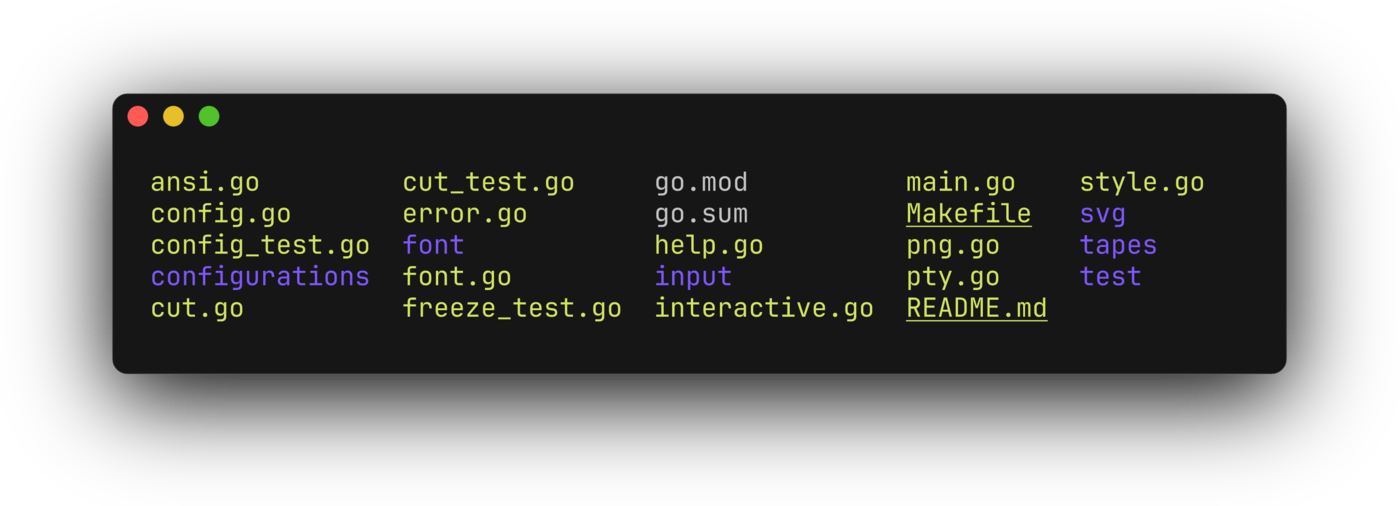
All five ANSI goldens match byte for byte, apart from the font declaration (section VII), and so do eight more cases I rendered with the Go binary: line numbers, --wrap, --lines and a fixed size on terminal output, font size, line height and family, margins, and an --execute of 256-colour, bold, italic and tab sequences. --wrap needed a port of cellbuf.Wrap, which differs from Lip Gloss's Wrap in how it carries styles and links across the inserted line breaks.
--execute needs a terminal. Upstream uses a PTY library; Node has none built in. Under Bun the port uses Bun.spawn with its terminal option, under Node.js on macOS and Linux it wraps the command in script(1) and sets the window size with stty, and elsewhere it falls back to pipes with FORCE_COLOR set. The execute golden runs echo "Hello, world!" through that path, \r\n line endings and all, and matches.
VI – PNG, and Why Go Prefers the Wrong Font
Upstream converts the SVG to PNG with rsvg-convert if it's installed and otherwise with resvg compiled to WebAssembly. The order matters more than it looks. librsvg ignores the font embedded in the SVG and asks the system for "JetBrains Mono"; on a machine without it installed, the PNG comes out in a proportional font. With rsvg-convert installed (as it is on this Mac, through Homebrew), that is what Go freeze produces:
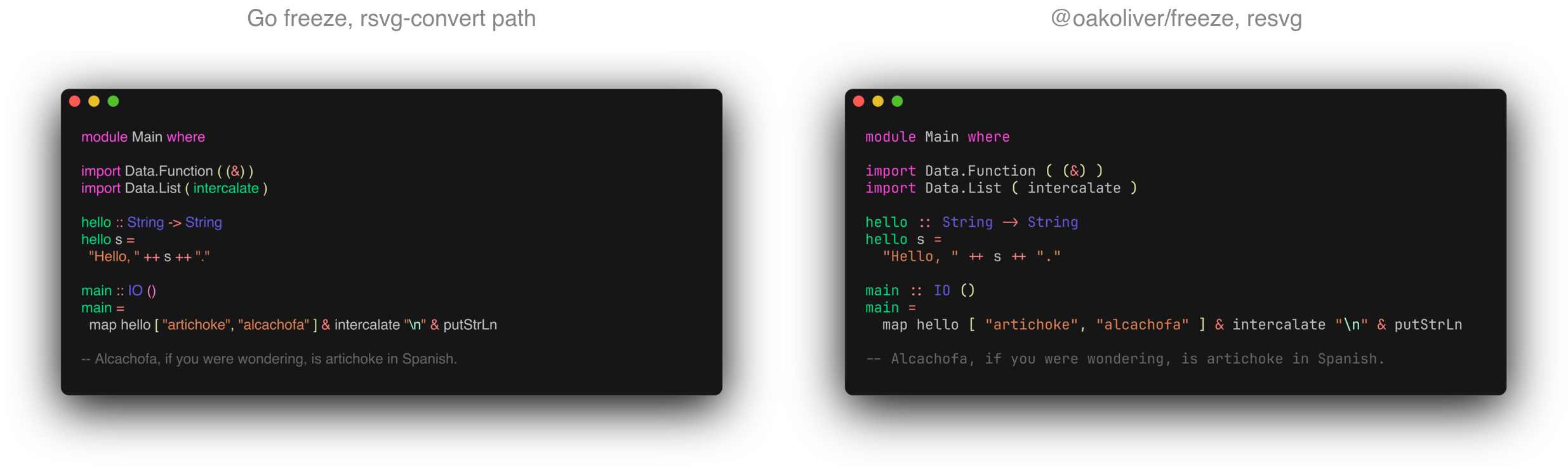
The port goes the other way: resvg through @resvg/resvg-js first, with the two bundled TTFs loaded into its font database (as upstream's fallback does), and rsvg-convert only when resvg-js isn't installed. Freeze draws auto-sized PNGs at four times the SVG's size, and the port does the same.
Timings for the full-preset Haskell sample, the median of five runs on an Apple Silicon Mac with the machine otherwise idle:
| Command | Go freeze | TypeScript port |
|---|---|---|
| SVG | 22 ms | 76 ms (Bun), 152 ms (Node) |
| PNG, resvg | 9,033 ms (WebAssembly) | 434 ms (Bun), 510 ms (Node) |
| PNG, rsvg-convert | 263 ms (wrong font) | — |
--execute "echo hi" to SVG |
238 ms | 143 ms (Bun) |
Go is faster for SVG. Most of the port's time there is starting the runtime: called in-process, renderSVG takes 6.9 ms. resvg-js is native code, so the PNG comes out about 20 times faster than through Go's WebAssembly resvg. I didn't profile why Go's --execute is the slower one.
One more fix fell out of this. resvg ignores @font-face and picks fonts by family name, and the no-ligature font's family is "JetBrains Mono NL", not "JetBrains Mono". So --no-font.ligatures changes upstream's SVGs but not its PNGs: => is still drawn as an arrow. The port rasterizes with the NL family when ligatures are off.
VII – Two Upstream Bugs, Fixed on Purpose
The font's label. Upstream embeds the TTF files but declares them as application/x-font-woff2 with format('woff2'), and chroma's template leaves a stray ' after the declaration. Browsers sniff the real format, so nobody notices, but stricter consumers do. The port declares font/ttf and format('truetype'). The golden tests compare everything except that line, and separately check that the embedded font is the same file, byte for byte.
WebP. freeze's help lists .webp, but the code only special-cases .png: -o code.webp writes SVG text into a file called code.webp. The port writes real WebP with its own encoder, webp.ts, 455 lines: the lossless VP8L format with the subtract-green transform, a 1,024-entry colour cache, LZ77 backward references (left, above and a hash chain) and length-limited canonical Huffman codes. For the full-preset sample at 3087×1688:
| Format | Size |
|---|---|
| PNG (resvg-js) | 364.6 KB |
| WebP (the port's encoder) | 101.6 KB |
WebP (cwebp -lossless -q 100) |
80.7 KB |
The test suite round-trips an image through libwebp's dwebp and compares pixels, and the full-preset image above decodes to exactly the pixels of the PNG.
VIII – The Interactive Form, and a Bug in Our Own Port
--interactive is a Huh form: output file, theme, padding, margin, window controls, font, border and shadow. Porting it found one bug upstream and one in our Huh port.
Upstream sets Huh's field separator to an empty style. With Huh v1, which current freeze uses, that runs the fields together, so the form shows the section titles and hardly any fields; I recorded the Go binary to check, and it does exactly that. The port uses a single newline, which gives the layout of upstream's own demo recording.
In @oakoliver/huh 1.1.2, an Input bound with .value(getter, setter) only copies the value into its text box when the field gets focus, while every update writes the text box back through the setter. Fields the user hasn't reached yet are emptied before they're shown, so freeze's form came up with blank padding, margin and font fields and saved zeros. Go's Value(&v) fills the text box immediately. Until Huh is fixed, freeze focuses and blurs each input once when it builds the form, which fills the text box first.
IX – Test Parity
| File | Tests | Expects | What it covers |
|---|---|---|---|
golden.test.ts |
30 | 117 | upstream's 29 golden SVGs through the CLI, plus the colour-agreement report |
extra-golden.test.ts |
8 | 16 | 8 more goldens from the Go binary, all terminal output but one |
freeze.test.ts |
14 | 40 | upstream's CLI tests (help, output, missing file) plus errors, stdin, PNG at 4x, WebP |
cut.test.ts |
16 | 16 | upstream's cut_test.go |
config.test.ts |
7 | 30 | upstream's config_test.go, kong's JSON resolver rules |
unit.test.ts |
25 | 83 | Go rounding, etree, chroma styles and registry, tokens, wrap, WebP round trip, the library API |
| Total | 100 | 302 |
Like upstream's, the golden tests run the command, not the library, so the CLI's flag parsing and config loading are covered by the same files.
X – The Examples
The repository has three larger programs. A snapshot studio built with Bubble Tea previews the highlighted code in the terminal with the theme, window and line range you pick, and exports the image:

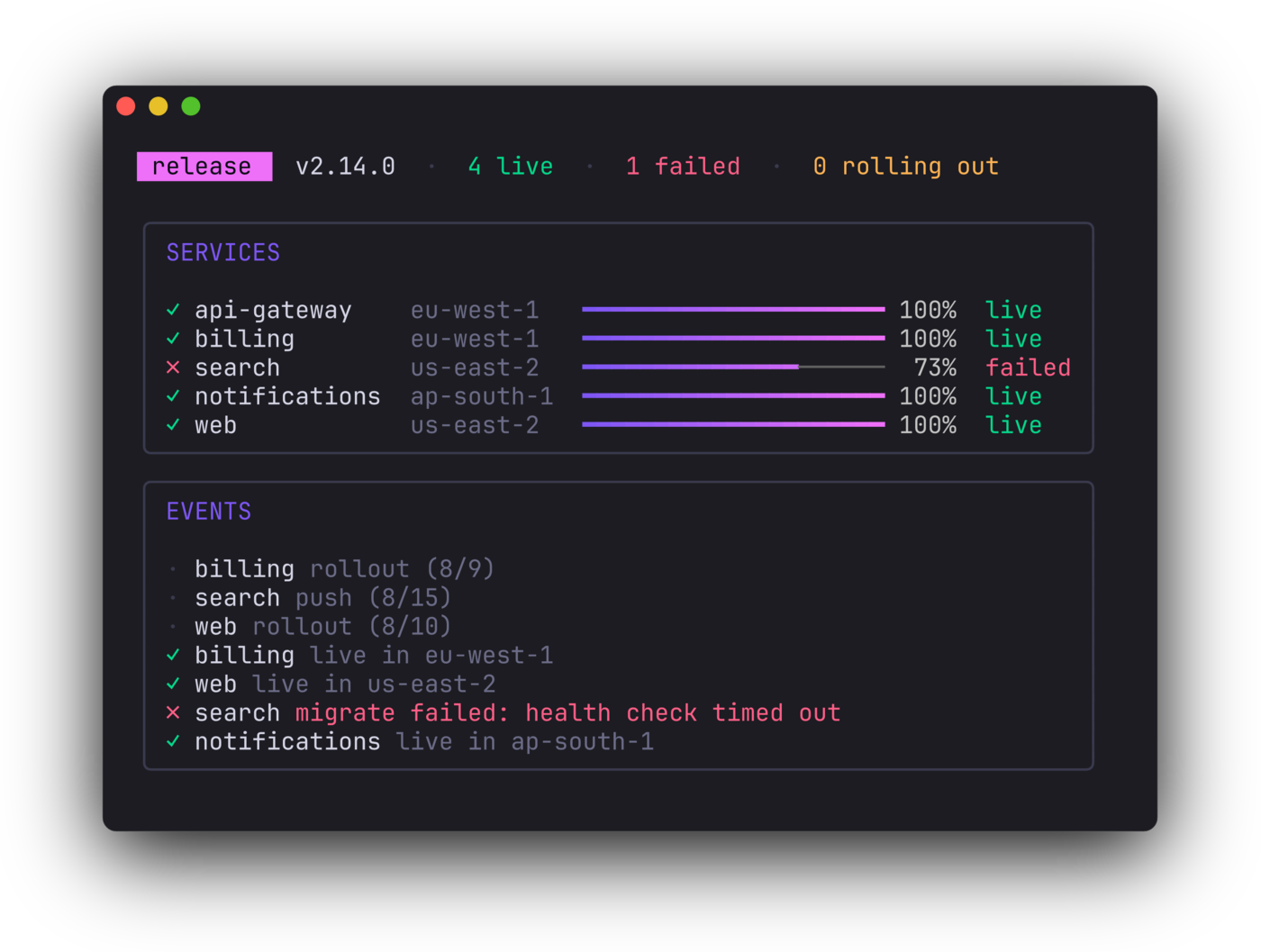
Another renders a set of README and social images in one go, at exact sizes such as 1200×630. The third freezes a Bubble Tea program: a view is a string with ANSI styling, so any frame of it can go through the terminal-output path. This is a frame of a small release dashboard, rendered without a terminal by calling update() and view() directly:
To start using it, see Getting Started with Freeze.
FAQ
Can I install freeze with npm?
Yes. npm install -g @oakoliver/freeze puts a freeze command on your PATH with the same flags as Charm's Go version, and npm install @oakoliver/freeze gives you the library. PNG and WebP use @resvg/resvg-js, which npm installs as an optional dependency.
Is the output the same as Go freeze?
For terminal output, yes, byte for byte, apart from the font's format label. For code, the layout, sizes and text are identical and the colours of some tokens differ, because the port highlights with highlight.js instead of chroma; on upstream's own test files 93.1% of characters get the same colour.
Does it need Go, a browser or a native PTY?
No. SVG is plain TypeScript. PNG and WebP need @resvg/resvg-js, which ships prebuilt binaries. --execute uses Bun's built-in terminal, or script under Node.js on macOS and Linux.
The TypeScript Charm Series
Each package is a TypeScript port of one of Charm's Go tools, published on npm and running on Node.js and Bun.
| Package | What it does | Start here | How it was ported | Source |
|---|---|---|---|---|
| @oakoliver/lipgloss | Terminal styling | Getting started | Porting story | GitHub |
| @oakoliver/glamour | Markdown rendering | Getting started | Porting story | GitHub |
| @oakoliver/bubbletea | TUI framework | Getting started | Porting story | GitHub |
| @oakoliver/bubbles | TUI components | Getting started | Porting story | GitHub |
| @oakoliver/huh | Terminal forms | Getting started | Porting story | GitHub |
| @oakoliver/glow | Markdown reader | Getting started | Porting story | GitHub |
| @oakoliver/gum | Shell script prompts | Getting started | — | GitHub |
| @oakoliver/vhs | Terminal GIFs | Getting started | — | GitHub |
| @oakoliver/freeze | Code and terminal images | Getting started | this article | GitHub |
– Antonio