Program Status, Colour Profiles and Snapshots That Don't Stop the Program: What Today's Charm Port Releases Add
Today eleven of our TypeScript ports shipped new versions. Most are upstream syncs. Bubble Tea is at parity with Bubble Tea v2.1.1, gum with gum v2.0.2, VHS with v0.12.1, specify-cli with spec-kit 1.2.5, bm25s with 0.3.16 and PageIndex with v0.5.0. The others are fixes and small additions. Several were found while building the station, the multi-user dashboard from yesterday's guide, and one while syncing gum.
This article is about what those releases let you build that you couldn't before, or couldn't do well. It uses one new example that needs nearly all of them: canary, a terminal program that watches an invented release go from build to production and asks you to approve it.
A program can now tell its terminal what it is doing, write colours the terminal can actually show, take a 4x screenshot of itself without freezing, and be tested against the exact frame it drew.
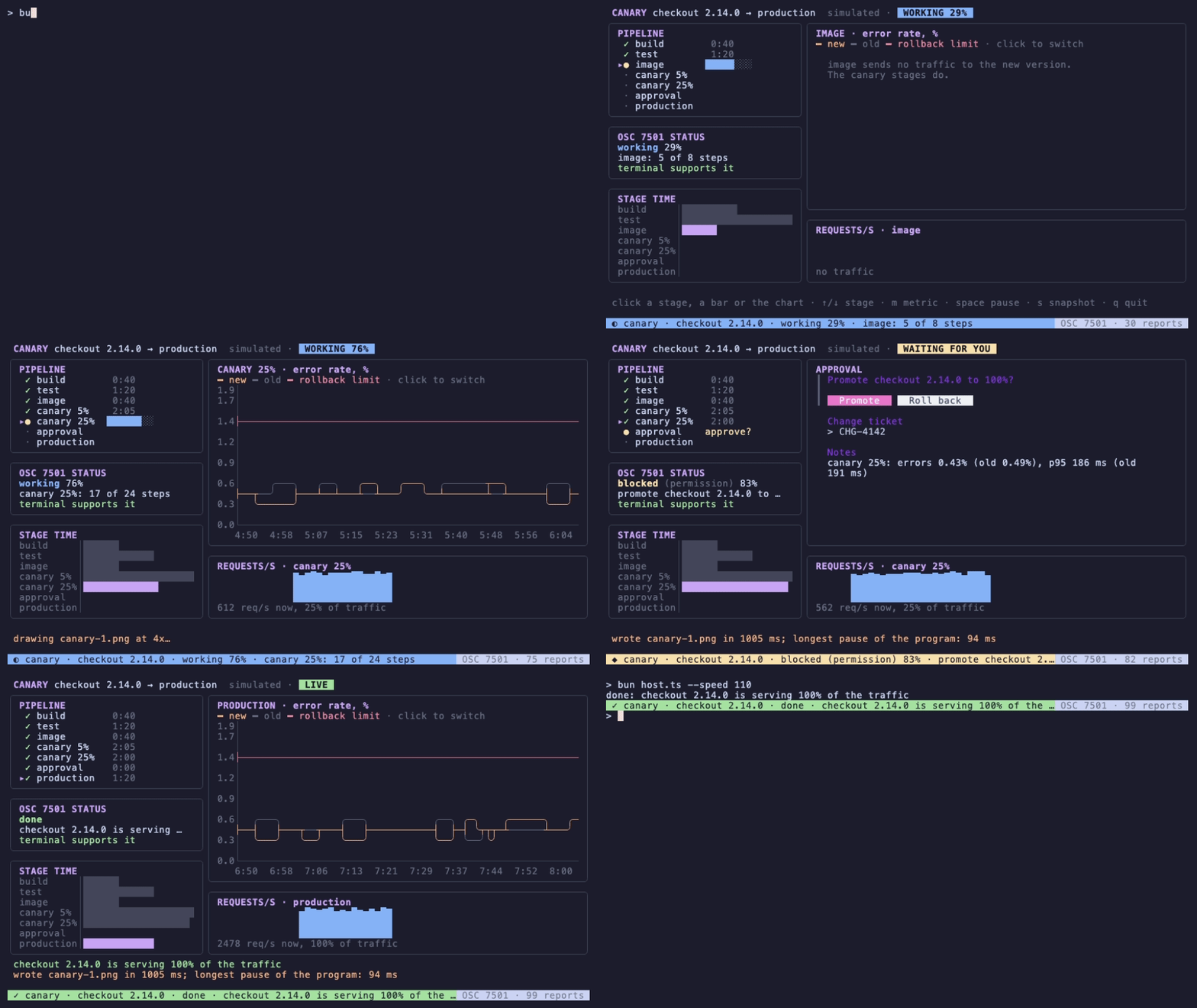
That recording is examples/canary in the Bubble Tea repository. It runs under host.ts, a 124-line program that plays the part of a terminal supporting OSC 7501 and draws the reports on the last row. It was recorded with our own VHS port, 1.2.1, from the tape that sits next to the GIF. The release, the service and every number in it are invented by a seeded random generator.
I – What Shipped
| Package | Version | What's new | On npm today |
|---|---|---|---|
@oakoliver/bubbletea |
1.2.2 → 1.4.0 | Parity with Bubble Tea v2.1.1: program status (OSC 7501), implausible window sizes ignored (GHSA-qc58-pfg9-7pph), 0×0 size fallback. From 1.3.0 (not published on its own): frames written in the colour profile, Go's profile detection, ColorProfile.NoTTY, program.settle() |
yes |
@oakoliver/lipgloss |
1.1.4 | 256- and 16-colour conversion exactly as Go (Convert256/Convert16); resets written as ESC[m |
yes |
@oakoliver/huh |
1.1.3 | Bound Input and Text values fill their boxes at once |
yes |
@oakoliver/freeze |
1.1.0 | renderPNGAsync, renderWebPAsync, freezeAsync, rasterizeAsync and friends: resvg draws on a worker thread |
not yet |
@oakoliver/ntcharts |
1.1.0 | WithZoneID/setZoneID on six charts; sparkline.resetMax() |
not yet |
@oakoliver/teatest |
1.1.0 | settle() waits for the frame; the test output reports isTTY |
not yet |
@oakoliver/vhs |
1.1.1 → 1.2.1 | Parity with VHS v0.12.1: Set Rows/Set Columns, optional .tape; Set Framerate honoured, default really 50 fps |
yes (1.2.1) |
@oakoliver/gum |
1.2.1 | Parity with gum v2.0.2: output follows the terminal's colour depth and NO_COLOR |
yes (1.2.1) |
@oakoliver/specify-cli |
2.1.1 | Parity with spec-kit 1.2.5: specify mcp, workflow composition, 43 integrations |
yes (2.1.1) |
bm25s |
2.1.0 | Parity with bm25s 0.3.16 | yes |
pageindex |
3.0.0 | Parity with PageIndex v0.5.0 (breaking: new default model, PDF tree shape) | yes |
freeze 1.1.0, ntcharts 1.1.0 and teatest 1.1.0 are tagged on GitHub but not on npm yet. Until they are, the example's README shows how to build them from their tags with npm pack. That is how everything in this article was run. vhs, gum and specify-cli went out as 1.2.1, 1.2.1 and 2.1.1: their x.y.0 tags failed the test step of the publish job, and the patch versions change only those tests and the version number.
II – The Canary
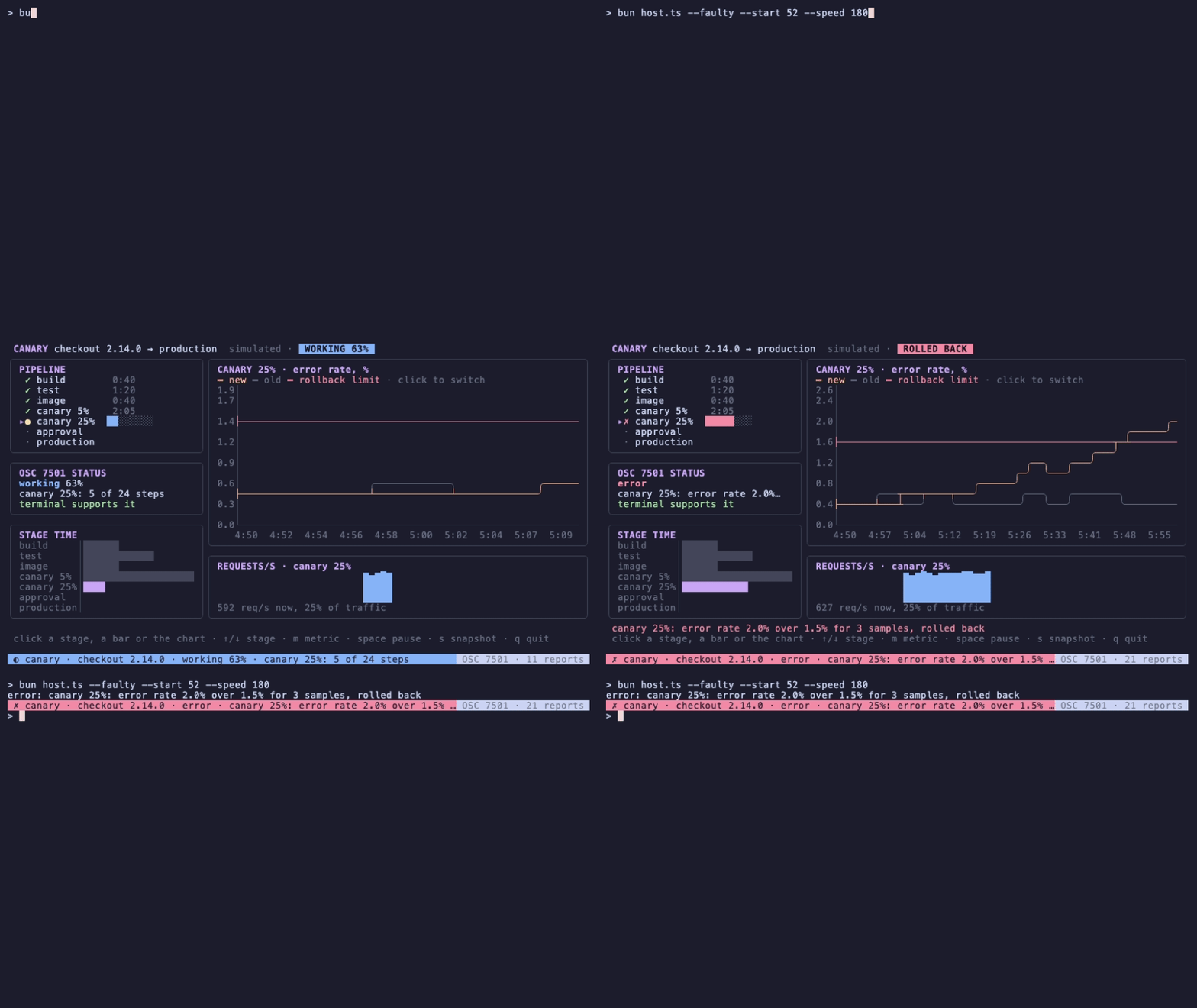
The canary follows one release of an invented service, checkout 2.14.0, through seven stages. Build, test and image send no traffic. A 5% canary and a 25% canary serve a share of the requests while their error rate and p95 latency are compared with the old version's. An approval gate waits for a person. Production serves 100%. With --faulty, the new version's error rate climbs during the 25% canary; after three samples over 1.5% the pipeline rolls it back.
It is seven files and a test, 1,273 lines of TypeScript:
| File | What it holds |
|---|---|
pipeline.ts |
The simulation: a seeded random walk, one step per five pipeline seconds; nothing moves unless something calls step() |
canary.ts |
The Bubble Tea model: layout, charts, the approval form, the status report |
snapshot.ts |
4x PNG snapshots with freeze, and the event-loop watcher that measures what they cost |
protocol.ts, host.ts |
The terminal's side of OSC 7501, and a host that runs any program in a pseudo-terminal |
main.ts |
Flags, the timer, program.run() |
bench-snapshot.ts |
The snapshot benchmark in section VII |
canary.test.ts |
11 tests with teatest |
git clone https://github.com/oakoliver/bubbletea && cd bubbletea
bun install
# freeze, ntcharts and teatest 1.1.0 from their tags first: see examples/canary/README.md
bun add --no-save @oakoliver/bubbles @oakoliver/bubblezone @oakoliver/lipgloss@^1.1.4 @oakoliver/huh@^1.1.3
bun examples/canary/host.ts                 # with the status line; main.ts runs without it
bun examples/canary/host.ts --faulty        # the rollback
bun test ./examples/canary/canary.test.ts
The sections below take the releases one at a time, each with the part of the canary that uses it.
III – Telling the Terminal What You're Doing
A long-running terminal program has one way to get your attention: what it draws. If it sits in another tab, or behind your editor, you find out it needs you when you look. Bubble Tea v2.1 adds the Program Status Protocol, OSC 7501, and 1.4.0 ports it. A program sets programStatus on its view. Bubble Tea sends a report whenever the status changes, and a terminal that supports the protocol can show it on the tab, in a sidebar or as a notification.
The canary's status follows its pipeline:
  status(): ProgramStatus {
    const p = this.pipeline;
    const base = { app: 'canary', title: `${p.service} ${p.version}` };
    switch (p.phase) {
      case 'running':
        return { ...base, state: ProgramState.Working, progress: p.progress(), hasProgress: true, message: `${p.stage().def.name}: ${p.stage().done} of ${p.stage().steps} steps` };
      case 'paused':
        return { ...base, state: ProgramState.Idle, message: `paused at ${p.stage().def.name}` };
      case 'waiting':
        return { ...base, state: ProgramState.Blocked, kind: ProgramStatusKind.Permission, progress: p.progress(), hasProgress: true, message: `promote ${p.service} ${p.version} to 100%? ${p.summary()}` };
      case 'live':
        return { ...base, state: ProgramState.Done, message: p.outcome };
      case 'rolled-back':
        return { ...base, state: ProgramState.Error, message: p.outcome };
    }
  }
and view() attaches it to every frame:
  view(): View {
    const v = new View(this.frame());
    v.altScreen = true;
    v.mouseMode = MouseMode.CellMotion;
    v.programStatus = this.status();
    return v;
  }
That is all the program does. At the approval gate, the report Bubble Tea writes is this one line. The title and message are base64, so they can hold any text:
ESC ] 7501;state=blocked:kind=permission:progress=83:app=canary:title=Y2hlY2tvdXQgMi4xNC4w:msg=cHJvbW90ZSBjaGVja291dCAy…== BEL
A few details that matter when you use it:
- Reports are sent on change, not per frame. The renderer compares the new status with the last one sent. The canary's message names the step, so it changes on every step: a whole release, start to finish, is 99 reports. A status that only names the stage would send a handful.
statedecides what the other fields mean.kind(permission,question,auth) is only sent withblocked, andprogressonly withworkingorblockedand only whenhasProgressis true. The port sanitises the text the way x/ansi does: control characters become spaces, and titles and messages are cut to 192 and 2,048 bytes on a character boundary.- The status stays after the program exits. That is upstream's choice, so that a
doneorerrorstays visible. Report one of those before you quit rather than leaveworkingbehind. - Ask before you rely on it.
RequestProgramStatusSupportsendsOSC 7501 ; ?. A terminal that supports the protocol answers, and the program receives aProgramStatusSupportMsg. Terminals that don't support the protocol never answer, and I have none that does. The canary's OSC 7501 STATUS box says "no reply from the terminal" until one arrives.
A host that reads the reports
To see the reports, I wrote the other side: host.ts runs a program in a pseudo-terminal one row shorter than the real one, and passes its output through. Every OSC 7501 sequence is taken out and decoded, and the root record is drawn on the last row, which the program never sees. When the program asks whether the protocol is supported, the host answers. That is why the canary's box says "terminal supports it" in the recording.
The pseudo-terminal comes from Bun: Bun.spawn with a terminal option. The part that matters is a small state machine in protocol.ts that splits the program's output into what goes to the screen and the OSC 7501 payloads, across chunk boundaries. It can also tell when a chunk ended in the middle of an escape sequence, so the status line is only drawn between sequences:
  const filter = new OscFilter((payload) => {
    if (payload.startsWith('?')) {
      proc.terminal.write('\x1b]7501;?\x1b\\'); // the support reply
      return;
    }
    const rec = parseReport(payload);
    if (!rec) return;
    reports++;
    if (rec.state === 'clear') {
      for (const id of [...records.keys()]) if (rec.id === '' || id === rec.id || id.startsWith(`${rec.id}/`)) records.delete(id);
    } else records.set(rec.id, rec);
  });

  const proc = Bun.spawn(cmd, {
    env: process.env,
    terminal: {
      cols,
      rows: rows - 1,
      data(_term, data) {
        const out = filter.write(decoder.decode(data, { stream: true }));
        if (out) process.stdout.write(out);
        if (filter.ground) drawStatus(); // save the cursor, draw the last row, restore it
      },
    },
  });
It is not specific to the canary. bun host.ts --cmd bun ../program-status.ts runs upstream's own example, ported in Bubble Tea 1.4. With --log reports.jsonl the host writes each decoded report as a line of JSON, and that run logged idle, then working at 0, 5, 10… 30%, then blocked with kind: permission and the message "Deploy to production?".
When the canary rolls back, the status line turns red and stays after the program exits, as the protocol intends:
What you could build with it
- Agents and long jobs that wait for you. The
blockedstate withkind: permissionis made for a coding agent that wants approval to run a command, or a deploy tool at a gate. In a terminal with tabs, that tab can now say so. - A supervisor for many programs.
host.tskeeps one record peridand already handlesclearfor a whole subtree. Run several programs, each in its own pseudo-terminal, and you have a jobs board that knows which one is blocked without parsing anyone's output. - Notifications where the terminal has none. The host is the right place to ring the bell, or call your desktop's notifier, when a record turns
blockedorerror.
IV – Colours for the Terminal You're In
Until 1.3.0, the Bubble Tea port wrote whatever colours your styles had. A frame styled in 24-bit colour reached a 256-colour terminal, a 16-colour terminal and a log file unchanged. WithColorProfile only changed the ColorProfileMsg the model received. Go's renderer converts every cell to the terminal's profile, and the port now does the same. 24-bit colours become the nearest of the 256 colours or the 16 ANSI colours, Ascii keeps bold, italic and underline but drops colours, and NoTTY writes no styles at all.
Detection follows Go's colorprofile.Detect. I ran the port's detection on the environments in the picture below:
| Environment | Profile |
|---|---|
TERM=xterm-256color COLORTERM=truecolor |
truecolor |
TERM=xterm-256color |
ansi256 |
TERM=xterm |
ansi |
TERM=xterm-256color NO_COLOR=1 |
ascii |
TERM=dumb |
notty |
| any of these, output not a terminal | notty |
Here is the canary's rollback screen in the first four, each recorded in the same xterm.js with only the environment changed. Nothing in the canary chooses colours per profile:
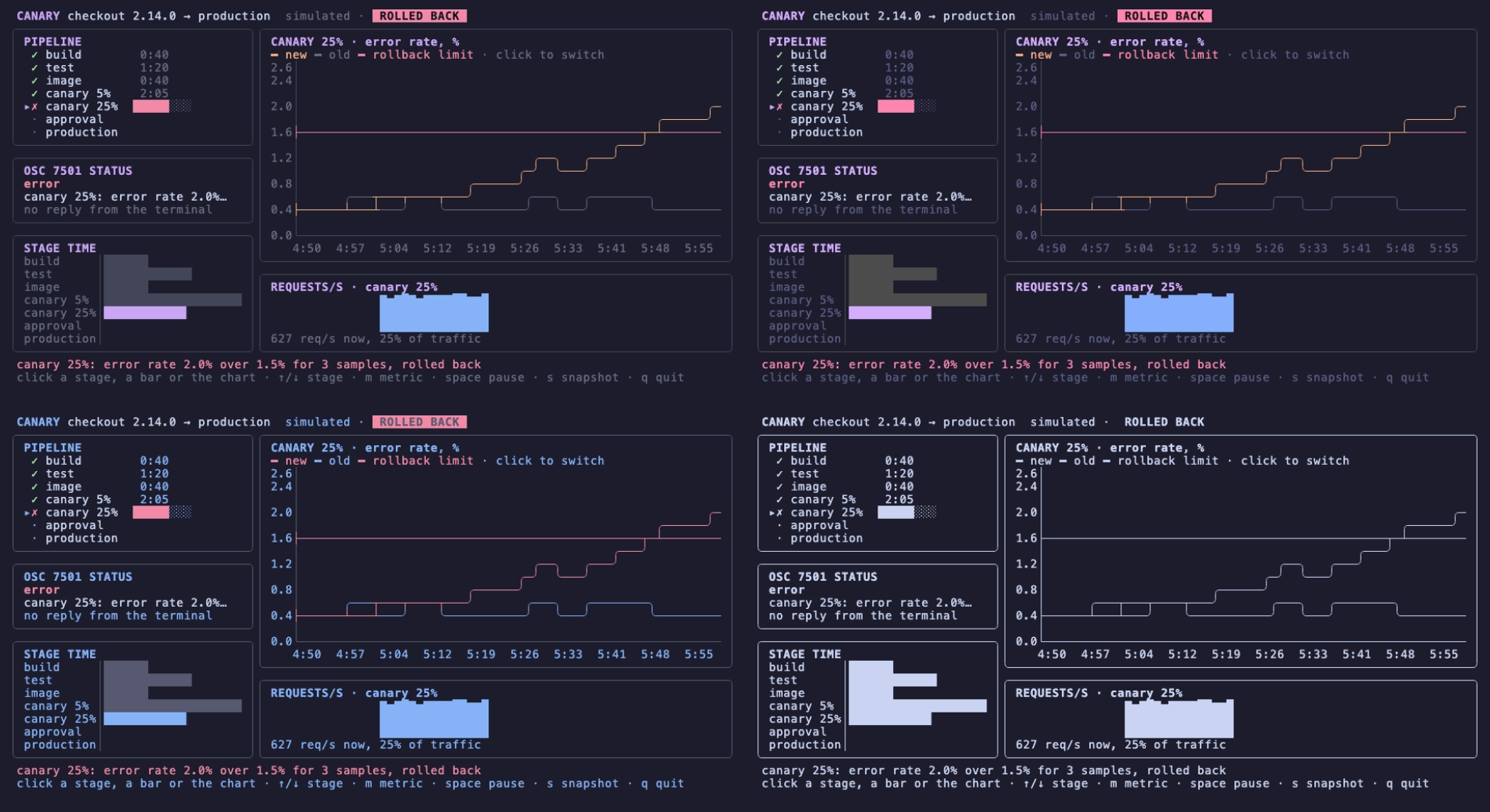
Top left is 24-bit, top right 256 colours, bottom left 16 colours, bottom right NO_COLOR. The 256-colour screen is hard to tell from the original. The 16-colour one shows what conversion can't fix. The canary's dim grey, #6C7086, is closest to ANSI blue (ESC[34m), so labels that should fade turn blue. The new version's peach line, #FAB387, and the rollback limit's red, #F38BA8, both become bright red (ESC[91m), so on that screen you can't tell the error rate from its limit. The conversion is right; the palette is too small for this design. If your users may run your program in 16 colours, look at it there. Now that the renderer converts, WithColorProfile(ColorProfile.ANSI) in a test or in your own terminal shows you exactly that screen.
One change can surprise you. Output that is not a terminal now gets no styles. With its output redirected to a file, the canary writes no colour or style sequences at all. It is still a full-screen program, so the cursor movements and line clears remain, and a non-terminal output reports 80×24, too small for it. For a program that also prints results, no styles in a log is what you want. But some streams stand for a terminal without being a TTY: an SSH channel, a web terminal's socket. A program writing to one of those must pass WithColorProfile, or it loses its colours. wish already does: bubbletea.MakeOptions(session) detects the profile from the client's environment and passes it on, so the station over SSH is unchanged. The other case is teatest 1.0.0, in section VIII.
Lip Gloss 1.1.4: the same colours as Go
Bubble Tea's conversion is a port of x/ansi's Convert256 and Convert16. Lip Gloss has its own copy, for renderColorProfile, ColorProfileWriter and the print functions, and until today it picked the nearest palette colour by RGB distance. Go compares the nearest colour of the 6×6×6 cube with the nearest grey by HSLuv distance, and for dark colours that gives a different answer:
import { newStyle, renderColorProfile } from '@oakoliver/lipgloss';
const s = newStyle().foreground('#112233').bold(true).render('x');
console.log(JSON.stringify(renderColorProfile(s, 'ansi256')), JSON.stringify(renderColorProfile(s, 'ansi')));
1.1.3: "\u001b[1m\u001b[38;5;235mx\u001b[0m" "\u001b[1m\u001b[30mx\u001b[0m"
1.1.4: "\u001b[1m\u001b[38;5;17mx\u001b[m" "\u001b[1m\u001b[34mx\u001b[m"
A dark navy was a near-black grey at 256 colours and black at 16. It is now navy (17) and blue (34), as in Go. The changelog has the scale of the fix: of 70,909 sampled colours, 4,807 came out different at 256 colours and 3,824 at 16. All 16,777,216 24-bit colours now match Go built for amd64. Resets are written as ESC[m, as colorprofile writes them.
gum's sync is where this was found. gum v2.0 writes style, join and format through a colour-profile writer, and the port, now 1.2.1, follows it. Run in a pseudo-terminal, gum style --foreground "#112233" --bold hi writes 24-bit colour under COLORTERM=truecolor, 256 colours under TERM=xterm-256color, 16 under TERM=xterm, and only bold under NO_COLOR=1. With Lip Gloss 1.1.3 the 256-colour answer was 235; with 1.1.4, which a fresh install of gum resolves, it is 17. One upstream change was left out on purpose. Upstream gum v2.0.2 strips colours whenever stdout is not a terminal, and that breaks $(gum style …) and gum format | less -R (gum#1127 and #1131, both open). The port keeps colours in a pipe and follows NO_COLOR, CLICOLOR_FORCE and TERM=dumb.
V – An Approval Form That Is Already Filled In
At the gate, the canary opens a huh form inside its own view: promote or roll back, a change ticket and notes. The ticket and the notes are filled in from the pipeline, because the person approving should edit the summary, not type it:
    this.ticket = `CHG-${4100 + (p.version.length * 7) % 100}`;
    this.notes = p.summary();
    this.promote = true;
    this.form = NewForm(
      NewGroup(
        NewConfirm()
          .title(`Promote ${p.service} ${p.version} to 100%?`)
          .affirmative('Promote')
          .negative('Roll back')
          .value(() => this.promote, (v) => { this.promote = v; }),
        NewInput().title('Change ticket').value(() => this.ticket, (v) => { this.ticket = v; }),
        NewText().title('Notes').lines(3).value(() => this.notes, (v) => { this.notes = v; }),
      ),
    )
      .withTheme(ThemeFunc(ThemeCatppuccin))
      .withShowHelp(false)
      .withWidth(56);
    return this.form.init();
With huh 1.1.2, this form showed empty boxes. Input and Text read their bound value only when they got the focus, but every update wrote the box back through the setter. So the first message the form handled overwrote the ticket and the notes with empty strings, before anyone reached those fields. huh 1.1.3 fills the box when the value is bound, as Go does:
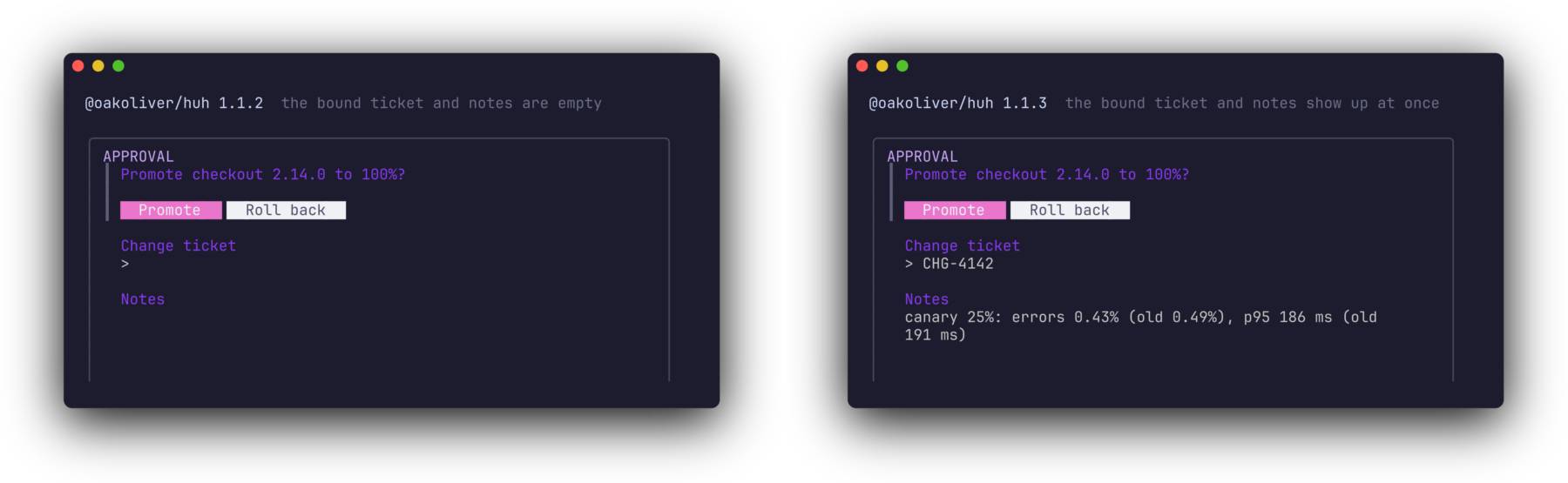
Both panels come from the same code; only the installed huh differs. One thing I got wrong while embedding the form: huh does not complete a form on the key press itself. The last field sends a message back, and the form completes when that message comes through update. So the check has to run after every update the form receives, not only after keys:
  private updateForm(msg: Msg): [Model, Cmd] {
    const form = this.form!;
    const [, cmd] = form.update(msg);
    // huh completes a form on a message its last field sends back, not on the key itself.
    if (form.State === FormState.Completed) {
      this.form = null;
      this.pipeline.decide(this.promote, this.opts.user ?? 'you', this.ticket, this.notes);
      return [this, null];
    }
    return [this, cmd];
  }
VI – Charts With Names You Choose
When an ntcharts chart has a bubblezone manager, it marks its own zone, and until today the ID came from the manager's newPrefix(), a counter for the whole process. Two programs in one process got different IDs for the same chart. That is why the station guide stored another viewer's pointer over the bar chart as bars and translated it in each session. The ID was also only known after the chart was built, so tests had to reach into the model for it.
ntcharts 1.1 adds WithZoneID (and setZoneID) to canvas, barchart, linechart, streamlinechart, timeserieslinechart and wavelinechart. The default is unchanged, as in Go. The canary names both of its clickable charts:
export const Z = {
  stageTime: 'canary/stage-time',
  metric: 'canary/metric',
  stage: (i: number) => `canary/stage/${i}`,
} as const;

    const bc = barchart.New(w, STAGES.length,
      barchart.WithHorizontalBars(),
      barchart.WithBarGap(0),
      barchart.WithStyles(newStyle().foreground(C.line), newStyle().foreground(C.dim)),
      barchart.WithZoneManager(this.zm),
      barchart.WithZoneID(Z.stageTime), // fixed, instead of the process-wide counter
    );
and the click handler and the tests use the same names:
    const bars = this.zm.get(Z.stageTime);
    if (bars.inBounds(msg) && this.stageTime) {
      const [x, y] = bars.pos(msg);
      const i = STAGES.findIndex((s) => s.name === this.stageTime!.barDataFromPoint({ x, y }).label);
      if (i >= 0) this.select(i);
    }
    if (this.zm.get(Z.metric).inBounds(msg)) this.metric = this.metric === 'errors' ? 'p95' : 'errors';
The ID is used as given, so it must be unique among one manager's zones. heatmap and sparkline don't mark zones, so they don't take one.
Reusing a sparkline
The canary draws requests per second for whichever stage you look at, with one sparkline. A sparkline's maximum only grows, and, as in Go, clear() keeps it. Look at production (about 2,400 requests per second), then at the 5% canary (about 120), and the canary is drawn on production's scale:
│ REQUESTS/S · canary 5%                                         │
│                                                                │
│                                                                │
│      ▁▁▁▁▁▁▁▁▁▁▁▁▁▁▁▁▁▁▁▁▁▁▁▁▁                                 │
│ 120 req/s now, 5% of traffic                                   │
resetMax(), new in 1.1, puts the maximum back to the one you set, or 1 if you set none. The canary calls it when the stage changes:
  private requests(st: Stage, i: number): string {
    this.spark.clear();
    if (i !== this.sparkStage) {
      // clear() keeps the maximum, as in Go. Without resetMax() the scale would stay at the
      // busiest stage shown so far, and after production the 5% canary would be a flat line.
      this.spark.resetMax();
      this.sparkStage = i;
    }
    this.spark.pushAll(st.samples.slice(-30).map((s) => s.rps));
    this.spark.draw();
│ REQUESTS/S · canary 5%                                         │
│      ▅▆▅▆▇█▆▆▆▆▇██▇▇▇▆▇▇▇▆▇▇▇▆                                 │
│      █████████████████████████                                 │
│      █████████████████████████                                 │
│ 120 req/s now, 5% of traffic                                   │
Both outputs are from the same frame, the first with the resetMax() line taken out.
VII – Snapshots That Don't Stop the Program
s saves the screen as a PNG. freeze draws terminal output as an image, and at its default 4x scale that takes most of a second for a 100×30 frame. Yesterday's guide noted the problem: resvg drew on the calling thread, so for that long nothing else in the process ran. In a single program the screen freezes. On an SSH server, every session freezes. freeze 1.1 adds promise-returning versions of the raster functions, and resvg now draws on a worker thread:
const png = sync ? renderPNG(options(frame)) : await renderPNGAsync(options(frame));
snapshot.ts measures what each costs the program: a 10 ms timer runs while the PNG is drawn, and the longest gap between two of its ticks is how long the event loop was held up. bench-snapshot.ts draws the same canary frame seven times each way after a warm-up. It was run alone on the machine, through our benchmark queue in exclusive mode:
renderPNG       828 ms (816–835)  longest event-loop gap 839 ms (826–845)  743202 bytes
renderPNGAsync  834 ms (829–864)  longest event-loop gap 89 ms (87–93)  743202 bytes
Medians and ranges on an Apple M5 Max with Bun 1.4.4. The PNG takes as long either way, and the files are identical. What changes is that the program keeps running. The 89 ms that remain are PNG encoding of the finished pixels, which freeze still does on the main thread, as its changelog says. That is about five frames at 60 fps, not fifty.
In the recording, the footer says "drawing canary-1.png at 4x…" while the 25% canary goes on through steps 11, 15 and 18 of 24, and "wrote canary-1.png in 1005 ms; longest pause of the program: 94 ms" at step 21. Those numbers are higher than the benchmark's because Chrome and ffmpeg were recording at the same time. Run main.ts --sync-snapshots to see the other case: the progress bar stops for the length of the drawing.
This is the file s wrote, 4,087 × 2,696 pixels:
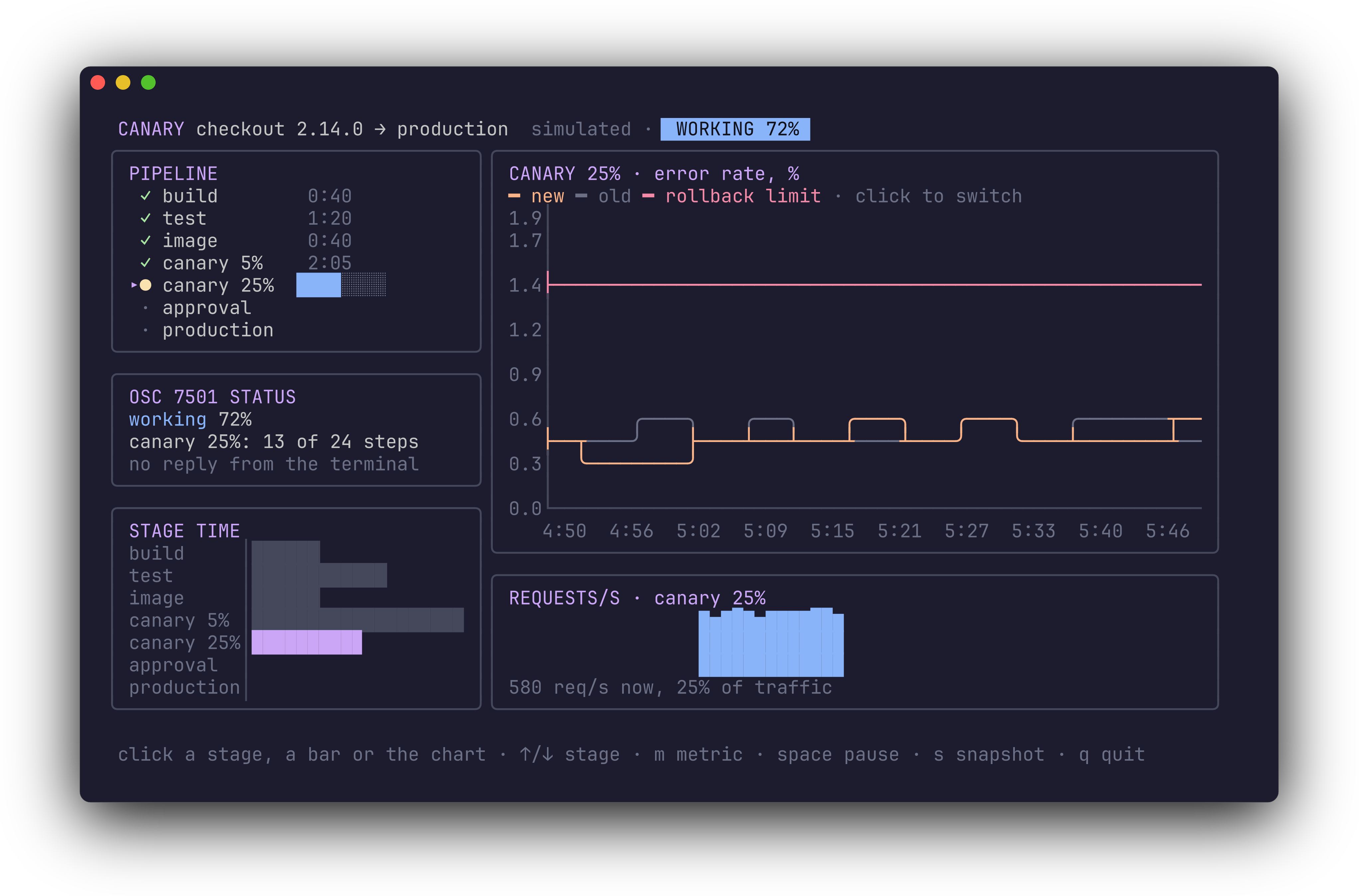
The bytes are freeze's, so the freeze guide applies to them. One limit I hit: freeze draws no colour for 16-colour backgrounds (SGR 40–47 and 100–107; its README lists 100–107 among the upstream behaviours it keeps on purpose). At 16 colours the canary's badges would lose their background, so the colour-profile picture in section IV was recorded in a terminal rather than drawn with freeze.
VIII – Tests That See the Frame You Drew
teatest runs a Bubble Tea program without a terminal and lets a test send it keys and raw input. Its settle() existed in 1.0.0 and resolved once the program had handled every message, but Bubble Tea wrote the frame on the next tick of its frame timer. A check right after settle() saw the new model and, depending on timing, the old screen. Bubble Tea 1.3 added program.settle(). It resolves after every queued message is handled, including messages that synchronous commands send back and input bytes still being decoded, and the frame for the result is written. teatest 1.1 uses it. Every check of the canary's screen comes right after settle(), with no waits and no timers:
test('the terminal answers the support query', async () => {
  const [tm, c] = open(new Pipeline());
  await tm.settle();
  expect(c.statusSupported).toBe(false);
  tm.writeInput('\x1b]7501;?\x1b\\'); // what host.ts answers
  await tm.settle();
  expect(c.statusSupported).toBe(true);
  expect(screen(tm)).toContain('terminal supports it');
});
The fixed zone IDs make the click tests read like the click handler. click() turns a zone and an offset into the SGR mouse bytes a terminal sends, so the click goes through Bubble Tea's input parser and bubblezone's hit-testing:
  click(tm, c, Z.stageTime, 14, STAGES.findIndex((s) => s.name === 'test'));
  await tm.settle();
  expect(c.shown()).toBe(1);
  expect(stripAnsi(tm.output().read().toString())).toContain('TEST · error rate');
Some tests check Bubble Tea 1.3 and 1.4 directly. One decodes the OSC 7501 reports in the output with the host's own parser and checks working, blocked and done. One runs the same screen at every colour profile and checks which escape sequences appear. One checks the security fix: since 1.4, Bubble Tea ignores a window size report with a negative side, a side over 4,096 or more than 1,048,576 cells (GHSA-qc58-pfg9-7pph). Size reports arrive on the input, so anything that can write to it could claim a huge screen, and in this port the alt-screen renderer would then write a line clear for every claimed row on every frame:
  tm.writeInput('\x1b[8;99999;99999t'); // anything that can write to the input could claim this
  await tm.settle();
  expect([c.width, c.height]).toEqual([100, 30]);
  tm.writeInput('\x1b[8;34;120t'); // a plausible report still counts
  await tm.settle();
  expect([c.width, c.height]).toEqual([120, 34]);
bun test v1.4.4-canary.1 (5c6d4e24c)

 11 pass
 0 fail
 38 expect() calls
Ran 11 tests across 1 file. [2.20s]
I ran the suite eight times in a row; it passed every time. To check that the tests can fail, I broke what they test. Without the resetMax() call, the sparkline test fails. With huh 1.1.2, the form test fails on the empty ticket. With teatest 1.0.0, three tests fail:
- The golden file loses its colours. 58 of its 59 lines differ. teatest 1.0.0's output doesn't say it is a terminal, so Bubble Tea 1.3+ treats it as
NoTTY. teatest 1.1's output saysisTTY: true, and the profile comes from the pinned test environment as before. - Two checks after
settle()see the previous frame. The model already says the terminal supports OSC 7501, but the screen doesn't yet.
So: don't use teatest 1.0.0 with Bubble Tea 1.3 or later. teatest 1.1.0 declares that in its peer dependency, but npm has only 1.0.0 today.
Also new in Bubble Tea 1.4, and not used by the canary: a terminal that reports a size of 0×0 now gets COLUMNS/LINES from the environment, then 80×24. Since 1.2.2, alt+letter keys report no text, as in Go, so bindings like alt+b match.
IX – Recording It With Our Own VHS
All the GIFs here were recorded with @oakoliver/vhs 1.2.1, which syncs with VHS v0.12.1. Two of its additions shaped the tapes. Set Columns and Set Rows size the terminal in cells instead of pixels, so the tape asks for exactly the 100×31 the canary and its status line need. And the .tape extension is optional on the command line:
Set FontSize 14
Set Columns 100
Set Rows 31
Set Padding 12
Set Framerate 12
vhs assets/tapes/canary # renders assets/tapes/canary.tape
The other change you will notice: Set Framerate used to be ignored, and every recording came out at 25 fps, a bug that is still open upstream (charmbracelet/vhs#750). It is honoured now, and the documented default of 50 fps takes effect. Tapes that don't set a frame rate get twice the frames and roughly twice the file size. The canary's tape sets 12, and the GIF has 295 frames over 24.58 seconds, 12 per second, 817 KB.
X – The Rest of Today's Releases
specify-cli 2.1: spec-kit 1.2.5
The spec-driven development CLI moves from spec-kit 1.0.12 to 1.2.5. It has 43 integrations, among them MiniMax Code (mcode) and none, which installs the shared scaffolding only. Workflows can compose other workflows, with a unified execution tree and resumable nested runs. init --allow-symlinks records a symlink policy, and project commands now refuse a symlinked .specify directory. And there is an experimental MCP server over stdio. The port implements it with its own JSON-RPC server instead of Python's mcp package:
printf '%s\n' \
  '{"jsonrpc":"2.0","id":1,"method":"initialize","params":{"protocolVersion":"2025-06-18","capabilities":{},"clientInfo":{"name":"demo","version":"0"}}}' \
  '{"jsonrpc":"2.0","method":"notifications/initialized"}' \
  '{"jsonrpc":"2.0","id":2,"method":"tools/list"}' \
  | bunx @oakoliver/specify-cli@2.1.1 mcp | tail -1 | jq -r '.result.tools[].name'
specify_list_commands
specify_describe_command
specify_run_command
specify_version
specify_artifact_list
specify_artifact_info
specify_workflow_list
The port replays 36 requests recorded from upstream and gets byte-identical responses, except for the runtime field of the version tool. specify init produces the same files as upstream 1.2.5 in 14 configurations. The test count went from 3,121 to 4,331. No flag or command was removed, but a few things are stricter, as upstream made them; the changelog lists them.
bm25s 2.1: bm25s 0.3.16
Scores, stopwords and the tokenizer did not change upstream in this range, so search results are identical to 2.0.0. What changed is how bad input fails. retrieve() with a negative k now throws a RangeError that says so, where it used to fail with an unrelated TypeError. save() serializes the whole corpus before it writes anything, so an entry that can't be serialized leaves no half-written index:
const bad: any = { text: 'loop' }; bad.self = bad;
const r = new BM25();
r.index(tokenize(['a cat purrs', 'a dog barks', 'loop']));
try { await r.save('idx', { corpus: ['a cat purrs', 'a dog barks', bad] }); } catch (e) { console.log(e.message); }
console.log(existsSync('idx'));
Document at index 2 could not be serialized to JSON (TypeError: JSON.stringify cannot serialize cyclic structures.). Skipping it would misalign the saved corpus with the index.
false
This default differs from upstream on purpose. Python bm25s 0.3.16 warns and skips the entry, which leaves the saved corpus one line out of step with the index. raiseOnSerializationError: false gives you upstream's behaviour.
pageindex 3.0: PageIndex v0.5.0
A major version, because upstream's changes reach the output. The default index model is now gpt-6-luna. For PDFs, a parent whose first child starts on a later page gets an "(intro)" child for its opening pages, so node IDs shift. A parent's page range now covers its whole section. Summaries are built bottom-up. Leaves over both size limits are split with the model, where the limits used to be accepted and ignored. Only network failures and 408/409/429/5xx are retried. Markdown indexing did not change, and with summaries off it still makes no model calls. If you index PDFs, rebuild your trees and check anything that stored node IDs.
XI – What You Could Build Next
The canary is one combination. The pieces travel:
- A terminal for your own tools.
protocol.tsandhost.tsare about 250 lines. Put the host around a test watcher, a build, or an agent, and keep one status line, or one record per job, for all of them. - A deploy or review tool that asks properly. A huh form with bound, pre-filled values inside a Bubble Tea view, with
blocked/permissionreported to the terminal while it waits. - Dashboards that degrade honestly. Write in 24-bit colour, test with
WithColorProfileatANSIandAscii, and give the one or two colours that collapse a second cue: a symbol, bold, a different line style. - Screenshots on demand in servers.
renderPNGAsyncin a wish server, sossh host snapshot pngdoesn't stall everyone else's session. - Stable test hooks. Fixed zone IDs mean a test, a demo script or another session can click "the stage-time chart" by name, whatever the layout.
XII – Requirements
Everything in this article was run on an Apple M5 Max:
- Bun 1.4.4: the canary,
host.ts, the tests, the benchmark, the recordings - Node.js 26.8.1:
node examples/canary/main.ts, snapshot included.host.tsneeds Bun, for theterminaloption ofBun.spawn, and says so on Node.
with @oakoliver/bubbletea 1.4.0, @oakoliver/lipgloss 1.1.4, @oakoliver/huh 1.1.3, @oakoliver/bubbles 1.2.2 and @oakoliver/bubblezone 1.0.0 from npm, and freeze 1.1.0, ntcharts 1.1.0 and teatest 1.1.0 packed from their v1.1.0 tags. The recordings used @oakoliver/vhs 1.2.1. The gum checks used gum 1.2.0 from its tag, with Lip Gloss 1.1.3 and then 1.1.4. specify-cli 2.1.1, bm25s 2.1.0 and pageindex 3.0.0 came from npm.